BHIM UCO UPI
تازہ کاری
موجودہ ورژن
1.4.5
پیشکش بذریعہ

اپنے موبائل فون پر BHIM UCO UPI کا استعمال کرتے وقت زیادہ چارج ہونے کی فکر نہ کریں، خود کو چھوٹی اسکرین سے آزاد کریں اور ایپ کو زیادہ بڑے ڈسپلے پر استعمال کرنے کا لطف اٹھائیں۔ اس کے بعد سے کی بورڈ اور ماؤس کے ساتھ اپنے ایپ کا فل اسکرین کا تجربہ حاصل کریں۔ MEmu آپ کو وہ تمام حیران کن خصوصیات پیش کرتا ہے جن کی آپ کو توقع کرتے ہیں: فوری انسٹال اور آسان سیٹ اپ، وجدانی کنٹرول، مزید بیٹری، موبائل ڈیٹا کی کوئی حد نہیں اور اب مزید پریشان کن کالز نہیں۔ نئے برانڈ کا MEmu 9 آپ کے کمپیوٹر پر BHIM UCO UPI استعمال کرنے کے لیے بہترین اختیار ہے۔ MEmu کثیر نظیری منیجر بیک وقت 2 یا اس سے زیادہ اکاؤنٹس کھولنا ممکن بناتا ہے۔ اور سب اہم بات، ہمارا خصوصی ایمولیشن انجن آپ کے پی سی کی پوری طاقت ریلیز کرتے ہوئے ہر چیز ہموار اور قابل تفریح بناتا ہے۔
مزید دکھائیں
Download BHIM UCO UPI on PC with MEmu Android Emulator. Enjoy playing on big screen. UCO Bank launches official UPI-Unified Payment Interface app for all banking needs of customer.
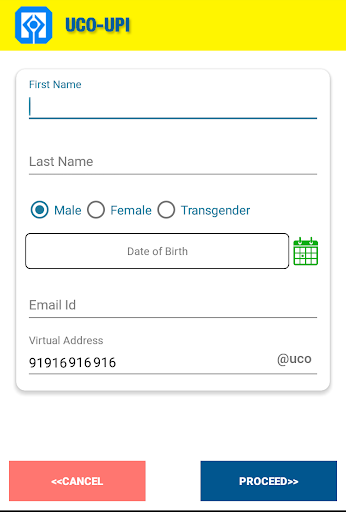
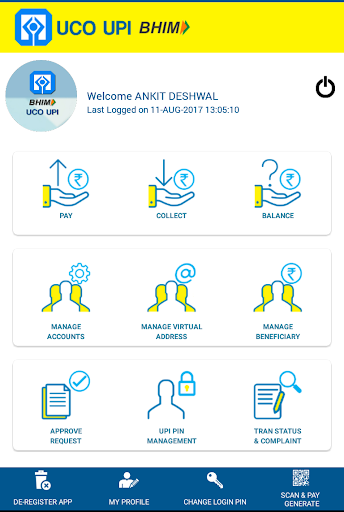
UCO Bank launches official UPI-Unified Payment Interface app for all banking needs of customer.
UCO Bank is a commercial Bank and a Government of India undertaking and providing various services to its customers.
BHIM UCO UPI-Unified Payment Interface allows customers to Pay/Collect money using Virtual Private Address. Virtual Private Address is unique for each customers account. Customer can download the UPI app and install it in device(Mobile/ Tablets). While doing the registration, UPI app communicates with NPCI in encrypted data format. The customer has to create virtual address and complete profile information. The customer can add UPI enabled Bank accounts based on their Mobile Number registered in banks. After adding the bank account, it has to verified using debit card information and set MPIN using OTP. After debit card verification, the customer can pay/collect to other bank accounts. The customer can do the balance enquiry. UPI uses IMPS as underlying base. The customer can use P2P(using MMID and Mobile of Remitter), P2A(using IFSC and account), P2U (AAdhar payments) and VPA(Virtual Private Address) for doing payments. The customer can initiate collect request to other UPI customer. It will appear in Collect Authorisation option where user can accept or reject requests. The transaction history shows details of all payment and collect requests. Using Add beneficiary, the customer can add beneficiary of other banks for doing payments.
The Unified Payment Interface allows payments to be initiated by the payer, or by the payee. In the basic payee initiated flows, the payment request is routed by the initiating application through the NPCI switch to the payer for approval. However, in certain instances, where it is possible to connect with the payer immediately, it is preferred that the payee sends a payment request to the payer, who can then initiate the payment request with his credentials.
Unified Payments Interface (UPI) is an architecture and a set of standard APIs to facilitate the next generation online immediate payments leveraging trends such as increasing smartphone adoption, Indian language interfaces, and universal access to Internet and data. UPI is launched by National Payments Corporation of India with Reserve Bank of India's vision of migrating towards a 'less-cash' and more digital society. NPCI has built on the Immediate Payment Service(IMPS) platform through which one could transfer money instantly by going online-by adding another layer that allows easy debit capability even on mobile phones.
Bank as a part of digital banking, is introducing QR code for its BHIMUCOUPI. This will facilitate in leveraging quick fund transfer and healthy replacement of PoS (Point of Sale).
مزید دکھائیں

1. MEmu انسٹالر ڈاؤن لوڈ کریں اور سیٹ اپ مکمل کریں

2. MEmu شروع کریں اسکے بعد ڈیسکٹاپ پر Google Play کھولیں

3. Google Play میں BHIM UCO UPI تلاش کریں
Install
4. BHIM UCO UPI ڈاؤن لوڈ کریں اور انسٹال کریں
5. انسٹال مکمل ہونے کے بعد سٹارٹ کرنے کے لیے آئیکن پر کلک کریں

6. MEmu کے ساتھ پی سی پر BHIM UCO UPI کھیلنے کا لطف لیں
MEmu پلے بہترین اینڈرائڈ ایمولیٹر ہے اور 100 ملین لوگ اس کے زبردست اینڈرائڈ گیمنگ تجربہ سے لطف اندوز ہو رہے ہیں۔ MEmu کی ورچولائزیشن ٹیکنالوجی آپ کو اپنے PC پر ہزاروں اینڈرائڈ گیمز یہاں تک کہ انتہائی گرافک والے گیمز باسہولت کھیلنے کی طاقت دیتی ہے۔
بہتر گرافکس کے ساتھ بڑی اسکرین؛ طویل دورانیہ، بیٹری یا لامحدود موبائل ڈیٹا کے بغیر۔
کی بورڈ اور ماؤس یا گیم پیڈ کے عین مطابق کنٹرول کے لیے کی میپنگ کا پورا سپورٹ۔
کثیر مثالی منیجر کے ساتھ بیک وقت ایک پی سی پر متعدد گیم اکاؤنٹس یا ٹاسکس۔
پی سی پر درج ذیل مراحل پر عمل کرتے ہوئے پر BHIM UCO UPI استعمال کریں: u003c/p>