BlazeClean
تازہ کاری
موجودہ ورژن
V1.0.0
پیشکش بذریعہ

اپنے موبائل فون پر BlazeClean کا استعمال کرتے وقت زیادہ چارج ہونے کی فکر نہ کریں، خود کو چھوٹی اسکرین سے آزاد کریں اور ایپ کو زیادہ بڑے ڈسپلے پر استعمال کرنے کا لطف اٹھائیں۔ اس کے بعد سے کی بورڈ اور ماؤس کے ساتھ اپنے ایپ کا فل اسکرین کا تجربہ حاصل کریں۔ MEmu آپ کو وہ تمام حیران کن خصوصیات پیش کرتا ہے جن کی آپ کو توقع کرتے ہیں: فوری انسٹال اور آسان سیٹ اپ، وجدانی کنٹرول، مزید بیٹری، موبائل ڈیٹا کی کوئی حد نہیں اور اب مزید پریشان کن کالز نہیں۔ نئے برانڈ کا MEmu 9 آپ کے کمپیوٹر پر BlazeClean استعمال کرنے کے لیے بہترین اختیار ہے۔ MEmu کثیر نظیری منیجر بیک وقت 2 یا اس سے زیادہ اکاؤنٹس کھولنا ممکن بناتا ہے۔ اور سب اہم بات، ہمارا خصوصی ایمولیشن انجن آپ کے پی سی کی پوری طاقت ریلیز کرتے ہوئے ہر چیز ہموار اور قابل تفریح بناتا ہے۔
مزید دکھائیں
MEmu Play کے ساتھ PC پر BlazeClean استعمال کرنے کے شاندار تجربے سے لطف اٹھائیں۔ یہ ایک طاقتور مفت اینڈرائیڈ ایمولیٹر ہے جو آپ کو ان کے ڈیسک ٹاپ ورژن کے لیے ہزاروں اینڈرائیڈ ایپس فراہم کرتا ہے۔ دوستوں کے ساتھ جڑنے اور اعلی کارکردگی کے ساتھ اپنے کام کو چمکانے کا لطف اٹھائیں! BlazeClean is a lightweight storage management tool designed to assist Android users in organizing their device files and managing installed applications.
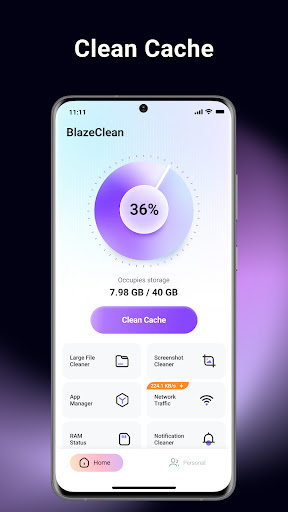
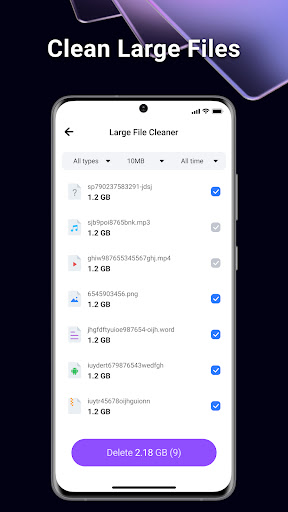
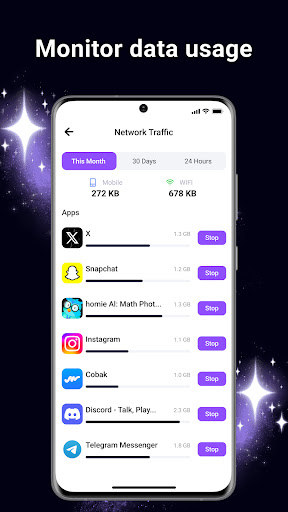
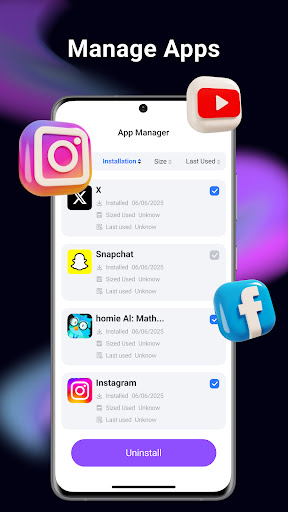
BlazeClean is a lightweight storage management tool designed to assist Android users in organizing their device files and managing installed applications. By scanning for unnecessary data and providing a clear overview of storage usage, BlazeClean helps users maintain a tidy file environment.
Core Functionality
• Junk File Cleaner
BlazeClean scans your device to identify temporary files, app cache, AD junk, and residual files left behind by uninstalled applications. Users can review these files and remove them to reclaim storage space.
• Large File Management
The application analyzes internal storage to locate large files (such as videos, audio, and documents) that occupy significant space. It categorizes these files by size and type, allowing users to easily browse and decide which files to delete to free up space.
• Application Manager
View a comprehensive list of installed applications along with the storage space they consume. The App Manager tool facilitates the identification of infrequently used apps and supports quick uninstallation to release storage.
Technical Features
• Safe Cleaning: The scanning algorithm is designed to distinguish between temporary junk and vital user data to prevent accidental deletion of important files.
• User-Controlled: All deletion actions require user confirmation. The app does not automatically delete files without permission.
Privacy and Security
BlazeClean is committed to user privacy and strictly follows Google Play's developer policies:
• Local Processing: All file scanning and cleaning operations are performed locally on your Android device.
• No Data Uploads: We do not upload your personal files, photos, or documents to external servers.
Permission Usage: The app requests storage permissions solely for the purpose of identifying and removing junk files.
How to Use
1.Launch BlazeClean and grant the necessary storage access permissions.
2.Select "Clean Cache" to scan for cache and residual files.
3.Use "Large Files" to review big media files stored on your device.
4.Use "App Manager" to uninstall unwanted applications.
Confirm any deletion tasks to free up space.
Note: This app is a file management utility. It focuses on cleaning storage and does not claim to alter hardware performance parameters or modify system settings.
مزید دکھائیں

1. MEmu انسٹالر ڈاؤن لوڈ کریں اور سیٹ اپ مکمل کریں

2. MEmu شروع کریں اسکے بعد ڈیسکٹاپ پر Google Play کھولیں

3. Google Play میں BlazeClean تلاش کریں
Install
4. BlazeClean ڈاؤن لوڈ کریں اور انسٹال کریں
5. انسٹال مکمل ہونے کے بعد سٹارٹ کرنے کے لیے آئیکن پر کلک کریں

6. MEmu کے ساتھ پی سی پر BlazeClean کھیلنے کا لطف لیں
MEmu پلے بہترین اینڈرائڈ ایمولیٹر ہے اور 100 ملین لوگ اس کے زبردست اینڈرائڈ گیمنگ تجربہ سے لطف اندوز ہو رہے ہیں۔ MEmu کی ورچولائزیشن ٹیکنالوجی آپ کو اپنے PC پر ہزاروں اینڈرائڈ گیمز یہاں تک کہ انتہائی گرافک والے گیمز باسہولت کھیلنے کی طاقت دیتی ہے۔
بہتر گرافکس کے ساتھ بڑی اسکرین؛ طویل دورانیہ، بیٹری یا لامحدود موبائل ڈیٹا کے بغیر۔
کی بورڈ اور ماؤس یا گیم پیڈ کے عین مطابق کنٹرول کے لیے کی میپنگ کا پورا سپورٹ۔
کثیر مثالی منیجر کے ساتھ بیک وقت ایک پی سی پر متعدد گیم اکاؤنٹس یا ٹاسکس۔
پی سی پر درج ذیل مراحل پر عمل کرتے ہوئے پر BlazeClean استعمال کریں: u003c/p>