Canara e-Passbook
تازہ کاری
موجودہ ورژن
1.0.20
پیشکش بذریعہ

اپنے موبائل فون پر Canara e-Passbook کا استعمال کرتے وقت زیادہ چارج ہونے کی فکر نہ کریں، خود کو چھوٹی اسکرین سے آزاد کریں اور ایپ کو زیادہ بڑے ڈسپلے پر استعمال کرنے کا لطف اٹھائیں۔ اس کے بعد سے کی بورڈ اور ماؤس کے ساتھ اپنے ایپ کا فل اسکرین کا تجربہ حاصل کریں۔ MEmu آپ کو وہ تمام حیران کن خصوصیات پیش کرتا ہے جن کی آپ کو توقع کرتے ہیں: فوری انسٹال اور آسان سیٹ اپ، وجدانی کنٹرول، مزید بیٹری، موبائل ڈیٹا کی کوئی حد نہیں اور اب مزید پریشان کن کالز نہیں۔ نئے برانڈ کا MEmu 9 آپ کے کمپیوٹر پر Canara e-Passbook استعمال کرنے کے لیے بہترین اختیار ہے۔ MEmu کثیر نظیری منیجر بیک وقت 2 یا اس سے زیادہ اکاؤنٹس کھولنا ممکن بناتا ہے۔ اور سب اہم بات، ہمارا خصوصی ایمولیشن انجن آپ کے پی سی کی پوری طاقت ریلیز کرتے ہوئے ہر چیز ہموار اور قابل تفریح بناتا ہے۔
مزید دکھائیں
Download Canara e-Passbook on PC with MEmu Android Emulator. Enjoy playing on big screen. • Concise form of physical passbook.

• Concise form of physical passbook.
• Easy and convenient to use.
• Registration via. OTP authentication to registered mobile no.
• Details of all accounts (SB, RD, FD, and Loans) and transactions available in a bundled form.
• Real-time updates of account details and transactions.
• Customer details and Branch Details included with an option to share via. SMS/ WhatsApp.
• Statement generation option is available.
• Loan accounts details and statement generation option.
• Enhanced in-built security through MPIN/ Fingerprint/ Face ID lock.
• Option for maintaining personal ledger(s) and entering personalized remarks for transaction(s).
• Branch Holiday details are available.
• Creation of personal Expenses heads, tagging passbook entries to those heads with graph capabilities.
• Consolidate Asset/Liability View
• Off-line functionality.
STEPS FOR VALIDATING MOBILE NUMBER:
1) Click on 'Send SMS'.
2) The screen will be redirected to SMS application containing the encrypted text for registration. Click on 'Send'. SMS will be sent to the Bank’s server and details linked to registered Mobile number in the device will be fetched (In case of dual SIM cards, User must send SMS from their Registered Mobile Number).
3) After sending the SMS, User shall be redirected back to ePassbook application. If not so, the user may manually switch to the e-Passbook application using the 'BACK' button.
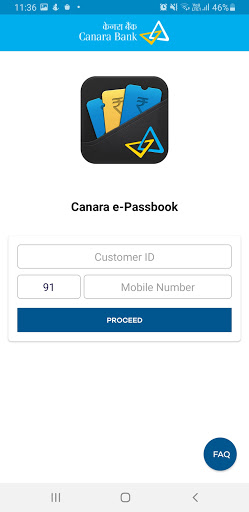
4) In the next page, the mobile number fetched from Bank‘s server will be displayed. User shall enter his/her customer ID and click on Proceed.
5) If the Mobile Number matches with the Customer ID of the User the application will ask for OTP or the error message 'Customer Id is not registered with Mobile number’ will be displayed. We request the user to kindly try with the registered mobile number and customer ID.
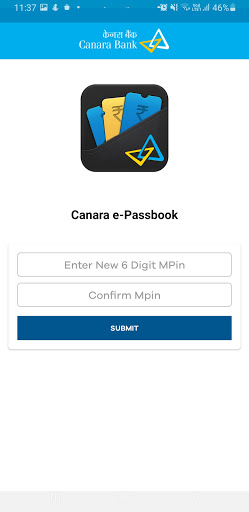
6) After OTP validation, User shall be asked to create new MPin and enter it twice.
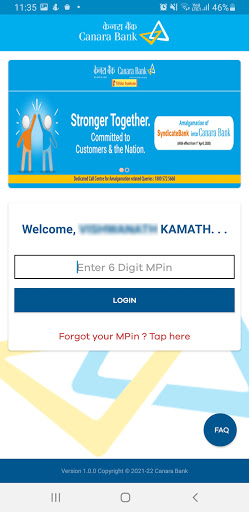
7) After MPIN creation, User will be redirected to the login page of the application.
8) The User may enter MPIN to login to the application.
مزید دکھائیں

1. MEmu انسٹالر ڈاؤن لوڈ کریں اور سیٹ اپ مکمل کریں

2. MEmu شروع کریں اسکے بعد ڈیسکٹاپ پر Google Play کھولیں

3. Google Play میں Canara e-Passbook تلاش کریں
Install
4. Canara e-Passbook ڈاؤن لوڈ کریں اور انسٹال کریں
5. انسٹال مکمل ہونے کے بعد سٹارٹ کرنے کے لیے آئیکن پر کلک کریں

6. MEmu کے ساتھ پی سی پر Canara e-Passbook کھیلنے کا لطف لیں
MEmu پلے بہترین اینڈرائڈ ایمولیٹر ہے اور 100 ملین لوگ اس کے زبردست اینڈرائڈ گیمنگ تجربہ سے لطف اندوز ہو رہے ہیں۔ MEmu کی ورچولائزیشن ٹیکنالوجی آپ کو اپنے PC پر ہزاروں اینڈرائڈ گیمز یہاں تک کہ انتہائی گرافک والے گیمز باسہولت کھیلنے کی طاقت دیتی ہے۔
بہتر گرافکس کے ساتھ بڑی اسکرین؛ طویل دورانیہ، بیٹری یا لامحدود موبائل ڈیٹا کے بغیر۔
کی بورڈ اور ماؤس یا گیم پیڈ کے عین مطابق کنٹرول کے لیے کی میپنگ کا پورا سپورٹ۔
کثیر مثالی منیجر کے ساتھ بیک وقت ایک پی سی پر متعدد گیم اکاؤنٹس یا ٹاسکس۔
پی سی پر درج ذیل مراحل پر عمل کرتے ہوئے پر Canara e-Passbook استعمال کریں: u003c/p>