ChatBoost: AI Agent Client
تازہ کاری
موجودہ ورژن
3.26.0
پیشکش بذریعہ

اپنے موبائل فون پر ChatBoost: AI Agent Client کا استعمال کرتے وقت زیادہ چارج ہونے کی فکر نہ کریں، خود کو چھوٹی اسکرین سے آزاد کریں اور ایپ کو زیادہ بڑے ڈسپلے پر استعمال کرنے کا لطف اٹھائیں۔ اس کے بعد سے کی بورڈ اور ماؤس کے ساتھ اپنے ایپ کا فل اسکرین کا تجربہ حاصل کریں۔ MEmu آپ کو وہ تمام حیران کن خصوصیات پیش کرتا ہے جن کی آپ کو توقع کرتے ہیں: فوری انسٹال اور آسان سیٹ اپ، وجدانی کنٹرول، مزید بیٹری، موبائل ڈیٹا کی کوئی حد نہیں اور اب مزید پریشان کن کالز نہیں۔ نئے برانڈ کا MEmu 9 آپ کے کمپیوٹر پر ChatBoost: AI Agent Client استعمال کرنے کے لیے بہترین اختیار ہے۔ MEmu کثیر نظیری منیجر بیک وقت 2 یا اس سے زیادہ اکاؤنٹس کھولنا ممکن بناتا ہے۔ اور سب اہم بات، ہمارا خصوصی ایمولیشن انجن آپ کے پی سی کی پوری طاقت ریلیز کرتے ہوئے ہر چیز ہموار اور قابل تفریح بناتا ہے۔
مزید دکھائیں
MEmu Play کے ساتھ PC پر ChatBoost: AI Agent Client استعمال کرنے کے شاندار تجربے سے لطف اٹھائیں۔ یہ ایک طاقتور مفت اینڈرائیڈ ایمولیٹر ہے جو آپ کو ان کے ڈیسک ٹاپ ورژن کے لیے ہزاروں اینڈرائیڈ ایپس فراہم کرتا ہے۔ دوستوں کے ساتھ جڑنے اور اعلی کارکردگی کے ساتھ اپنے کام کو چمکانے کا لطف اٹھائیں! A more flexible AI client, built for your phone.
A more flexible AI client, built for your phone
Tired of switching between apps whenever you want to use a different AI model?
ChatBoost brings multi-model chat, AI agents, web search, tool calling, and an AI Keyboard into one mobile app. Connect the AI services you already use, choose the right model for each task, and keep your conversations, files, and everyday work in one place.
No ChatBoost account is required. Use the built-in service or connect your own AI services and API keys. Chat history stays on your device, and requests go to the model service you select.
Use multiple AI models in one app
Different models are useful for different tasks.
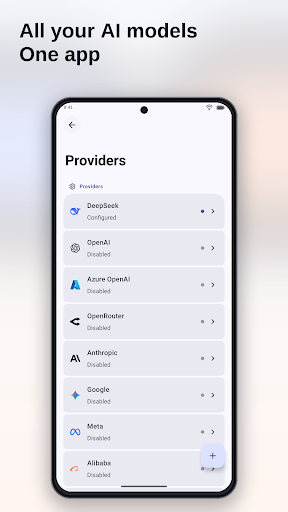
Connect OpenAI, Claude, Gemini, OpenRouter, DeepSeek, Qwen, Mistral, Ollama, Azure OpenAI, Amazon Bedrock, NVIDIA, and custom OpenAI-compatible services.
Choose a model for writing, switch to one with web search for research, or use a vision-capable model for images and files. Your conversations no longer need to be scattered across different apps.
Build AI agents for the way you work
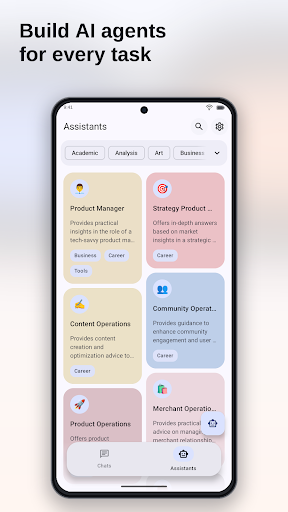
Start with a built-in agent for writing, translation, learning, or research. You can also create your own with custom instructions and prompts.
Choose a model for each agent, customize its name and avatar, and enable web search or tool calling when the selected model supports them.
Create assistants for writing, research, learning, or everyday tasks.
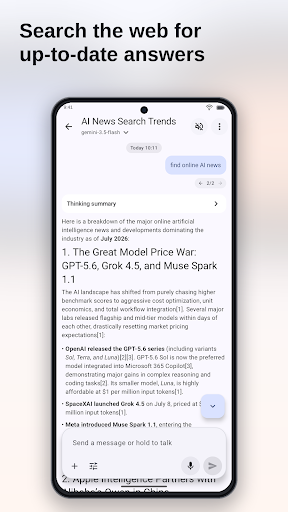
Find current information on the web
Give supported models access to web search so they can find and organize up-to-date information.
Use ChatBoost to:
• Find and summarize recent information
• Compare information from different sources
• Research topics and create content
• Extract web pages and organize key points
• Include current information in answers
Some models also provide native search. You can configure other search services when needed.
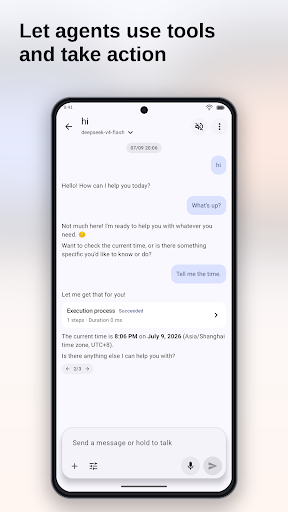
Let agents take action
With tool calling, supported AI agents can carry out tasks such as creating calendar events, generating images, or running available tools.
ChatBoost also supports MCP for connecting additional external tools.
On Android, you can set ChatBoost as your system digital assistant for faster access.
Use AI Keyboard in other apps
ChatBoost AI Keyboard brings AI to wherever you are already typing:
• Write and reply to messages
• Rewrite awkward sentences
• Translate between languages
• Change tone and writing style
• Polish emails, notes, and social posts
• Draft replies using the context of a conversation
Use AI inside messaging, email, browser, and note-taking apps without repeatedly copying text.
Work with text, images, files, and voice
ChatBoost supports more than text chat.
Upload images for compatible vision models to understand, use supported models to generate images, and add documents, audio, or video as conversation attachments. You can also speak your prompts and listen to responses with text-to-speech.
Long text can become an attachment, while code and Markdown stay readable.
More control when you need it
For supported models, adjust settings such as Temperature, Top-p, Max Tokens, reasoning effort, and streaming responses.
You can also:
• Add custom models and API endpoints
• Manage multiple API keys
• Search, pin, and organize conversations
• Review token usage
• Import, export, and back up data
• Customize fonts, themes, and voice settings
Start chatting immediately, then open advanced settings when you need more control.
Your models, data, and setup stay under your control
ChatBoost does not require a product account and does not lock you into one model or provider.
API keys and chat history are managed on your device. Required content is sent to the model, search, or tool service you select and handled under that service's terms and privacy policy.
If you want a mobile AI client with your own API keys, multiple models, AI agents, web search, and practical mobile workflows, try ChatBoost.
Questions or feedback? Contact us at fb@muggle.studio.
مزید دکھائیں

1. MEmu انسٹالر ڈاؤن لوڈ کریں اور سیٹ اپ مکمل کریں

2. MEmu شروع کریں اسکے بعد ڈیسکٹاپ پر Google Play کھولیں

3. Google Play میں ChatBoost: AI Agent Client تلاش کریں
Install
4. ChatBoost: AI Agent Client ڈاؤن لوڈ کریں اور انسٹال کریں
5. انسٹال مکمل ہونے کے بعد سٹارٹ کرنے کے لیے آئیکن پر کلک کریں

6. MEmu کے ساتھ پی سی پر ChatBoost: AI Agent Client کھیلنے کا لطف لیں
MEmu پلے بہترین اینڈرائڈ ایمولیٹر ہے اور 100 ملین لوگ اس کے زبردست اینڈرائڈ گیمنگ تجربہ سے لطف اندوز ہو رہے ہیں۔ MEmu کی ورچولائزیشن ٹیکنالوجی آپ کو اپنے PC پر ہزاروں اینڈرائڈ گیمز یہاں تک کہ انتہائی گرافک والے گیمز باسہولت کھیلنے کی طاقت دیتی ہے۔
بہتر گرافکس کے ساتھ بڑی اسکرین؛ طویل دورانیہ، بیٹری یا لامحدود موبائل ڈیٹا کے بغیر۔
کی بورڈ اور ماؤس یا گیم پیڈ کے عین مطابق کنٹرول کے لیے کی میپنگ کا پورا سپورٹ۔
کثیر مثالی منیجر کے ساتھ بیک وقت ایک پی سی پر متعدد گیم اکاؤنٹس یا ٹاسکس۔
پی سی پر درج ذیل مراحل پر عمل کرتے ہوئے پر ChatBoost: AI Agent Client استعمال کریں: u003c/p>