Clarity Guard- Focus Your Time
تازہ کاری
موجودہ ورژن
2025.12.16
پیشکش بذریعہ

اپنے موبائل فون پر Clarity Guard- Focus Your Time کا استعمال کرتے وقت زیادہ چارج ہونے کی فکر نہ کریں، خود کو چھوٹی اسکرین سے آزاد کریں اور ایپ کو زیادہ بڑے ڈسپلے پر استعمال کرنے کا لطف اٹھائیں۔ اس کے بعد سے کی بورڈ اور ماؤس کے ساتھ اپنے ایپ کا فل اسکرین کا تجربہ حاصل کریں۔ MEmu آپ کو وہ تمام حیران کن خصوصیات پیش کرتا ہے جن کی آپ کو توقع کرتے ہیں: فوری انسٹال اور آسان سیٹ اپ، وجدانی کنٹرول، مزید بیٹری، موبائل ڈیٹا کی کوئی حد نہیں اور اب مزید پریشان کن کالز نہیں۔ نئے برانڈ کا MEmu 9 آپ کے کمپیوٹر پر Clarity Guard- Focus Your Time استعمال کرنے کے لیے بہترین اختیار ہے۔ MEmu کثیر نظیری منیجر بیک وقت 2 یا اس سے زیادہ اکاؤنٹس کھولنا ممکن بناتا ہے۔ اور سب اہم بات، ہمارا خصوصی ایمولیشن انجن آپ کے پی سی کی پوری طاقت ریلیز کرتے ہوئے ہر چیز ہموار اور قابل تفریح بناتا ہے۔
مزید دکھائیں
MEmu Play کے ساتھ PC پر Clarity Guard- Focus Your Time استعمال کرنے کے شاندار تجربے سے لطف اٹھائیں۔ یہ ایک طاقتور مفت اینڈرائیڈ ایمولیٹر ہے جو آپ کو ان کے ڈیسک ٹاپ ورژن کے لیے ہزاروں اینڈرائیڈ ایپس فراہم کرتا ہے۔ دوستوں کے ساتھ جڑنے اور اعلی کارکردگی کے ساتھ اپنے کام کو چمکانے کا لطف اٹھائیں! Are you tired of endless scrolling on social media?
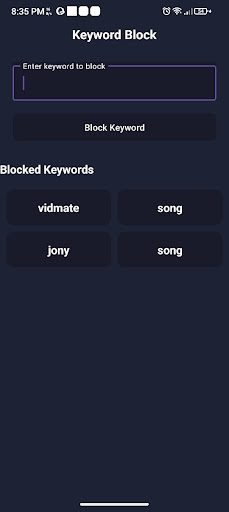
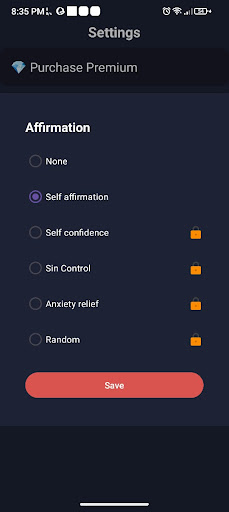
Are you tired of endless scrolling on social media? Is your phone sabotaging your productivity and study goals? It's time to take back control.
Clarity Guard is more than just an app blocker; it's your personal focus shield in a world full of digital distractions. We help you build better digital habits so you can concentrate on what truly matters.
Key Features That Empower You:
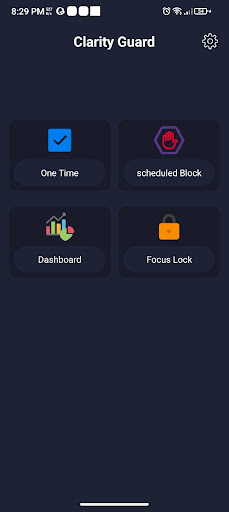
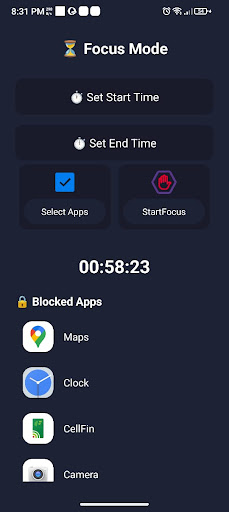
Powerful App Blocker Instantly block access to social media, games, or any distracting app that steals your valuable time. You create the rules, you decide when to focus.
Unique Keyword Blocker Go beyond simple app blocking. Our standout feature lets you block websites in any browser by adding specific keywords. If a URL contains a blocked keyword (e.g., "news," "sale," "video"), Clarity Guard will prevent it from loading. Stop mindless browsing in its tracks!
Unbreakable Focus Lock Sessions Commit to your tasks with our timed Focus Lock. Start a session, and Clarity Guard will prevent you from accessing your blocked apps and websites until the timer runs out. Perfect for deep work, study sessions, or being present with family.
Smart Scheduling Automate your focus. Set up recurring schedules to block distractions during specific times, like your work hours (9 AM - 5 PM) or study time. Set it once and let Clarity Guard handle the rest.
Your Privacy is Our Priority
We believe that your data belongs to you. Period.
100% On-Device Operation: All your data—your blocklists, schedules, and keywords—is stored securely and only on your device.
No Data Collection: We do not see, collect, or share any of your personal information or on-screen content.
Transparent Permissions: We only ask for permissions that are essential for the app to work. The Accessibility Service is used exclusively to identify which app or URL to block based on your rules. We never monitor your personal activity.
Who is Clarity Guard for?
Students who need to focus on exams and assignments without distraction.
Professionals who want to get more done during their workday.
Writers & Creatives who need uninterrupted time to get into a state of flow.
Anyone looking to reduce screen time, improve their digital wellbeing, and fight phone addiction.
Stop letting your phone control you. It's time to build a healthier relationship with technology.
Download Clarity Guard today and rediscover the power of true focus!
مزید دکھائیں

1. MEmu انسٹالر ڈاؤن لوڈ کریں اور سیٹ اپ مکمل کریں

2. MEmu شروع کریں اسکے بعد ڈیسکٹاپ پر Google Play کھولیں

3. Google Play میں Clarity Guard- Focus Your Time تلاش کریں
Install
4. Clarity Guard- Focus Your Time ڈاؤن لوڈ کریں اور انسٹال کریں
5. انسٹال مکمل ہونے کے بعد سٹارٹ کرنے کے لیے آئیکن پر کلک کریں

6. MEmu کے ساتھ پی سی پر Clarity Guard- Focus Your Time کھیلنے کا لطف لیں
MEmu پلے بہترین اینڈرائڈ ایمولیٹر ہے اور 100 ملین لوگ اس کے زبردست اینڈرائڈ گیمنگ تجربہ سے لطف اندوز ہو رہے ہیں۔ MEmu کی ورچولائزیشن ٹیکنالوجی آپ کو اپنے PC پر ہزاروں اینڈرائڈ گیمز یہاں تک کہ انتہائی گرافک والے گیمز باسہولت کھیلنے کی طاقت دیتی ہے۔
بہتر گرافکس کے ساتھ بڑی اسکرین؛ طویل دورانیہ، بیٹری یا لامحدود موبائل ڈیٹا کے بغیر۔
کی بورڈ اور ماؤس یا گیم پیڈ کے عین مطابق کنٹرول کے لیے کی میپنگ کا پورا سپورٹ۔
کثیر مثالی منیجر کے ساتھ بیک وقت ایک پی سی پر متعدد گیم اکاؤنٹس یا ٹاسکس۔
پی سی پر درج ذیل مراحل پر عمل کرتے ہوئے پر Clarity Guard- Focus Your Time استعمال کریں: u003c/p>