CLICS
تازہ کاری
موجودہ ورژن
3.7.42
پیشکش بذریعہ

اپنے موبائل فون پر CLICS کا استعمال کرتے وقت زیادہ چارج ہونے کی فکر نہ کریں، خود کو چھوٹی اسکرین سے آزاد کریں اور ایپ کو زیادہ بڑے ڈسپلے پر استعمال کرنے کا لطف اٹھائیں۔ اس کے بعد سے کی بورڈ اور ماؤس کے ساتھ اپنے ایپ کا فل اسکرین کا تجربہ حاصل کریں۔ MEmu آپ کو وہ تمام حیران کن خصوصیات پیش کرتا ہے جن کی آپ کو توقع کرتے ہیں: فوری انسٹال اور آسان سیٹ اپ، وجدانی کنٹرول، مزید بیٹری، موبائل ڈیٹا کی کوئی حد نہیں اور اب مزید پریشان کن کالز نہیں۔ نئے برانڈ کا MEmu 9 آپ کے کمپیوٹر پر CLICS استعمال کرنے کے لیے بہترین اختیار ہے۔ MEmu کثیر نظیری منیجر بیک وقت 2 یا اس سے زیادہ اکاؤنٹس کھولنا ممکن بناتا ہے۔ اور سب اہم بات، ہمارا خصوصی ایمولیشن انجن آپ کے پی سی کی پوری طاقت ریلیز کرتے ہوئے ہر چیز ہموار اور قابل تفریح بناتا ہے۔
مزید دکھائیں
Download CLICS on PC with MEmu Android Emulator. Enjoy playing on big screen. CLICS® Elevating Stylists and Salons.

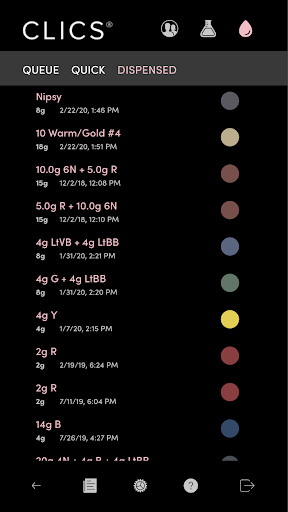
CLICS® Elevating Stylists and Salons. Where artistry and innovation meet.
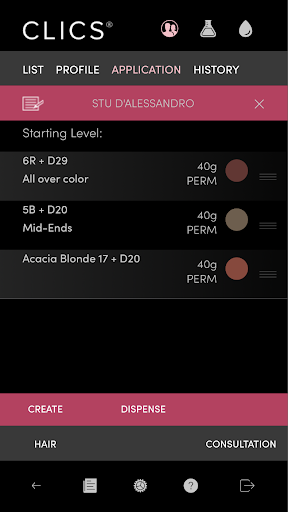
The CLICS® app allows hair stylists to access their salon's CLICS Dispensers to create any shade of demi or permanent color with the touch of a button, expanding their creativity and productivity.
This precision system takes all of the guesswork out of color formulation, allowing measuring, mixing and dispensing to be done with ease. There's no waste, no mess, and no mistakes. Designed exclusively for licensed hair stylists and cosmetology students, it's the color you've always dreamed of. You dream it, CLICS delivers it.
It’s visionary hair color, for artists like you!
In order to use the CLICS system a stylist must be invited by their salon and set up a CLICS login. If you work in more than one CLICS-enhanced salon you can easily switch between your salons using the sign-out icon.
Mix Color on the Fly
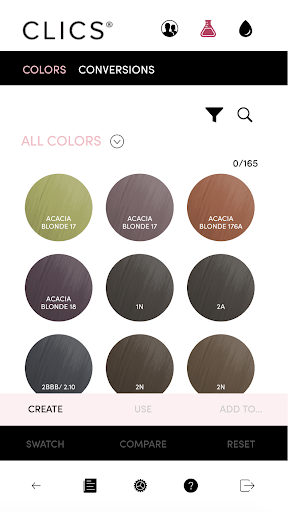
Use the CLICS Lab - your own digital color bar - to quickly formulate simple or complex hair color formulas. Your formulas can be dispensed at the touch of a button.
Create Your Own Color Library
Save your best color formulas in your own color library or use CLICS' curated libraries to get started with great looking color.
Touch Up with Amazing Accuracy
Easily look up and choose the exact color formulas applied previously for a client from CLICS' client history .Repeat the exact mixture used before or use an earlier color as a starting point for a brand new look.
Make the Environment - and Your Clients - Happy!
An important mission for CLICS has been to reduce the waste inherent in traditional color application methods. By combining efficient packaging with digitally-accurate dispensing, waste - and its impact on both the environment and your bottom line - are greatly reduced. Protect the environment while making your clients look great - with CLICS.
مزید دکھائیں

1. MEmu انسٹالر ڈاؤن لوڈ کریں اور سیٹ اپ مکمل کریں

2. MEmu شروع کریں اسکے بعد ڈیسکٹاپ پر Google Play کھولیں

3. Google Play میں CLICS تلاش کریں
Install
4. CLICS ڈاؤن لوڈ کریں اور انسٹال کریں
5. انسٹال مکمل ہونے کے بعد سٹارٹ کرنے کے لیے آئیکن پر کلک کریں

6. MEmu کے ساتھ پی سی پر CLICS کھیلنے کا لطف لیں
MEmu پلے بہترین اینڈرائڈ ایمولیٹر ہے اور 100 ملین لوگ اس کے زبردست اینڈرائڈ گیمنگ تجربہ سے لطف اندوز ہو رہے ہیں۔ MEmu کی ورچولائزیشن ٹیکنالوجی آپ کو اپنے PC پر ہزاروں اینڈرائڈ گیمز یہاں تک کہ انتہائی گرافک والے گیمز باسہولت کھیلنے کی طاقت دیتی ہے۔
بہتر گرافکس کے ساتھ بڑی اسکرین؛ طویل دورانیہ، بیٹری یا لامحدود موبائل ڈیٹا کے بغیر۔
کی بورڈ اور ماؤس یا گیم پیڈ کے عین مطابق کنٹرول کے لیے کی میپنگ کا پورا سپورٹ۔
کثیر مثالی منیجر کے ساتھ بیک وقت ایک پی سی پر متعدد گیم اکاؤنٹس یا ٹاسکس۔
پی سی پر درج ذیل مراحل پر عمل کرتے ہوئے پر CLICS استعمال کریں: u003c/p>