Dexcom ONE+
تازہ کاری
موجودہ ورژن
1.9.0
پیشکش بذریعہ

اپنے موبائل فون پر Dexcom ONE+ کا استعمال کرتے وقت زیادہ چارج ہونے کی فکر نہ کریں، خود کو چھوٹی اسکرین سے آزاد کریں اور ایپ کو زیادہ بڑے ڈسپلے پر استعمال کرنے کا لطف اٹھائیں۔ اس کے بعد سے کی بورڈ اور ماؤس کے ساتھ اپنے ایپ کا فل اسکرین کا تجربہ حاصل کریں۔ MEmu آپ کو وہ تمام حیران کن خصوصیات پیش کرتا ہے جن کی آپ کو توقع کرتے ہیں: فوری انسٹال اور آسان سیٹ اپ، وجدانی کنٹرول، مزید بیٹری، موبائل ڈیٹا کی کوئی حد نہیں اور اب مزید پریشان کن کالز نہیں۔ نئے برانڈ کا MEmu 9 آپ کے کمپیوٹر پر Dexcom ONE+ استعمال کرنے کے لیے بہترین اختیار ہے۔ MEmu کثیر نظیری منیجر بیک وقت 2 یا اس سے زیادہ اکاؤنٹس کھولنا ممکن بناتا ہے۔ اور سب اہم بات، ہمارا خصوصی ایمولیشن انجن آپ کے پی سی کی پوری طاقت ریلیز کرتے ہوئے ہر چیز ہموار اور قابل تفریح بناتا ہے۔
مزید دکھائیں
MEmu Play کے ساتھ PC پر Dexcom ONE+ استعمال کرنے کے شاندار تجربے سے لطف اٹھائیں۔ یہ ایک طاقتور مفت اینڈرائیڈ ایمولیٹر ہے جو آپ کو ان کے ڈیسک ٹاپ ورژن کے لیے ہزاروں اینڈرائیڈ ایپس فراہم کرتا ہے۔ دوستوں کے ساتھ جڑنے اور اعلی کارکردگی کے ساتھ اپنے کام کو چمکانے کا لطف اٹھائیں! Diabetes goes where you go, now your glucose readings can too, with the Dexcom ONE+ Continuous Glucose Monitoring (CGM) system and mobile app†.
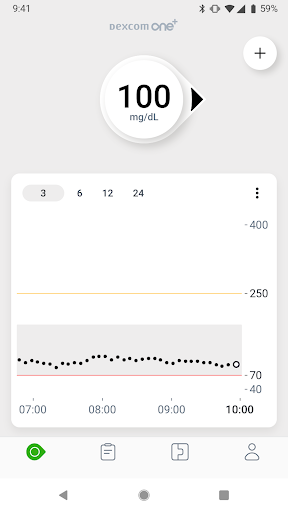
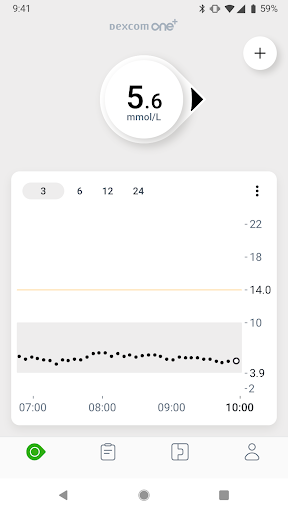
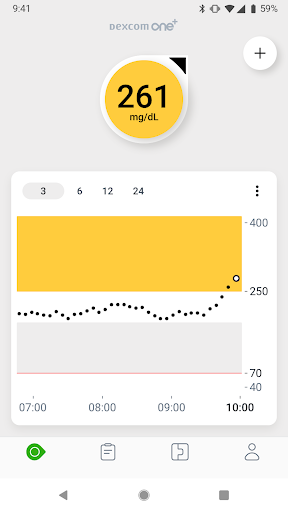
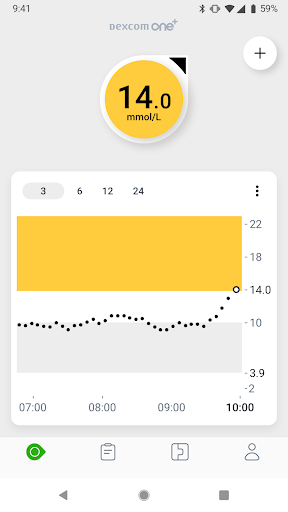
Diabetes goes where you go, now your glucose readings can too, with the Dexcom ONE+ Continuous Glucose Monitoring (CGM) system and mobile app†.
With the Dexcom ONE+ mobile app†, users can access their real-time glucose readings at a glance and set customisable alerts that can help warn of highs and lows, all with no finger pricks* or scanning.
The Dexcom ONE+ mobile app† has been designed with enhanced features to help in the management of diabetes:
• The app-led onboarding allows users get started in a few clicks only.
• Share your glucose data with up to 10 followers who can monitor your glucose data and trends on their compatible smart device with the Dexcom Follow app. Share and Follow functions require an internet connection.
• Key diabetes metrics displayed in the Clarity Card section of the mobile app, so that users can see both real-time and retrospective glucose data.**
• Event logging where users can track activities like meal intake, exercise sessions and insulin injections, helping them better understand their glucose patterns.1
• Alerts to notify users 12-hours before the end of a sensor session, so you can change your sensor when it’s convenient for you.1
Learn more at Dexcom.com.
This app is only for use with the Dexcom ONE+ Continuous Glucose Monitoring System.
*If your glucose alerts and readings from the Dexcom ONE+ do not match symptoms or expectations, use a blood glucose meter to make diabetes treatment decisions
† Smart device sold separately. For a list of compatible devices, visit www.dexcom.com/compatibility.
**An internet connection is required for patients to send their glucose data to Dexcom Clarity via a compatible smart device: dexcom.com/compatibility.
1 Dexcom ONE+ User Guide, 2023.
مزید دکھائیں

1. MEmu انسٹالر ڈاؤن لوڈ کریں اور سیٹ اپ مکمل کریں

2. MEmu شروع کریں اسکے بعد ڈیسکٹاپ پر Google Play کھولیں

3. Google Play میں Dexcom ONE+ تلاش کریں
Install
4. Dexcom ONE+ ڈاؤن لوڈ کریں اور انسٹال کریں
5. انسٹال مکمل ہونے کے بعد سٹارٹ کرنے کے لیے آئیکن پر کلک کریں

6. MEmu کے ساتھ پی سی پر Dexcom ONE+ کھیلنے کا لطف لیں
MEmu پلے بہترین اینڈرائڈ ایمولیٹر ہے اور 100 ملین لوگ اس کے زبردست اینڈرائڈ گیمنگ تجربہ سے لطف اندوز ہو رہے ہیں۔ MEmu کی ورچولائزیشن ٹیکنالوجی آپ کو اپنے PC پر ہزاروں اینڈرائڈ گیمز یہاں تک کہ انتہائی گرافک والے گیمز باسہولت کھیلنے کی طاقت دیتی ہے۔
بہتر گرافکس کے ساتھ بڑی اسکرین؛ طویل دورانیہ، بیٹری یا لامحدود موبائل ڈیٹا کے بغیر۔
کی بورڈ اور ماؤس یا گیم پیڈ کے عین مطابق کنٹرول کے لیے کی میپنگ کا پورا سپورٹ۔
کثیر مثالی منیجر کے ساتھ بیک وقت ایک پی سی پر متعدد گیم اکاؤنٹس یا ٹاسکس۔
پی سی پر درج ذیل مراحل پر عمل کرتے ہوئے پر Dexcom ONE+ استعمال کریں: u003c/p>