TGSRTC Gamyam
تازہ کاری
موجودہ ورژن
2024.11.29.03
پیشکش بذریعہ

اپنے موبائل فون پر TGSRTC Gamyam کا استعمال کرتے وقت زیادہ چارج ہونے کی فکر نہ کریں، خود کو چھوٹی اسکرین سے آزاد کریں اور ایپ کو زیادہ بڑے ڈسپلے پر استعمال کرنے کا لطف اٹھائیں۔ اس کے بعد سے کی بورڈ اور ماؤس کے ساتھ اپنے ایپ کا فل اسکرین کا تجربہ حاصل کریں۔ MEmu آپ کو وہ تمام حیران کن خصوصیات پیش کرتا ہے جن کی آپ کو توقع کرتے ہیں: فوری انسٹال اور آسان سیٹ اپ، وجدانی کنٹرول، مزید بیٹری، موبائل ڈیٹا کی کوئی حد نہیں اور اب مزید پریشان کن کالز نہیں۔ نئے برانڈ کا MEmu 9 آپ کے کمپیوٹر پر TGSRTC Gamyam استعمال کرنے کے لیے بہترین اختیار ہے۔ MEmu کثیر نظیری منیجر بیک وقت 2 یا اس سے زیادہ اکاؤنٹس کھولنا ممکن بناتا ہے۔ اور سب اہم بات، ہمارا خصوصی ایمولیشن انجن آپ کے پی سی کی پوری طاقت ریلیز کرتے ہوئے ہر چیز ہموار اور قابل تفریح بناتا ہے۔
مزید دکھائیں
Download TGSRTC Gamyam on PC with MEmu Android Emulator. Enjoy playing on big screen. “TGSRTC Gamyam – In the pursuit of making the bus journey easy”.
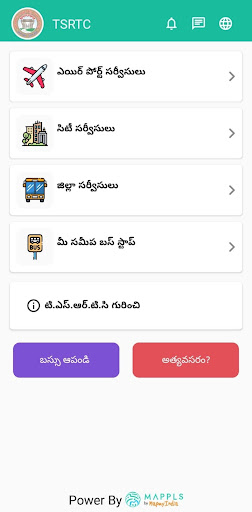
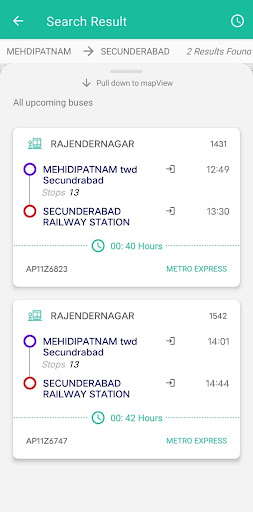
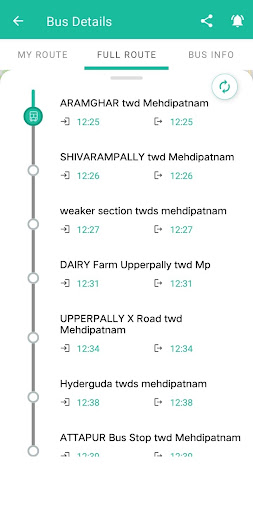
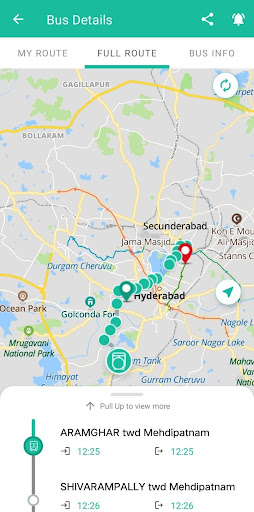
“TGSRTC Gamyam – In the pursuit of making the bus journey easy”
“TGSRTC encourages citizens of Telangana and the visitors to use RTC Bus service to travel both within Hyderabad City as well as to travel from one city to another. In this pursuit, we have dedicated this Bus Tracking App to help passengers to know the arrival and departure of buses at various stops across Telangana and nearby states to where TGSRTC services are available, so that the passengers can plan their travel to avoid unwanted waiting at the bus stops / stations”
The App provides you real-time tracking of Pushpak AC Airport buses and all Express and above special type bus services of TGSRTC with information of ETA (Expected time of Arrival) at boarding stage and selected destination to plan your travel schedule in advance. It also tracks your reservation buses based on Service no. provided in your reservation ticket. It has updated information of schedules and bus routes of TGSRTC.
The TGSRTC BUS TRACKING app improves your experience of Travelling by TGSRTC buses by providing you accurate information on bus arrival at the bus stop near you from the vicinity of your home, office, shopping, functions or any other location. It provides better coordination for your travel plan by connecting you to Airport or Railway Stations in your search.
Major App Features:
1. Provides tracking of buses both in Hyderabad City and District services separately.
2. Provides Expected time of Arrival (ETA) for your origin and destination points.
3. Search for Bus services between from and to places/stages for Special type services like Garuda plus, Rajadhani, Super Luxury, Deluxe & Express buses in District.
4. Search for Bus services between from and to places/stages for Special type services like Pushpak (Airport services), Metro Luxury, Metro Deluxe & Metro Express buses in Hyderabad City.
5. Search for Rajiv Gandhi International Airport (RGIA), Shamshabad Electric buses (Pushpak) which run 24/7 for the convenience of passengers.
6. Search by Bus number, when your near and dear one’s are travelling by a particular bus to pick up them in time.
7. Search by Route name/number, when you want to see all the active trips on the route.
8. View your current Location and nearest bus stop in the App and plan your Trip.
9. View the current active trips which are arriving to selected bus stop with ETA and also live location of bus in the Map.
10. Use Emergency services from TGSRTC like woman helpline, report breakdowns and accidents, if any.
مزید دکھائیں

1. MEmu انسٹالر ڈاؤن لوڈ کریں اور سیٹ اپ مکمل کریں

2. MEmu شروع کریں اسکے بعد ڈیسکٹاپ پر Google Play کھولیں

3. Google Play میں TGSRTC Gamyam تلاش کریں
Install
4. TGSRTC Gamyam ڈاؤن لوڈ کریں اور انسٹال کریں
5. انسٹال مکمل ہونے کے بعد سٹارٹ کرنے کے لیے آئیکن پر کلک کریں

6. MEmu کے ساتھ پی سی پر TGSRTC Gamyam کھیلنے کا لطف لیں
MEmu پلے بہترین اینڈرائڈ ایمولیٹر ہے اور 100 ملین لوگ اس کے زبردست اینڈرائڈ گیمنگ تجربہ سے لطف اندوز ہو رہے ہیں۔ MEmu کی ورچولائزیشن ٹیکنالوجی آپ کو اپنے PC پر ہزاروں اینڈرائڈ گیمز یہاں تک کہ انتہائی گرافک والے گیمز باسہولت کھیلنے کی طاقت دیتی ہے۔
بہتر گرافکس کے ساتھ بڑی اسکرین؛ طویل دورانیہ، بیٹری یا لامحدود موبائل ڈیٹا کے بغیر۔
کی بورڈ اور ماؤس یا گیم پیڈ کے عین مطابق کنٹرول کے لیے کی میپنگ کا پورا سپورٹ۔
کثیر مثالی منیجر کے ساتھ بیک وقت ایک پی سی پر متعدد گیم اکاؤنٹس یا ٹاسکس۔
پی سی پر درج ذیل مراحل پر عمل کرتے ہوئے پر TGSRTC Gamyam استعمال کریں: u003c/p>