
eFriend - Your Online Friend
تازہ کاری
موجودہ ورژن
1.5.30
پیشکش بذریعہ

اپنے موبائل فون پر eFriend - Your Online Friend کا استعمال کرتے وقت زیادہ چارج ہونے کی فکر نہ کریں، خود کو چھوٹی اسکرین سے آزاد کریں اور ایپ کو زیادہ بڑے ڈسپلے پر استعمال کرنے کا لطف اٹھائیں۔ اس کے بعد سے کی بورڈ اور ماؤس کے ساتھ اپنے ایپ کا فل اسکرین کا تجربہ حاصل کریں۔ MEmu آپ کو وہ تمام حیران کن خصوصیات پیش کرتا ہے جن کی آپ کو توقع کرتے ہیں: فوری انسٹال اور آسان سیٹ اپ، وجدانی کنٹرول، مزید بیٹری، موبائل ڈیٹا کی کوئی حد نہیں اور اب مزید پریشان کن کالز نہیں۔ نئے برانڈ کا MEmu 9 آپ کے کمپیوٹر پر eFriend - Your Online Friend استعمال کرنے کے لیے بہترین اختیار ہے۔ MEmu کثیر نظیری منیجر بیک وقت 2 یا اس سے زیادہ اکاؤنٹس کھولنا ممکن بناتا ہے۔ اور سب اہم بات، ہمارا خصوصی ایمولیشن انجن آپ کے پی سی کی پوری طاقت ریلیز کرتے ہوئے ہر چیز ہموار اور قابل تفریح بناتا ہے۔
مزید دکھائیں
Download eFriend - Your Online Friend on PC with MEmu Android Emulator. Enjoy playing on big screen. Welcome to eFriend, the revolutionary video calling app that transcends geographical boundaries and connects you with potential friends from around the world.
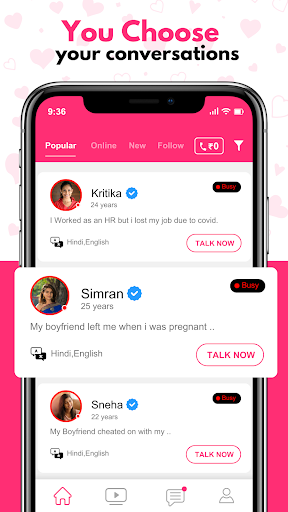

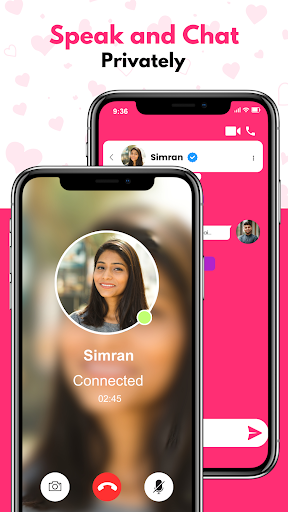

Welcome to eFriend, the revolutionary video calling app that transcends geographical boundaries and connects you with potential friends from around the world. Designed to facilitate meaningful connections, eFriend isn't just another video chat platform; it's a gateway to finding multiple friends who shares your values, interests, and aspirations, all while experiencing the magic of face-to-face conversations.
Key Features:
Discover Your eFriend: eFriend introduces you to a diverse and global community of individuals seeking genuine connections. You can explore profiles and engage in video calls with like-minded people.
Secure and Private: At eFriend, we prioritize your privacy and security. We've implemented robust measures to safeguard your personal information, ensuring a safe and respectful environment for all users.
Verified Profiles: Boost your credibility and authenticity by verifying your profile. This trust-enhancing feature helps users build connections based on transparency and reliability.
Global Reach: eFriend transcends borders, allowing you to meet people from different corners of the world. Embrace cultural diversity, learn new languages, and discover unique perspectives—all through video calls.
Crystal-Clear Video Calls: Share your stories, dreams, and emotions in real-time, fostering deeper connections.
Instant Messaging: Initiate conversations before or after video calls with our secure messaging platform. This feature provides a comfortable pace for building connections.
Interest-Based Filters: Fine-tune your search using filters that align with your hobbies, interests, and preferences. Find individuals who resonate with your passions.
Report and Block: Maintain a respectful community by reporting inappropriate behavior. You can also block users who do not adhere to our community guidelines.
Guidelines and Tips: eFriend provides in-app guidance on responsible online communication and etiquette, fostering a positive and respectful environment for users.
Embark on Your online Friendship Journey:
Are you ready to embark on a journey of meaningful connections? Download the app now and become a part of our global community. eFriend is your trusted companion in breaking down barriers and bringing people together to create memories, share experiences, and potentially find your true friends.
Please note that eFriend is intended for individuals seeking genuine connections, friendships, and meaningful relationships. Users are expected to treat each other with respect and adhere to our community guidelines.
Start your journey today and start making online friends with eFriend.
مزید دکھائیں

1. MEmu انسٹالر ڈاؤن لوڈ کریں اور سیٹ اپ مکمل کریں

2. MEmu شروع کریں اسکے بعد ڈیسکٹاپ پر Google Play کھولیں

3. Google Play میں eFriend - Your Online Friend تلاش کریں
Install
4. eFriend - Your Online Friend ڈاؤن لوڈ کریں اور انسٹال کریں
5. انسٹال مکمل ہونے کے بعد سٹارٹ کرنے کے لیے آئیکن پر کلک کریں

6. MEmu کے ساتھ پی سی پر eFriend - Your Online Friend کھیلنے کا لطف لیں
MEmu پلے بہترین اینڈرائڈ ایمولیٹر ہے اور 100 ملین لوگ اس کے زبردست اینڈرائڈ گیمنگ تجربہ سے لطف اندوز ہو رہے ہیں۔ MEmu کی ورچولائزیشن ٹیکنالوجی آپ کو اپنے PC پر ہزاروں اینڈرائڈ گیمز یہاں تک کہ انتہائی گرافک والے گیمز باسہولت کھیلنے کی طاقت دیتی ہے۔
بہتر گرافکس کے ساتھ بڑی اسکرین؛ طویل دورانیہ، بیٹری یا لامحدود موبائل ڈیٹا کے بغیر۔
کی بورڈ اور ماؤس یا گیم پیڈ کے عین مطابق کنٹرول کے لیے کی میپنگ کا پورا سپورٹ۔
کثیر مثالی منیجر کے ساتھ بیک وقت ایک پی سی پر متعدد گیم اکاؤنٹس یا ٹاسکس۔
پی سی پر درج ذیل مراحل پر عمل کرتے ہوئے پر eFriend - Your Online Friend استعمال کریں: u003c/p>