EKitap
تازہ کاری
موجودہ ورژن
1.1.5
پیشکش بذریعہ

اپنے موبائل فون پر EKitap کا استعمال کرتے وقت زیادہ چارج ہونے کی فکر نہ کریں، خود کو چھوٹی اسکرین سے آزاد کریں اور ایپ کو زیادہ بڑے ڈسپلے پر استعمال کرنے کا لطف اٹھائیں۔ اس کے بعد سے کی بورڈ اور ماؤس کے ساتھ اپنے ایپ کا فل اسکرین کا تجربہ حاصل کریں۔ MEmu آپ کو وہ تمام حیران کن خصوصیات پیش کرتا ہے جن کی آپ کو توقع کرتے ہیں: فوری انسٹال اور آسان سیٹ اپ، وجدانی کنٹرول، مزید بیٹری، موبائل ڈیٹا کی کوئی حد نہیں اور اب مزید پریشان کن کالز نہیں۔ نئے برانڈ کا MEmu 9 آپ کے کمپیوٹر پر EKitap استعمال کرنے کے لیے بہترین اختیار ہے۔ MEmu کثیر نظیری منیجر بیک وقت 2 یا اس سے زیادہ اکاؤنٹس کھولنا ممکن بناتا ہے۔ اور سب اہم بات، ہمارا خصوصی ایمولیشن انجن آپ کے پی سی کی پوری طاقت ریلیز کرتے ہوئے ہر چیز ہموار اور قابل تفریح بناتا ہے۔
مزید دکھائیں
MEmu Play کے ساتھ PC پر EKitap استعمال کرنے کے شاندار تجربے سے لطف اٹھائیں۔ یہ ایک طاقتور مفت اینڈرائیڈ ایمولیٹر ہے جو آپ کو ان کے ڈیسک ٹاپ ورژن کے لیے ہزاروں اینڈرائیڈ ایپس فراہم کرتا ہے۔ دوستوں کے ساتھ جڑنے اور اعلی کارکردگی کے ساتھ اپنے کام کو چمکانے کا لطف اٹھائیں! Our “EKitap” mobile application is your personal electronic library, where you will have thousands of books, news and articles at your fingertips!
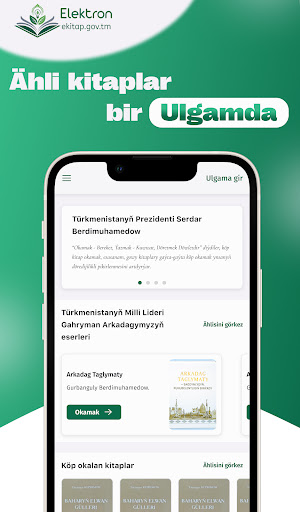
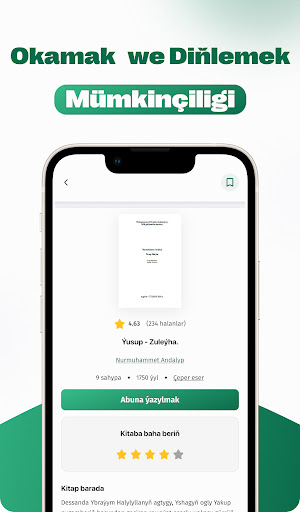
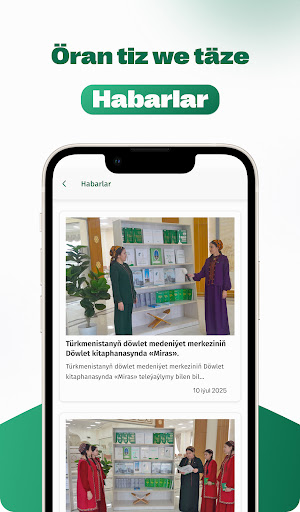
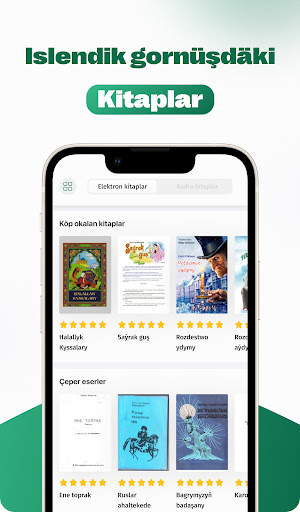
Our “EKitap” mobile application is your personal electronic library, where you will have thousands of books, news and articles at your fingertips! With the help of the application, you can find books of various contents and read them online or offline at any time. Download books, add them to your favorites, create your own collections, get acquainted with new news and articles from the world of literature — all in one place!
Our main features:
- A huge catalog of e-books: Thousands of books are available, from classics to modern bestsellers. Every reader can find a work that suits him.
- The ability to read offline: Download books to your device and continue reading even when there is no Internet. Your personal library is always with you.
- Favorites and collections: You can add your favorite books to a separate list and create your own collections. It is very convenient to organize and manage books.
- Convenient search and filters: Quickly find books by title, author or genre. Using flexible filters, you can select only the works that interest you.
- News section: Get the latest news, articles and reviews about literature, books and culture. Through the application, you will be aware of literary events taking place in the world.
- Library list: Find nearby libraries, get acquainted with their information and search for new books.
- Detailed information about books: Detailed information about each book, information about the author, ratings and comments from readers are available.
- Profile and settings: Create a personal profile, change language and theme settings, and use additional features by subscribing.
- Downloads section: You can find your downloaded books in a separate section and easily manage them.
- Privacy and security: User data is kept under reliable protection.
The application interface is designed in a user-friendly and modern design. Each action is easily accessible, all settings and sections are logically arranged. Optimized for all screen sizes, they are available in different languages (Turkmen, Russian, English).
Our “EKitap” application is designed not only for reading books, but also for discovering new knowledge, getting acquainted with the latest developments in the world of literature, finding interesting works for yourself, and continuing your personal development. Download the application, register, and start your literary journey today!
مزید دکھائیں

1. MEmu انسٹالر ڈاؤن لوڈ کریں اور سیٹ اپ مکمل کریں

2. MEmu شروع کریں اسکے بعد ڈیسکٹاپ پر Google Play کھولیں

3. Google Play میں EKitap تلاش کریں
Install
4. EKitap ڈاؤن لوڈ کریں اور انسٹال کریں
5. انسٹال مکمل ہونے کے بعد سٹارٹ کرنے کے لیے آئیکن پر کلک کریں

6. MEmu کے ساتھ پی سی پر EKitap کھیلنے کا لطف لیں
MEmu پلے بہترین اینڈرائڈ ایمولیٹر ہے اور 100 ملین لوگ اس کے زبردست اینڈرائڈ گیمنگ تجربہ سے لطف اندوز ہو رہے ہیں۔ MEmu کی ورچولائزیشن ٹیکنالوجی آپ کو اپنے PC پر ہزاروں اینڈرائڈ گیمز یہاں تک کہ انتہائی گرافک والے گیمز باسہولت کھیلنے کی طاقت دیتی ہے۔
بہتر گرافکس کے ساتھ بڑی اسکرین؛ طویل دورانیہ، بیٹری یا لامحدود موبائل ڈیٹا کے بغیر۔
کی بورڈ اور ماؤس یا گیم پیڈ کے عین مطابق کنٹرول کے لیے کی میپنگ کا پورا سپورٹ۔
کثیر مثالی منیجر کے ساتھ بیک وقت ایک پی سی پر متعدد گیم اکاؤنٹس یا ٹاسکس۔
پی سی پر درج ذیل مراحل پر عمل کرتے ہوئے پر EKitap استعمال کریں: u003c/p>