Fingerprint Controls
تازہ کاری
موجودہ ورژن
2018.08.13
پیشکش بذریعہ

اپنے موبائل فون پر Fingerprint Controls کا استعمال کرتے وقت زیادہ چارج ہونے کی فکر نہ کریں، خود کو چھوٹی اسکرین سے آزاد کریں اور ایپ کو زیادہ بڑے ڈسپلے پر استعمال کرنے کا لطف اٹھائیں۔ اس کے بعد سے کی بورڈ اور ماؤس کے ساتھ اپنے ایپ کا فل اسکرین کا تجربہ حاصل کریں۔ MEmu آپ کو وہ تمام حیران کن خصوصیات پیش کرتا ہے جن کی آپ کو توقع کرتے ہیں: فوری انسٹال اور آسان سیٹ اپ، وجدانی کنٹرول، مزید بیٹری، موبائل ڈیٹا کی کوئی حد نہیں اور اب مزید پریشان کن کالز نہیں۔ نئے برانڈ کا MEmu 9 آپ کے کمپیوٹر پر Fingerprint Controls استعمال کرنے کے لیے بہترین اختیار ہے۔ MEmu کثیر نظیری منیجر بیک وقت 2 یا اس سے زیادہ اکاؤنٹس کھولنا ممکن بناتا ہے۔ اور سب اہم بات، ہمارا خصوصی ایمولیشن انجن آپ کے پی سی کی پوری طاقت ریلیز کرتے ہوئے ہر چیز ہموار اور قابل تفریح بناتا ہے۔
مزید دکھائیں
Download Fingerprint Controls on PC with MEmu Android Emulator. Enjoy playing on big screen. USERS: You will need to enable the bundled accessibility service.
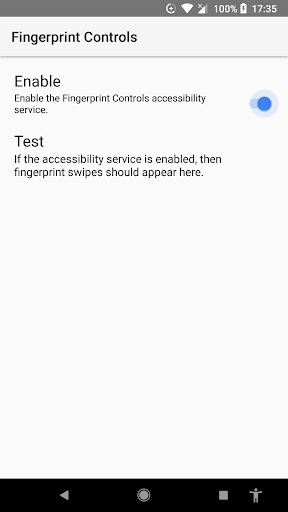
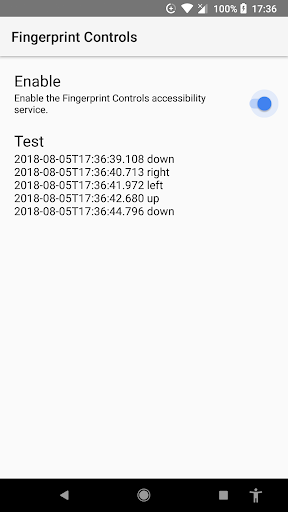
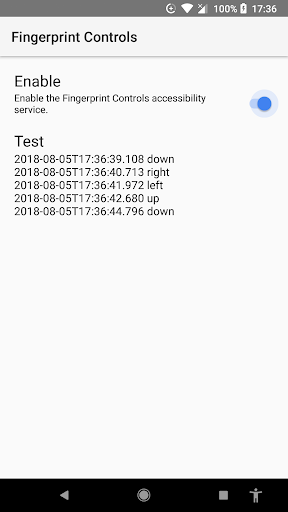
USERS: You will need to enable the bundled accessibility service. Contrary to the language of the standard warning message that appears, the accessibility service does not "observe your actions" or "retrieve window content". You can confirm that this app does not have permission to access the Internet, so no information is collected.
DEVELOPERS: Your game should contain one (and only one) view that is focusable, focusableInTouchMode, and focused, and has an attached accessibility delegate in order to receive the fingerprint input. That accessibility delegate should use code like this:
myView.setAccessibilityDelegate(new AccessibilityDelegate()
{
public boolean performAccessibilityAction(View _v, int _action, Bundle _args)
{
if((_action == ACTION_FOCUS) && (_args != null))
{
String method = _args.getString("by4a.method");
if("FingerprintGestureCallback.onGestureDetected".equals(method))
{
int gesture = _args.getInt("by4a.arg");
switch(gesture)
{
case FINGERPRINT_GESTURE_SWIPE_LEFT:
case FINGERPRINT_GESTURE_SWIPE_DOWN:
case FINGERPRINT_GESTURE_SWIPE_RIGHT:
case FINGERPRINT_GESTURE_SWIPE_UP:
}
}
}
return super.performAccessibilityAction(_v, _action, _args);
}
});
In addition, if your game can handle orientation changes or multiwindow mode, you will probably need some code like this. We're 99% certain this is a bug in Android.
@Override public void onWindowFocusChanged(boolean _focused)
{
myView.clearFocus();
myView.requestFocus();
}
If the user enters multiwindow mode, you will need BOTH the code above, AND for the user to tap inside your pane in order to continue receiving fingerprint gesture input. This is easily accomplished by simply pausing the game when multiwindow mode is activated, requiring the user to tap on the unpause button to continue.
The usefulness of fingerprint gesture input may vary based on the placement and reliability of the fingerprint sensor and the nature of the game being played. You should provide an option to ignore fingerprint gesture input to avoid accidental and undesired input.
مزید دکھائیں

1. MEmu انسٹالر ڈاؤن لوڈ کریں اور سیٹ اپ مکمل کریں

2. MEmu شروع کریں اسکے بعد ڈیسکٹاپ پر Google Play کھولیں

3. Google Play میں Fingerprint Controls تلاش کریں
Install
4. Fingerprint Controls ڈاؤن لوڈ کریں اور انسٹال کریں
5. انسٹال مکمل ہونے کے بعد سٹارٹ کرنے کے لیے آئیکن پر کلک کریں

6. MEmu کے ساتھ پی سی پر Fingerprint Controls کھیلنے کا لطف لیں
MEmu پلے بہترین اینڈرائڈ ایمولیٹر ہے اور 100 ملین لوگ اس کے زبردست اینڈرائڈ گیمنگ تجربہ سے لطف اندوز ہو رہے ہیں۔ MEmu کی ورچولائزیشن ٹیکنالوجی آپ کو اپنے PC پر ہزاروں اینڈرائڈ گیمز یہاں تک کہ انتہائی گرافک والے گیمز باسہولت کھیلنے کی طاقت دیتی ہے۔
بہتر گرافکس کے ساتھ بڑی اسکرین؛ طویل دورانیہ، بیٹری یا لامحدود موبائل ڈیٹا کے بغیر۔
کی بورڈ اور ماؤس یا گیم پیڈ کے عین مطابق کنٹرول کے لیے کی میپنگ کا پورا سپورٹ۔
کثیر مثالی منیجر کے ساتھ بیک وقت ایک پی سی پر متعدد گیم اکاؤنٹس یا ٹاسکس۔
پی سی پر درج ذیل مراحل پر عمل کرتے ہوئے پر Fingerprint Controls استعمال کریں: u003c/p>