Fix my speaker & Boost sound پی سی

پی سی پر Fix my speaker & Boost sound ڈاؤن لوڈ کریں

Fix my speaker & Boost sound پی سی

Fix my speaker & Boost sound

  • تازہ کاری

  • موجودہ ورژن

  • پیشکش بذریعہ

    Fix my speaker & Boost sound پی سی

پی سی پر Fix my speaker & Boost sound کی خصوصیات

اپنے موبائل فون پر Fix my speaker & Boost sound کا استعمال کرتے وقت زیادہ چارج ہونے کی فکر نہ کریں، خود کو چھوٹی اسکرین سے آزاد کریں اور ایپ کو زیادہ بڑے ڈسپلے پر استعمال کرنے کا لطف اٹھائیں۔ اس کے بعد سے کی بورڈ اور ماؤس کے ساتھ اپنے ایپ کا فل اسکرین کا تجربہ حاصل کریں۔ MEmu آپ کو وہ تمام حیران کن خصوصیات پیش کرتا ہے جن کی آپ کو توقع کرتے ہیں: فوری انسٹال اور آسان سیٹ اپ، وجدانی کنٹرول، مزید بیٹری، موبائل ڈیٹا کی کوئی حد نہیں اور اب مزید پریشان کن کالز نہیں۔ نئے برانڈ کا MEmu 9 آپ کے کمپیوٹر پر Fix my speaker & Boost sound استعمال کرنے کے لیے بہترین اختیار ہے۔ MEmu کثیر نظیری منیجر بیک وقت 2 یا اس سے زیادہ اکاؤنٹس کھولنا ممکن بناتا ہے۔ اور سب اہم بات، ہمارا خصوصی ایمولیشن انجن آپ کے پی سی کی پوری طاقت ریلیز کرتے ہوئے ہر چیز ہموار اور قابل تفریح بناتا ہے۔

مزید دکھائیں

اسکرین شاٹس اور Fix my speaker & Boost sound پی سی کی ویڈیو

MEmu Play کے ساتھ PC پر Fix my speaker & Boost sound استعمال کرنے کے شاندار تجربے سے لطف اٹھائیں۔ یہ ایک طاقتور مفت اینڈرائیڈ ایمولیٹر ہے جو آپ کو ان کے ڈیسک ٹاپ ورژن کے لیے ہزاروں اینڈرائیڈ ایپس فراہم کرتا ہے۔ دوستوں کے ساتھ جڑنے اور اعلی کارکردگی کے ساتھ اپنے کام کو چمکانے کا لطف اٹھائیں! Boost Audio Quality Anytime - Clear and Powerful Sound!
گیم کی معلومات

Boost Audio Quality Anytime - Clear and Powerful Sound!
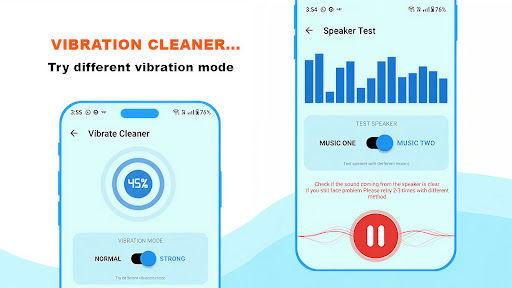
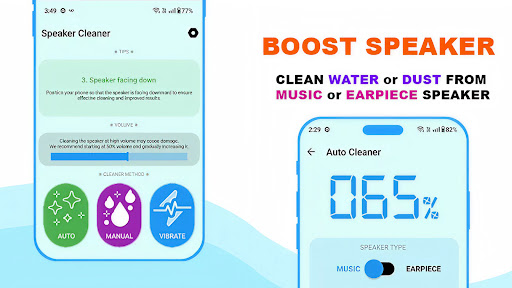
With Fix My Speaker and Boost Sound, you can refresh the audio on your device. It's as effective as an App To Get Water Out Of A Phone. Similar to vibrational tools, the app Fix My Speaker and Boost Sound draws away obscuring particles to give you cleaner audio output.

Fix My Speaker and Boost Sound is not like other tools. It simply and easily gives you an effective way to boost audio quality on your device. On top of getting audio to higher quality, you can also remove excess water and dust from the device. The app is always dependable. Sound waves are a more effective and safe way to achieve what you want.

What It Does
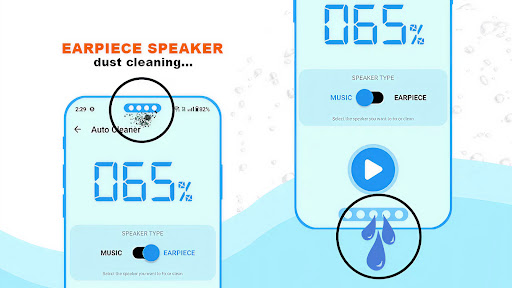
Removes water using sound frequencies like an App To Get Water Out Of Phone;
Powerful Dust Cleaner Speaker function improves clarity quickly;
Unclog Your Speaker App technology restores blocked speakers;
Fix My Speaker & Boost Sound for louder, sharper audio output;
Clean Speaker App with automatic and manual cleaning modes;
Dust Remover From Speaker Boost to shake out dirt safely;
Remove Dust From Speaker and Get Water Out Of Speakers instantly;
Works as an all-in-one Dust Cleaner Speaker and App To Get Water Out Of Phone.

Maximize Your Clean & Sound Enhancement!

Fix My Speaker & Boost Sound is the real App To Get Water Out Of Phone since it removes moisture and improves sound quality concurrently. It also Removes Dust From Speaker using safe and effective methods regularly used Remove Dust From Speaker. It can be used in either auto or manual mode using the Clean Speaker App. Use the system Dust Remover From Speaker Boost to easily and quickly move stubborn dirt.

Automatic Cleaning Easy:
Fix My Speaker & Boost Sound has pre-configured frequencies made to Get Water Out Of Speakers and eliminate debris with ease. Like an Unclog Your Speaker App, it shakes away volume-sapping, trapped water. Plus, it helps out Dust Cleaner Speaker performance, so you can do an effortless hands-free cleanup too!

Manual Cleaning for Precision:
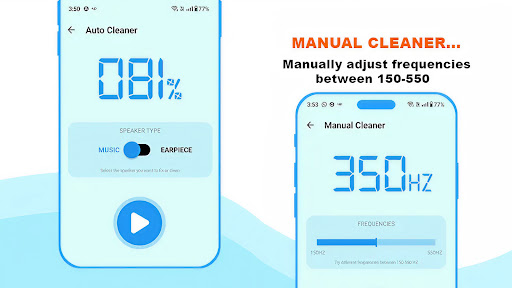
Want to be the one in control? Manual mode is for you. You can adjust the sound levels to Remove Dust From Speaker components with more precision. You can use Fix My Speaker & Boost Sound as a Clean Speaker App to change frequencies based on the amount of water or dust trapped. It can be an App To Get Water Out Of Phone, plus a Dust Remover From Speaker Boost, all in one!

Safe, Effective & Designed for Daily Use:
Cleaning hacks and risky techniques have no place here, as they go against the principle of Get Water Out Of Speakers safely. Dust Cleaner Speaker makes maintenance easy, and every cleaning cycle lets you do it with confidence that you'll benefit the long-term health of your speakers. If you want to Unclog Your Speaker App, have a task on hand, or refresh the sound quality, this one’s ideal for you. Dust Cleaner Speaker maintenance made easy!

Bring Back the Loud Relieve Yourself of the Dust from Home Speakers!

Fix My Speaker and Boost Sound provide the best option in removing the built-up dust From Speakers, improving clarity, and getting water Out Of Speakers fully. Your device stays dust-free, louder, and ready to go with the Boost Speakers Water Removal Application.

مزید دکھائیں

پی سی پر Fix my speaker & Boost sound کو کیسے ڈاؤن لوڈ کریں

  • Fix my speaker & Boost sound پی سی

    1. MEmu انسٹالر ڈاؤن لوڈ کریں اور سیٹ اپ مکمل کریں

  • Fix my speaker & Boost sound پی سی

    2. MEmu شروع کریں اسکے بعد ڈیسکٹاپ پر Google Play کھولیں

  • Fix my speaker & Boost sound پی سی

    3. Google Play میں Fix my speaker & Boost sound تلاش کریں

  • Fix my speaker & Boost sound پی سی Install

    4. Fix my speaker & Boost sound ڈاؤن لوڈ کریں اور انسٹال کریں

  • Fix my speaker & Boost sound پی سی

    5. انسٹال مکمل ہونے کے بعد سٹارٹ کرنے کے لیے آئیکن پر کلک کریں

  • Fix my speaker & Boost sound پی سی
    Fix my speaker & Boost sound پی سی Fix my speaker & Boost sound پی سی

    6. MEmu کے ساتھ پی سی پر Fix my speaker & Boost sound کھیلنے کا لطف لیں

Fix my speaker & Boost sound کے لیے Memu کا استعمال کیوں کریں

MEmu پلے بہترین اینڈرائڈ ایمولیٹر ہے اور 100 ملین لوگ اس کے زبردست اینڈرائڈ گیمنگ تجربہ سے لطف اندوز ہو رہے ہیں۔ MEmu کی ورچولائزیشن ٹیکنالوجی آپ کو اپنے PC پر ہزاروں اینڈرائڈ گیمز یہاں تک کہ انتہائی گرافک والے گیمز باسہولت کھیلنے کی طاقت دیتی ہے۔

  • بہتر گرافکس کے ساتھ بڑی اسکرین؛ طویل دورانیہ، بیٹری یا لامحدود موبائل ڈیٹا کے بغیر۔

  • کی بورڈ اور ماؤس یا گیم پیڈ کے عین مطابق کنٹرول کے لیے کی میپنگ کا پورا سپورٹ۔

  • کثیر مثالی منیجر کے ساتھ بیک وقت ایک پی سی پر متعدد گیم اکاؤنٹس یا ٹاسکس۔

کھیلنے کے لئے تیار؟

مقبول موضوعات

Fix my speaker & Boost sound - اکثر پوچھے جانے والے سوالات

  • اپنے پی سی پر Fix my speaker & Boost sound کا کس طرح استعمال کریں؟

    پی سی پر درج ذیل مراحل پر عمل کرتے ہوئے پر Fix my speaker & Boost sound استعمال کریں: u003c/p>

    • MEmu ڈاؤن لوڈ کریں، پھر انسٹال کریں اور اس کو لاؤنچ کریں
    • گوگل پلے اسٹور میں لاگ ان کریں، ایپ انسٹال کریں
    • Memuکے ساتھ پی سی پر ایپ کا استعمال کرتے ہوئے لطف اٹھائیں
  • پی سی پر Fix my speaker & Boost sound چلانے کے لیے کم از کم سسٹم کے کیا تقاضے ہیں؟
    • انٹیل یا اے ایم ڈی پروسیسر
    • مائکروسافٹ 7 یا اس سے اوپر
    • 2GB کی میموری
    • 5GB کا مفت اسپیس
    • ہارڈ ویئر ورچولائزیشن ٹیکنالوجی