Floating Apps (multitasking)
تازہ کاری
موجودہ ورژن
4.23.1
پیشکش بذریعہ

اپنے موبائل فون پر Floating Apps (multitasking) کا استعمال کرتے وقت زیادہ چارج ہونے کی فکر نہ کریں، خود کو چھوٹی اسکرین سے آزاد کریں اور ایپ کو زیادہ بڑے ڈسپلے پر استعمال کرنے کا لطف اٹھائیں۔ اس کے بعد سے کی بورڈ اور ماؤس کے ساتھ اپنے ایپ کا فل اسکرین کا تجربہ حاصل کریں۔ MEmu آپ کو وہ تمام حیران کن خصوصیات پیش کرتا ہے جن کی آپ کو توقع کرتے ہیں: فوری انسٹال اور آسان سیٹ اپ، وجدانی کنٹرول، مزید بیٹری، موبائل ڈیٹا کی کوئی حد نہیں اور اب مزید پریشان کن کالز نہیں۔ نئے برانڈ کا MEmu 9 آپ کے کمپیوٹر پر Floating Apps (multitasking) استعمال کرنے کے لیے بہترین اختیار ہے۔ MEmu کثیر نظیری منیجر بیک وقت 2 یا اس سے زیادہ اکاؤنٹس کھولنا ممکن بناتا ہے۔ اور سب اہم بات، ہمارا خصوصی ایمولیشن انجن آپ کے پی سی کی پوری طاقت ریلیز کرتے ہوئے ہر چیز ہموار اور قابل تفریح بناتا ہے۔
مزید دکھائیں
Download Floating Apps (multitasking) on PC with MEmu Android Emulator. Enjoy playing on big screen. Experience real multitasking on your Android!
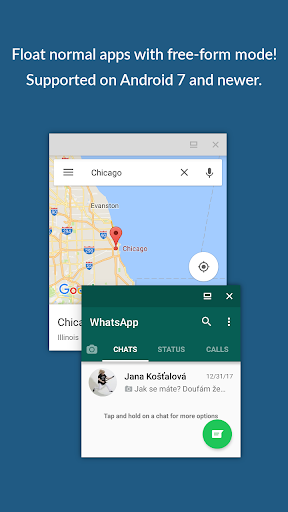
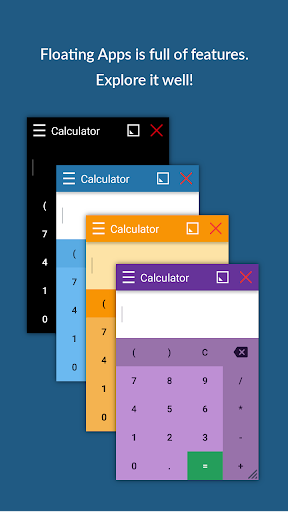
Experience real multitasking on your Android!
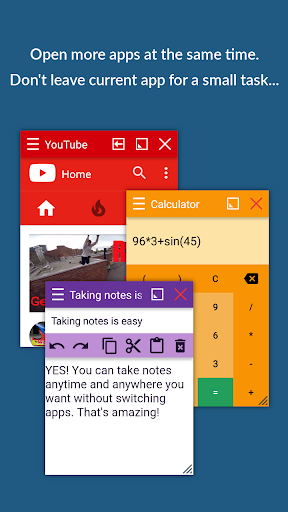
Open more apps at the same time in floating windows and enjoy real multitasking! Don't leave current app for a small task... Floating Apps is the largest and the most advanced collection of floating mini apps available on Google Play!
- take notes or use calculator anywhere & anytime
- view email attachments without leaving email app
- view multiple PDF files at the same time
- open links in floating browser and view them later
- translate vocabularies without leaving current app
- and do much much much more...
Supported languages: EN, IN, CS, DA, DE, ES, FR, IT, LT, PL, PT-BR, PT-PT, RO, SK, SV, VI, TR, RU, UK, KO, JA, HI, TH, ZH-TW, TH-CN, FA, AR, HU
If you have any problem with the app, contact us via fa@lwi.cz for help!
---
Floating Apps comes with more than 41 floating apps including:
- Browser
- Notes
- Document Viewer (PDF, DOC, DOCX, ODT and more)
- Calendar
- Facebook
- Twitter
- Calculator
- Contacts
- File Manager
- Music Player
- Video Player
- Image Viewer
- Audio Recorder
- Translator
- Paint
- Google Maps
- Wifi Manager
- Games
- and 21 more apps (see https://www.floatingapps.net for full list of 41 floating apps)...
- also, you can create your own floating apps from home screen widgets and URLs!
---
Our Commitment
Floating Apps is the best of its kind because of our commitment and never-ending work. We love to do it for you!
- We're always doing our best to help our users, so you're not left alone.
- We're developing Floating Apps for more than 5 years and it keeps getting better and better.
- We're listening to your requests and designing apps and features for you.
The Most Advanced Features
- Stop switching from one app to another and experience real multitasking with floating mini apps that make your life easier!
- Do not find the right floating app for you? Turn homescreen widgets and URLs into your very own floating apps.
- Access floating apps anywhere and anytime without leaving what you are just doing with Floating Menu and Quick Launch.
- Extremely powerful floating menu allows you to access not only floating apps, but also normal and recent apps and shortcuts!
- Access floating apps with one tap via movable & resizable quick launch icon that stays always on top of other apps.
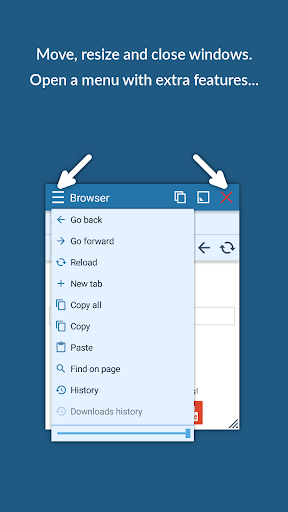
- Move windows by simply dragging their title, resize them by dragging their bottom bar. Arrange windows your way!
- Maximize the floating app to utilize the whole screen. Minimize it if you don't need it now and restore it later.
- Easily access advanced features & functions, control the window, its borders and transparency with context menu!
- Open links, videos or images using floating apps the same way as you do with normal apps. Use shortcuts, notifications and more.
- It's just like multiviews / multi windows on Samsung or split screen mode but for all Androids!
Links
Web: https://www.floatingapps.net
Facebook: https://www.facebook.com/FloatingApps
Twitter: https://twitter.com/FloatingAppsNet
Google+: https://plus.google.com/+FloatingappsNet
Feedback: https://floatingapps.uservoice.com
Testers Community: https://plus.google.com/communities/111601071691478533219
Permissions
Please see complete list at http://www.floatingapps.net/permissions.
مزید دکھائیں

1. MEmu انسٹالر ڈاؤن لوڈ کریں اور سیٹ اپ مکمل کریں

2. MEmu شروع کریں اسکے بعد ڈیسکٹاپ پر Google Play کھولیں

3. Google Play میں Floating Apps (multitasking) تلاش کریں
Install
4. Floating Apps (multitasking) ڈاؤن لوڈ کریں اور انسٹال کریں
5. انسٹال مکمل ہونے کے بعد سٹارٹ کرنے کے لیے آئیکن پر کلک کریں

6. MEmu کے ساتھ پی سی پر Floating Apps (multitasking) کھیلنے کا لطف لیں
MEmu پلے بہترین اینڈرائڈ ایمولیٹر ہے اور 100 ملین لوگ اس کے زبردست اینڈرائڈ گیمنگ تجربہ سے لطف اندوز ہو رہے ہیں۔ MEmu کی ورچولائزیشن ٹیکنالوجی آپ کو اپنے PC پر ہزاروں اینڈرائڈ گیمز یہاں تک کہ انتہائی گرافک والے گیمز باسہولت کھیلنے کی طاقت دیتی ہے۔
بہتر گرافکس کے ساتھ بڑی اسکرین؛ طویل دورانیہ، بیٹری یا لامحدود موبائل ڈیٹا کے بغیر۔
کی بورڈ اور ماؤس یا گیم پیڈ کے عین مطابق کنٹرول کے لیے کی میپنگ کا پورا سپورٹ۔
کثیر مثالی منیجر کے ساتھ بیک وقت ایک پی سی پر متعدد گیم اکاؤنٹس یا ٹاسکس۔
پی سی پر درج ذیل مراحل پر عمل کرتے ہوئے پر Floating Apps (multitasking) استعمال کریں: u003c/p>