Gesture Control
تازہ کاری
موجودہ ورژن
2.0
پیشکش بذریعہ

اپنے موبائل فون پر Gesture Control کا استعمال کرتے وقت زیادہ چارج ہونے کی فکر نہ کریں، خود کو چھوٹی اسکرین سے آزاد کریں اور ایپ کو زیادہ بڑے ڈسپلے پر استعمال کرنے کا لطف اٹھائیں۔ اس کے بعد سے کی بورڈ اور ماؤس کے ساتھ اپنے ایپ کا فل اسکرین کا تجربہ حاصل کریں۔ MEmu آپ کو وہ تمام حیران کن خصوصیات پیش کرتا ہے جن کی آپ کو توقع کرتے ہیں: فوری انسٹال اور آسان سیٹ اپ، وجدانی کنٹرول، مزید بیٹری، موبائل ڈیٹا کی کوئی حد نہیں اور اب مزید پریشان کن کالز نہیں۔ نئے برانڈ کا MEmu 9 آپ کے کمپیوٹر پر Gesture Control استعمال کرنے کے لیے بہترین اختیار ہے۔ MEmu کثیر نظیری منیجر بیک وقت 2 یا اس سے زیادہ اکاؤنٹس کھولنا ممکن بناتا ہے۔ اور سب اہم بات، ہمارا خصوصی ایمولیشن انجن آپ کے پی سی کی پوری طاقت ریلیز کرتے ہوئے ہر چیز ہموار اور قابل تفریح بناتا ہے۔
مزید دکھائیں
MEmu Play کے ساتھ PC پر Gesture Control استعمال کرنے کے شاندار تجربے سے لطف اٹھائیں۔ یہ ایک طاقتور مفت اینڈرائیڈ ایمولیٹر ہے جو آپ کو ان کے ڈیسک ٹاپ ورژن کے لیے ہزاروں اینڈرائیڈ ایپس فراہم کرتا ہے۔ دوستوں کے ساتھ جڑنے اور اعلی کارکردگی کے ساتھ اپنے کام کو چمکانے کا لطف اٹھائیں! Thank YOU for the immense support and appreciation.
Thank YOU for the immense support and appreciation. The little app turns an year. Cheers!
*** We have released the AD Free version. Check out below for "Gesture Control Pro"
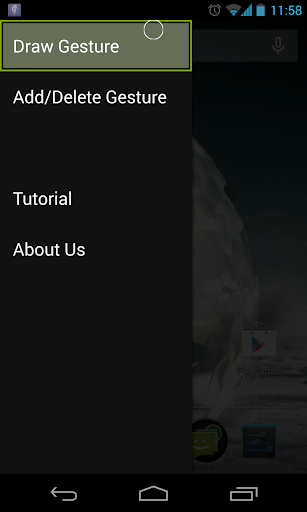
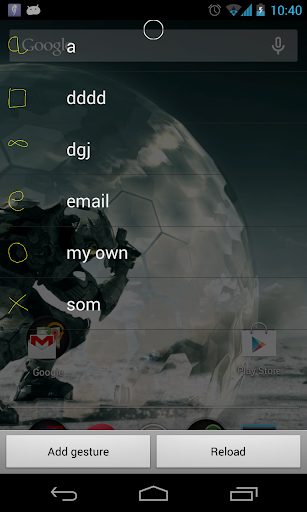
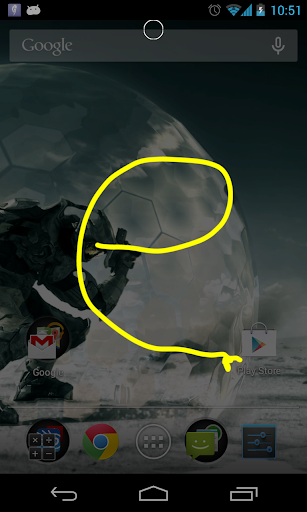
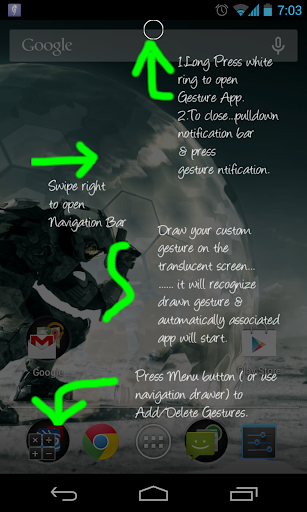
** NOTE: Long press on the overlay circle to activate the application. Then swipe right to open the Notification Drawer and add all the gestures you want. After that attach them to the application by long pressing on the Gesture from the displayed list.
“Gesture Control ” aims to provide a multi-tasking solution that allows the user to quickly open/ switch to applications that have been predefined by him/her. The application opening process will be gesture based.
It means the user will have to draw a symbol on the screen to open the corresponding application. The user has to first save this symbol in the application and associate it with application intent before using this functionality.
Gesture drawing takes a fraction of a second as compared to the cumbersome process of searching for the application in the phone and then opening it. Use it to increase your productivity and speed in navigating through various applications.
This application is still being tested for all devices so please comment if you face any problem ( mention your phone model and OS version too) .
Also provide suggestions as to what functions you would like to see incorporated in this application.
UPDATE: Version 6 will now feature extra information dialog box and some preferences.
List of preferences:
1. Change the color of the overlay ring: White, Black or Transparent
2. Change Notification display icon
3. Change position of Overlay Ring: Top , Right , Left
Enjoy!
مزید دکھائیں

1. MEmu انسٹالر ڈاؤن لوڈ کریں اور سیٹ اپ مکمل کریں

2. MEmu شروع کریں اسکے بعد ڈیسکٹاپ پر Google Play کھولیں

3. Google Play میں Gesture Control تلاش کریں
Install
4. Gesture Control ڈاؤن لوڈ کریں اور انسٹال کریں
5. انسٹال مکمل ہونے کے بعد سٹارٹ کرنے کے لیے آئیکن پر کلک کریں

6. MEmu کے ساتھ پی سی پر Gesture Control کھیلنے کا لطف لیں
MEmu پلے بہترین اینڈرائڈ ایمولیٹر ہے اور 100 ملین لوگ اس کے زبردست اینڈرائڈ گیمنگ تجربہ سے لطف اندوز ہو رہے ہیں۔ MEmu کی ورچولائزیشن ٹیکنالوجی آپ کو اپنے PC پر ہزاروں اینڈرائڈ گیمز یہاں تک کہ انتہائی گرافک والے گیمز باسہولت کھیلنے کی طاقت دیتی ہے۔
بہتر گرافکس کے ساتھ بڑی اسکرین؛ طویل دورانیہ، بیٹری یا لامحدود موبائل ڈیٹا کے بغیر۔
کی بورڈ اور ماؤس یا گیم پیڈ کے عین مطابق کنٹرول کے لیے کی میپنگ کا پورا سپورٹ۔
کثیر مثالی منیجر کے ساتھ بیک وقت ایک پی سی پر متعدد گیم اکاؤنٹس یا ٹاسکس۔
پی سی پر درج ذیل مراحل پر عمل کرتے ہوئے پر Gesture Control استعمال کریں: u003c/p>