Gesture Lock Screen
تازہ کاری
موجودہ ورژن
4.39
پیشکش بذریعہ

اپنے موبائل فون پر Gesture Lock Screen کا استعمال کرتے وقت زیادہ چارج ہونے کی فکر نہ کریں، خود کو چھوٹی اسکرین سے آزاد کریں اور ایپ کو زیادہ بڑے ڈسپلے پر استعمال کرنے کا لطف اٹھائیں۔ اس کے بعد سے کی بورڈ اور ماؤس کے ساتھ اپنے ایپ کا فل اسکرین کا تجربہ حاصل کریں۔ MEmu آپ کو وہ تمام حیران کن خصوصیات پیش کرتا ہے جن کی آپ کو توقع کرتے ہیں: فوری انسٹال اور آسان سیٹ اپ، وجدانی کنٹرول، مزید بیٹری، موبائل ڈیٹا کی کوئی حد نہیں اور اب مزید پریشان کن کالز نہیں۔ نئے برانڈ کا MEmu 9 آپ کے کمپیوٹر پر Gesture Lock Screen استعمال کرنے کے لیے بہترین اختیار ہے۔ MEmu کثیر نظیری منیجر بیک وقت 2 یا اس سے زیادہ اکاؤنٹس کھولنا ممکن بناتا ہے۔ اور سب اہم بات، ہمارا خصوصی ایمولیشن انجن آپ کے پی سی کی پوری طاقت ریلیز کرتے ہوئے ہر چیز ہموار اور قابل تفریح بناتا ہے۔
مزید دکھائیں
Download Gesture Lock Screen on PC with MEmu Android Emulator. Enjoy playing on big screen. Draw password to unlock your phone.
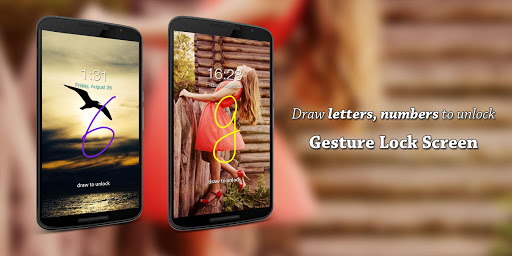
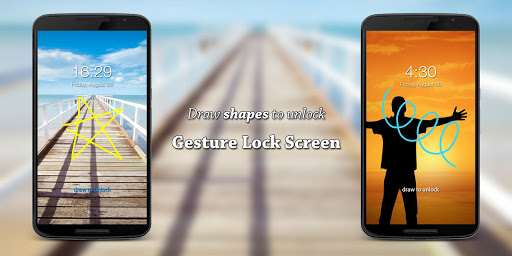
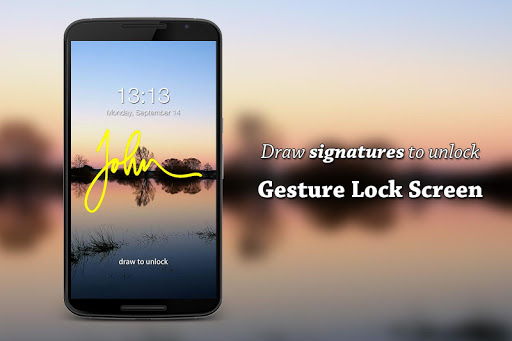
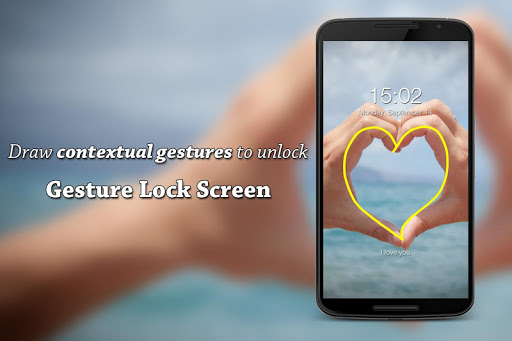
Draw password to unlock your phone.
Gesture
Add/change/delete gesture
Invisible/solid/transparent gesture colors
Gesture sensitivity
Single (one touch drawing) and multiple gesture strokes
Set letters, numbers, symbols, signatures, anything as gesture password
Gesture Lock Screen is a unique signature lock screen
Intruder Selfie
Snaps a photo of intruder who entered wrong gestures or PINs
Send intruder alert and photo to your email address
Show intruder notification on unlock
Show date and time on intruder photos
Custom intruder wrong attempts
View/open/change intruder selfie folder
Gesture Lock Screen is a intruder selfie alert lock screen
Notifications
Notifications on lock screen are available for Android 4.3 and newer
Show unread messages, missed calls, music player, alarm and more notifications on lock screen
Hide sensitive notification content
Single/double tap notification to draw gesture to unlock and view details
Swipe to remove notification
Custom notification background and text color
Change notification's size and position
Gesture Lock Screen is a highly customizable notification lock screen
Security+
Enter recovery password to unlock in case you forgot the gesture
4~8-digit recovery passwords
Gesture Lock Screen is a secure keypad lock screen
Customization
✨ Wallpaper
Pick wallpaper from local gallery
Online Unsplash wallpapers
✨ Rich date & time settings
✨ Custom lock/unlock/error sounds
✨ Unlock animations
Gesture Lock Screen is a highly customizable DIY lock screen
Advanced
Screen off and lock your phone without pressing the physical power button.
One tap away to lock your phone.
This app use the Device Administrator permission.
Please download Gesture Lock Screen, set letters, numbers, symbols, signatures or contextual gestures as password, and draw to unlock your phone.
مزید دکھائیں

1. MEmu انسٹالر ڈاؤن لوڈ کریں اور سیٹ اپ مکمل کریں

2. MEmu شروع کریں اسکے بعد ڈیسکٹاپ پر Google Play کھولیں

3. Google Play میں Gesture Lock Screen تلاش کریں
Install
4. Gesture Lock Screen ڈاؤن لوڈ کریں اور انسٹال کریں
5. انسٹال مکمل ہونے کے بعد سٹارٹ کرنے کے لیے آئیکن پر کلک کریں

6. MEmu کے ساتھ پی سی پر Gesture Lock Screen کھیلنے کا لطف لیں
MEmu پلے بہترین اینڈرائڈ ایمولیٹر ہے اور 100 ملین لوگ اس کے زبردست اینڈرائڈ گیمنگ تجربہ سے لطف اندوز ہو رہے ہیں۔ MEmu کی ورچولائزیشن ٹیکنالوجی آپ کو اپنے PC پر ہزاروں اینڈرائڈ گیمز یہاں تک کہ انتہائی گرافک والے گیمز باسہولت کھیلنے کی طاقت دیتی ہے۔
بہتر گرافکس کے ساتھ بڑی اسکرین؛ طویل دورانیہ، بیٹری یا لامحدود موبائل ڈیٹا کے بغیر۔
کی بورڈ اور ماؤس یا گیم پیڈ کے عین مطابق کنٹرول کے لیے کی میپنگ کا پورا سپورٹ۔
کثیر مثالی منیجر کے ساتھ بیک وقت ایک پی سی پر متعدد گیم اکاؤنٹس یا ٹاسکس۔
پی سی پر درج ذیل مراحل پر عمل کرتے ہوئے پر Gesture Lock Screen استعمال کریں: u003c/p>