
iYeasound
تازہ کاری
موجودہ ورژن
1.9.34
پیشکش بذریعہ

اپنے موبائل فون پر iYeasound کا استعمال کرتے وقت زیادہ چارج ہونے کی فکر نہ کریں، خود کو چھوٹی اسکرین سے آزاد کریں اور ایپ کو زیادہ بڑے ڈسپلے پر استعمال کرنے کا لطف اٹھائیں۔ اس کے بعد سے کی بورڈ اور ماؤس کے ساتھ اپنے ایپ کا فل اسکرین کا تجربہ حاصل کریں۔ MEmu آپ کو وہ تمام حیران کن خصوصیات پیش کرتا ہے جن کی آپ کو توقع کرتے ہیں: فوری انسٹال اور آسان سیٹ اپ، وجدانی کنٹرول، مزید بیٹری، موبائل ڈیٹا کی کوئی حد نہیں اور اب مزید پریشان کن کالز نہیں۔ نئے برانڈ کا MEmu 9 آپ کے کمپیوٹر پر iYeasound استعمال کرنے کے لیے بہترین اختیار ہے۔ MEmu کثیر نظیری منیجر بیک وقت 2 یا اس سے زیادہ اکاؤنٹس کھولنا ممکن بناتا ہے۔ اور سب اہم بات، ہمارا خصوصی ایمولیشن انجن آپ کے پی سی کی پوری طاقت ریلیز کرتے ہوئے ہر چیز ہموار اور قابل تفریح بناتا ہے۔
مزید دکھائیں
MEmu Play کے ساتھ PC پر iYeasound استعمال کرنے کے شاندار تجربے سے لطف اٹھائیں۔ یہ ایک طاقتور مفت اینڈرائیڈ ایمولیٹر ہے جو آپ کو ان کے ڈیسک ٹاپ ورژن کے لیے ہزاروں اینڈرائیڈ ایپس فراہم کرتا ہے۔ دوستوں کے ساتھ جڑنے اور اعلی کارکردگی کے ساتھ اپنے کام کو چمکانے کا لطف اٹھائیں! iYeasound is a smart companion app designed specifically for Yeasound hearing aids, making it easy to manage your hearing experience and enjoy clearer, more comfortable sound.
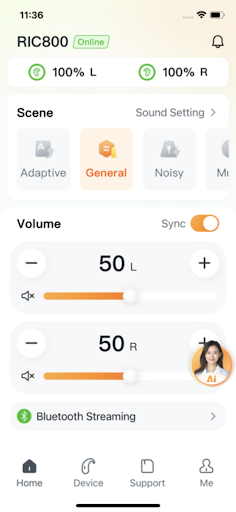
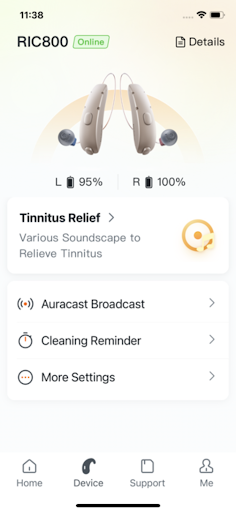
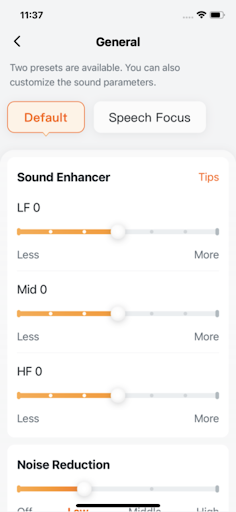
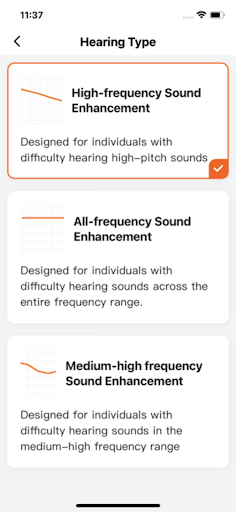
iYeasound is a smart companion app designed specifically for Yeasound hearing aids, making it easy to manage your hearing experience and enjoy clearer, more comfortable sound.
Once connected to your hearing aids, you can conveniently:
Adjust volume: Independently adjust the volume of your left and right hearing aids.
Switch listening programs: Change between different listening modes with a single tap.
Personalize sound settings: Adjust the equalizer, noise reduction, and other settings to create a more comfortable listening experience.
Auracast broadcasts: Connect to compatible Auracast audio broadcasts. This feature is available only on selected models; please contact customer support for details.
Relieve tinnitus: Choose from a variety of soothing background sounds designed to help ease tinnitus discomfort.
Update hearing aid firmware: Keep your hearing aids up to date with over-the-air (OTA) firmware updates, bringing ongoing improvements and optimizations.
Hearing test: Complete a basic hearing test in the app to better understand your current hearing condition.
Contact customer support: Get in touch with our after-sales support team directly through the app whenever you need assistance.
iYeasound makes hearing aid control simpler, so every listening moment feels more natural and comfortable.
Please note: This app is designed for use with Yeasound hearing aids. Some features may vary depending on the hearing aid model, hardware version, or region. Hearing test results are for reference only and are not a substitute for professional medical advice or diagnosis.
iYeasound can be used in combination with the following products: Yeasound RIC700、Yeasound RIC700 Plus、Yeasound RIC800、Yeasound CIC60
Before using this application and making any medical decisions, please be sure to seek the advice of a doctor.
This application is only available in countries where compatible hearing instruments have been officially approved for sale.
مزید دکھائیں

1. MEmu انسٹالر ڈاؤن لوڈ کریں اور سیٹ اپ مکمل کریں

2. MEmu شروع کریں اسکے بعد ڈیسکٹاپ پر Google Play کھولیں

3. Google Play میں iYeasound تلاش کریں
Install
4. iYeasound ڈاؤن لوڈ کریں اور انسٹال کریں
5. انسٹال مکمل ہونے کے بعد سٹارٹ کرنے کے لیے آئیکن پر کلک کریں

6. MEmu کے ساتھ پی سی پر iYeasound کھیلنے کا لطف لیں
MEmu پلے بہترین اینڈرائڈ ایمولیٹر ہے اور 100 ملین لوگ اس کے زبردست اینڈرائڈ گیمنگ تجربہ سے لطف اندوز ہو رہے ہیں۔ MEmu کی ورچولائزیشن ٹیکنالوجی آپ کو اپنے PC پر ہزاروں اینڈرائڈ گیمز یہاں تک کہ انتہائی گرافک والے گیمز باسہولت کھیلنے کی طاقت دیتی ہے۔
بہتر گرافکس کے ساتھ بڑی اسکرین؛ طویل دورانیہ، بیٹری یا لامحدود موبائل ڈیٹا کے بغیر۔
کی بورڈ اور ماؤس یا گیم پیڈ کے عین مطابق کنٹرول کے لیے کی میپنگ کا پورا سپورٹ۔
کثیر مثالی منیجر کے ساتھ بیک وقت ایک پی سی پر متعدد گیم اکاؤنٹس یا ٹاسکس۔
پی سی پر درج ذیل مراحل پر عمل کرتے ہوئے پر iYeasound استعمال کریں: u003c/p>