JioCall
تازہ کاری
موجودہ ورژن
1680182015
پیشکش بذریعہ

اپنے موبائل فون پر JioCall کا استعمال کرتے وقت زیادہ چارج ہونے کی فکر نہ کریں، خود کو چھوٹی اسکرین سے آزاد کریں اور ایپ کو زیادہ بڑے ڈسپلے پر استعمال کرنے کا لطف اٹھائیں۔ اس کے بعد سے کی بورڈ اور ماؤس کے ساتھ اپنے ایپ کا فل اسکرین کا تجربہ حاصل کریں۔ MEmu آپ کو وہ تمام حیران کن خصوصیات پیش کرتا ہے جن کی آپ کو توقع کرتے ہیں: فوری انسٹال اور آسان سیٹ اپ، وجدانی کنٹرول، مزید بیٹری، موبائل ڈیٹا کی کوئی حد نہیں اور اب مزید پریشان کن کالز نہیں۔ نئے برانڈ کا MEmu 9 آپ کے کمپیوٹر پر JioCall استعمال کرنے کے لیے بہترین اختیار ہے۔ MEmu کثیر نظیری منیجر بیک وقت 2 یا اس سے زیادہ اکاؤنٹس کھولنا ممکن بناتا ہے۔ اور سب اہم بات، ہمارا خصوصی ایمولیشن انجن آپ کے پی سی کی پوری طاقت ریلیز کرتے ہوئے ہر چیز ہموار اور قابل تفریح بناتا ہے۔
مزید دکھائیں
Download JioCall on PC with MEmu Android Emulator. Enjoy playing on big screen. *** Exclusively for Jio SIM and Jio Network users *** .
*** Exclusively for Jio SIM and Jio Network users ***
JioCall (earlier Jio4Gvoice) from Reliance Jio Infocomm Ltd now comes in a brand new avatar.
Did you know that you can make video calls from your Fixed Line number? JioCall can make your FixedLine connection smart by using your smartphone to make video and audio calls. For this, You have to configure your 10 digit Jio Fixed Line number on the JioCall app. By choosing the Fixed Profile on your JioCall app, you are ready to make or receive calls from your Fixed Line number conveniently on your smartphone This service does not need a Jio SIM.
JioCall will continue to offer all the features that were available earlier. It brings VoLTE high-definition voice and video calling on your existing 2G, 3G, 4G smartphone. You can use JioCall with a JioSIM either in the phone or in a JioFi connected to your phone. You can now use your non-VoLTE 4G smart phone to make HD voice and video calls to any landline or mobile number anywhere in the world. You can also use these VoLTE features on your existing 2G/3G smartphones via JioFi.
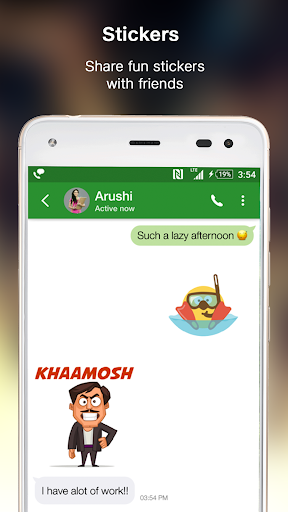
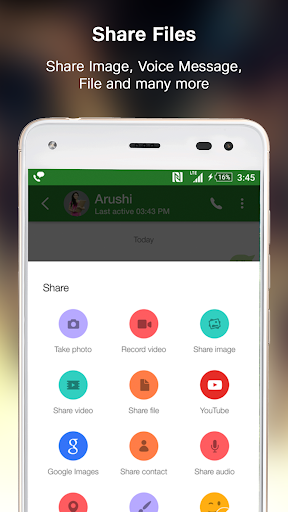
Not just that, JioCall also marks the entry of Rich Communication Services (RCS) in India. RCS has exciting features such as Rich Call, Chat, Group Chat, file share, location share, doodles, stickers and many more are available.
Features:
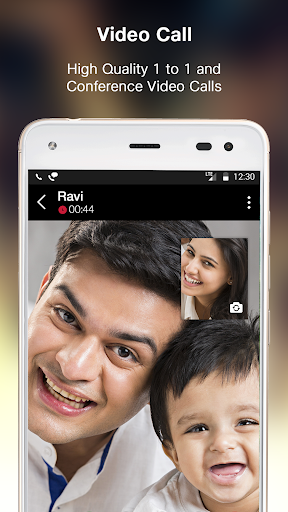
HD Voice & Video Calling
Stay connected with friends, family and work across the globe. With both the FixedLine and Mobile profiles on JioCall, you can make and receive calls from any other mobile/landline number. You can also enjoy group conversations with multiple participants. Enjoy HD voice and video calling with other Jio SIM or FixedLine users.
Unified Messaging for SMS & Chat
With JioCall you can send and receive text messages from your Jio SIM number to any mobile number. RCS allows you to do group chats & share images, videos, location and all types of files like .zip, .pdf to other RCS contacts. Set JioCall as your default messaging app to manage all your SMS and chat threads in one Inbox.
RCS also brings to you Enhanced Calling Features:
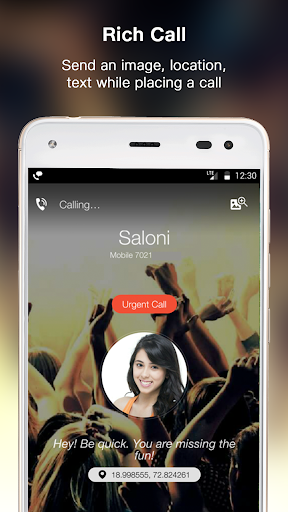
Rich Call
Give your calls more life with customized messaging, images & location on the receiver’s screen. Intimate the urgency of your call on the receiver’s screen by using the ‘Urgent Call’ feature. It is hard to ignore a call that says it all!
In Call Share
Calling made more fun! Express your thoughts with a quick doodle, share location of the party or sketch the direction to a meeting point in real time, all this while you are on a call. Share images & chat messages instantly without disconnecting your call!
Note: RCS features will be available only if you have a Jio SIM and the Mobile profile has been configured.
This service is provided by Reliance Jio Infocomm Ltd.
مزید دکھائیں

1. MEmu انسٹالر ڈاؤن لوڈ کریں اور سیٹ اپ مکمل کریں

2. MEmu شروع کریں اسکے بعد ڈیسکٹاپ پر Google Play کھولیں

3. Google Play میں JioCall تلاش کریں
Install
4. JioCall ڈاؤن لوڈ کریں اور انسٹال کریں
5. انسٹال مکمل ہونے کے بعد سٹارٹ کرنے کے لیے آئیکن پر کلک کریں

6. MEmu کے ساتھ پی سی پر JioCall کھیلنے کا لطف لیں
MEmu پلے بہترین اینڈرائڈ ایمولیٹر ہے اور 100 ملین لوگ اس کے زبردست اینڈرائڈ گیمنگ تجربہ سے لطف اندوز ہو رہے ہیں۔ MEmu کی ورچولائزیشن ٹیکنالوجی آپ کو اپنے PC پر ہزاروں اینڈرائڈ گیمز یہاں تک کہ انتہائی گرافک والے گیمز باسہولت کھیلنے کی طاقت دیتی ہے۔
بہتر گرافکس کے ساتھ بڑی اسکرین؛ طویل دورانیہ، بیٹری یا لامحدود موبائل ڈیٹا کے بغیر۔
کی بورڈ اور ماؤس یا گیم پیڈ کے عین مطابق کنٹرول کے لیے کی میپنگ کا پورا سپورٹ۔
کثیر مثالی منیجر کے ساتھ بیک وقت ایک پی سی پر متعدد گیم اکاؤنٹس یا ٹاسکس۔
پی سی پر درج ذیل مراحل پر عمل کرتے ہوئے پر JioCall استعمال کریں: u003c/p>