Just Me - Self chat & notes
تازہ کاری
موجودہ ورژن
2.2.3
پیشکش بذریعہ

اپنے موبائل فون پر Just Me - Self chat & notes کا استعمال کرتے وقت زیادہ چارج ہونے کی فکر نہ کریں، خود کو چھوٹی اسکرین سے آزاد کریں اور ایپ کو زیادہ بڑے ڈسپلے پر استعمال کرنے کا لطف اٹھائیں۔ اس کے بعد سے کی بورڈ اور ماؤس کے ساتھ اپنے ایپ کا فل اسکرین کا تجربہ حاصل کریں۔ MEmu آپ کو وہ تمام حیران کن خصوصیات پیش کرتا ہے جن کی آپ کو توقع کرتے ہیں: فوری انسٹال اور آسان سیٹ اپ، وجدانی کنٹرول، مزید بیٹری، موبائل ڈیٹا کی کوئی حد نہیں اور اب مزید پریشان کن کالز نہیں۔ نئے برانڈ کا MEmu 9 آپ کے کمپیوٹر پر Just Me - Self chat & notes استعمال کرنے کے لیے بہترین اختیار ہے۔ MEmu کثیر نظیری منیجر بیک وقت 2 یا اس سے زیادہ اکاؤنٹس کھولنا ممکن بناتا ہے۔ اور سب اہم بات، ہمارا خصوصی ایمولیشن انجن آپ کے پی سی کی پوری طاقت ریلیز کرتے ہوئے ہر چیز ہموار اور قابل تفریح بناتا ہے۔
مزید دکھائیں
MEmu Play کے ساتھ PC پر Just Me - Self chat & notes استعمال کرنے کے شاندار تجربے سے لطف اٹھائیں۔ یہ ایک طاقتور مفت اینڈرائیڈ ایمولیٹر ہے جو آپ کو ان کے ڈیسک ٹاپ ورژن کے لیے ہزاروں اینڈرائیڈ ایپس فراہم کرتا ہے۔ دوستوں کے ساتھ جڑنے اور اعلی کارکردگی کے ساتھ اپنے کام کو چمکانے کا لطف اٹھائیں! Stop messaging yourself on social media apps!
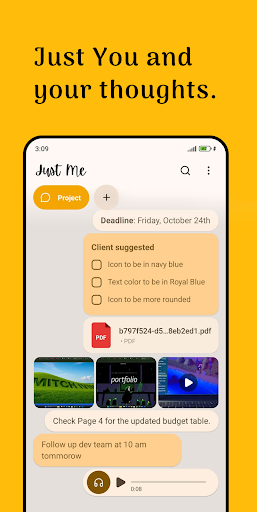
Stop messaging yourself on social media apps! Just Me is your private sanctuary designed for thoughts, ideas, reminders, and everything in between. Using a familiar chat-style interface, Just Me makes note-taking feel natural, fast, and completely secure.
Whether you need to save a quick grocery list, draft a professional email, or simply dump your thoughts at 2 AM, Just Me is the digital companion that listens.
---
WHY USE A SELF-CHAT APP?
Traditional note apps can feel like work. "Just Me" mimics the flow of a messaging app, allowing you to "text" yourself ideas as they happen. No complex folders, no rigid structures—just a seamless stream of your consciousness.
KEY FEATURES:
Familiar Chat Interface
Capture thoughts as easily as sending a text. It’s intuitive, fast, and requires zero learning curve.
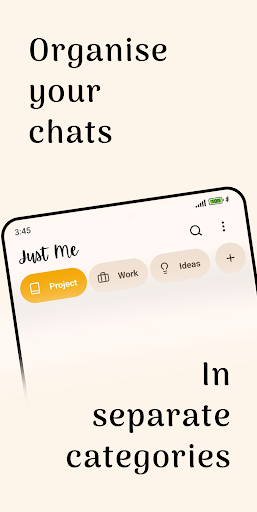
Organize by Category Don’t let your thoughts turn into a cluttered stream. Use dedicated tabs to separate your life like:
• Project: Track deadlines and client suggestions.
• Work: Follow up with teams and manage professional tasks.
• Ideas: A home for your "Aha!" moments and creative sparks.
• General: For everything else that matters.
You can create your own customized cateogery as much as you want.
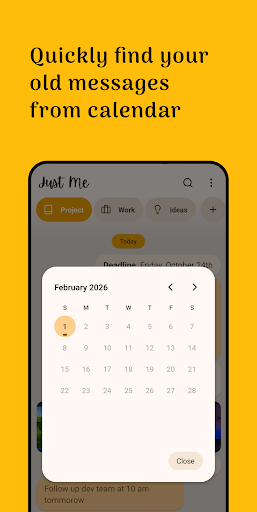
Smart Calendar Search Can’t remember the name of that note from last Tuesday? Use the built-in calendar view to jump back in time. Find old messages, reminders, and media exactly when you thought of them.
Rich Media & Attachments: It handles more than just text. Attach PDFs, videos, photos, and voice memos, or any other file type with a single tap.
Total Privacy & Security
Your notes are for your eyes only. Secure your app with Biometric Lock (Fingerprint or FaceID) to ensure your private data stays private. We don't track you, and your data stays on your device.
Reliable Backup & Restore Never lose a thought again. Sync your data to your own Google Drive account or use manual Import/Export. You have total control over your backup settings—daily, weekly, or on-demand.
Detailed Storage Management Keep your phone lean. See exactly how much space your each categories are using. Review and delete large files easily to keep your app running at lightning speed.
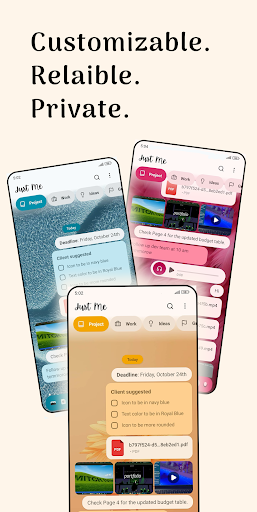
Fully Customizable Make your self-chat reflect your mood. Choose from beautiful themes—from calming beaches to vibrant flowers—and customize the UI to make it your own personal space.
Pin Important Messages
Keep your most urgent tasks or favorite quotes at the top of your feed. Never lose track of what matters most.
Dark Mode & Customization
Reduce eye strain with a beautiful Dark Mode and customize the chat colors to fit your personal style.
---
HOW TO USE "JUST ME":
• The Ultimate Brain Dump: Clear mental clutter by "texting" out your worries or ideas.
• Link Saver: Found an interesting article? Share it to Just Me to read it later without keeping 50 tabs open.
• Draft Content: Write your social media captions or blog posts in a low-pressure environment before publishing.
• Instant Memories: Capture a quick photo of a moment you want to remember, along with a short note.
• Daily Journaling: Use the chat stream as a simplified daily diary to track your moods and activities.
---
NO ONE. NO CLUTTER. JUST YOU.
In a world full of distractions and social pressure, Just Me is a quiet space dedicated entirely to you. No notifications from others, no "seen" receipts, and no data mining.
Download Just Me today and start the conversation with yourself!
مزید دکھائیں

1. MEmu انسٹالر ڈاؤن لوڈ کریں اور سیٹ اپ مکمل کریں

2. MEmu شروع کریں اسکے بعد ڈیسکٹاپ پر Google Play کھولیں

3. Google Play میں Just Me - Self chat & notes تلاش کریں
Install
4. Just Me - Self chat & notes ڈاؤن لوڈ کریں اور انسٹال کریں
5. انسٹال مکمل ہونے کے بعد سٹارٹ کرنے کے لیے آئیکن پر کلک کریں

6. MEmu کے ساتھ پی سی پر Just Me - Self chat & notes کھیلنے کا لطف لیں
MEmu پلے بہترین اینڈرائڈ ایمولیٹر ہے اور 100 ملین لوگ اس کے زبردست اینڈرائڈ گیمنگ تجربہ سے لطف اندوز ہو رہے ہیں۔ MEmu کی ورچولائزیشن ٹیکنالوجی آپ کو اپنے PC پر ہزاروں اینڈرائڈ گیمز یہاں تک کہ انتہائی گرافک والے گیمز باسہولت کھیلنے کی طاقت دیتی ہے۔
بہتر گرافکس کے ساتھ بڑی اسکرین؛ طویل دورانیہ، بیٹری یا لامحدود موبائل ڈیٹا کے بغیر۔
کی بورڈ اور ماؤس یا گیم پیڈ کے عین مطابق کنٹرول کے لیے کی میپنگ کا پورا سپورٹ۔
کثیر مثالی منیجر کے ساتھ بیک وقت ایک پی سی پر متعدد گیم اکاؤنٹس یا ٹاسکس۔
پی سی پر درج ذیل مراحل پر عمل کرتے ہوئے پر Just Me - Self chat & notes استعمال کریں: u003c/p>