Live TV: Watch Movies & Shows
تازہ کاری
موجودہ ورژن
1.0.3
پیشکش بذریعہ

اپنے موبائل فون پر Live TV: Watch Movies & Shows کا استعمال کرتے وقت زیادہ چارج ہونے کی فکر نہ کریں، خود کو چھوٹی اسکرین سے آزاد کریں اور ایپ کو زیادہ بڑے ڈسپلے پر استعمال کرنے کا لطف اٹھائیں۔ اس کے بعد سے کی بورڈ اور ماؤس کے ساتھ اپنے ایپ کا فل اسکرین کا تجربہ حاصل کریں۔ MEmu آپ کو وہ تمام حیران کن خصوصیات پیش کرتا ہے جن کی آپ کو توقع کرتے ہیں: فوری انسٹال اور آسان سیٹ اپ، وجدانی کنٹرول، مزید بیٹری، موبائل ڈیٹا کی کوئی حد نہیں اور اب مزید پریشان کن کالز نہیں۔ نئے برانڈ کا MEmu 9 آپ کے کمپیوٹر پر Live TV: Watch Movies & Shows استعمال کرنے کے لیے بہترین اختیار ہے۔ MEmu کثیر نظیری منیجر بیک وقت 2 یا اس سے زیادہ اکاؤنٹس کھولنا ممکن بناتا ہے۔ اور سب اہم بات، ہمارا خصوصی ایمولیشن انجن آپ کے پی سی کی پوری طاقت ریلیز کرتے ہوئے ہر چیز ہموار اور قابل تفریح بناتا ہے۔
مزید دکھائیں
MEmu Play کے ساتھ PC پر Live TV: Watch Movies & Shows استعمال کرنے کے شاندار تجربے سے لطف اٹھائیں۔ یہ ایک طاقتور مفت اینڈرائیڈ ایمولیٹر ہے جو آپ کو ان کے ڈیسک ٹاپ ورژن کے لیے ہزاروں اینڈرائیڈ ایپس فراہم کرتا ہے۔ دوستوں کے ساتھ جڑنے اور اعلی کارکردگی کے ساتھ اپنے کام کو چمکانے کا لطف اٹھائیں! "Watch live TV, explore TV channels, and enjoy movies and shows with Live TV: Watch Movies & Shows.
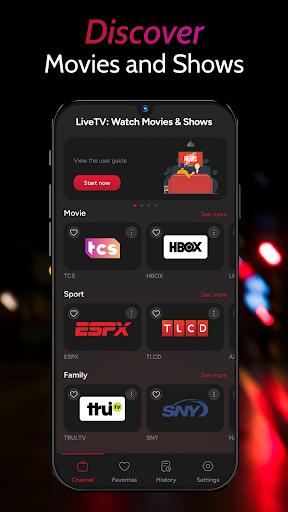

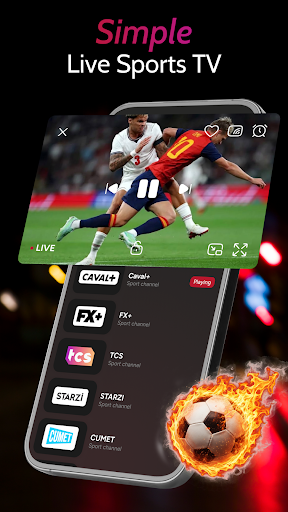
"Watch live TV, explore TV channels, and enjoy movies and shows with Live TV: Watch Movies & Shows. The app brings your favorite channels into one simple TV player, with tools for searching, organizing, and managing your viewing experience. Browse channels by category, save favorites, check watch history, and add playlists from a URL or file.
Whether you want to follow sports, explore family programs, find cooking content, or browse local TV channels, Live TV helps you keep your channels organized and easy to access.
Explore Live TV Channels
Browse live TV channels from different categories in one place. Explore sections such as Sport, Movies, Cooking, and TV Shows to find channels based on what you want to watch. Open a channel and start viewing directly from the built-in TV player.
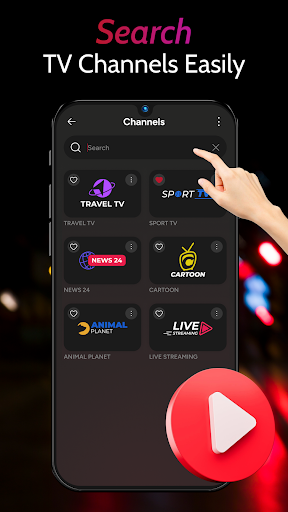
Search TV Channels Easily
Use channel search to find a specific Live TV channel. Search within your channel collection and quickly open the content you want to watch.
Save Favorite TV Channels
Add channels to your favorites for quick access later. Keep the channels you watch most often together and manage your favorite list whenever you need.
Keep Track of Watch History
Your watch history helps you find channels you have viewed before. Return to recently watched content without searching through your full channel list again.
▶ Simple Live TV Player
Watch live channels through a clean and easy-to-use TV player. Use playback controls, switch between channels, and enjoy a viewing layout designed for everyday TV watching.
Add Your Own Playlists
Add a playlist using a URL or import a playlist file. Enter a playlist name and source, then add the available channels to your collection for easier access.
Organize Channels by Category
Keep different types of TV content organized in separate sections. Browse sports, family programs, cooking channels, and other available categories from the home screen.
Live TV: Watch Movies & Shows makes it easier to organize your live TV channels, TV shows, sports, and other video content in one place. Search for channels, save favorites, manage playlists, and return to your viewing history whenever you want.
Download Live TV: Watch Movies & Shows to explore your TV channels in a simple player and build a viewing experience that fits your preferences. Availability of channels and content depends on the playlists or sources you add to the app."
مزید دکھائیں

1. MEmu انسٹالر ڈاؤن لوڈ کریں اور سیٹ اپ مکمل کریں

2. MEmu شروع کریں اسکے بعد ڈیسکٹاپ پر Google Play کھولیں

3. Google Play میں Live TV: Watch Movies & Shows تلاش کریں
Install
4. Live TV: Watch Movies & Shows ڈاؤن لوڈ کریں اور انسٹال کریں
5. انسٹال مکمل ہونے کے بعد سٹارٹ کرنے کے لیے آئیکن پر کلک کریں

6. MEmu کے ساتھ پی سی پر Live TV: Watch Movies & Shows کھیلنے کا لطف لیں
MEmu پلے بہترین اینڈرائڈ ایمولیٹر ہے اور 100 ملین لوگ اس کے زبردست اینڈرائڈ گیمنگ تجربہ سے لطف اندوز ہو رہے ہیں۔ MEmu کی ورچولائزیشن ٹیکنالوجی آپ کو اپنے PC پر ہزاروں اینڈرائڈ گیمز یہاں تک کہ انتہائی گرافک والے گیمز باسہولت کھیلنے کی طاقت دیتی ہے۔
بہتر گرافکس کے ساتھ بڑی اسکرین؛ طویل دورانیہ، بیٹری یا لامحدود موبائل ڈیٹا کے بغیر۔
کی بورڈ اور ماؤس یا گیم پیڈ کے عین مطابق کنٹرول کے لیے کی میپنگ کا پورا سپورٹ۔
کثیر مثالی منیجر کے ساتھ بیک وقت ایک پی سی پر متعدد گیم اکاؤنٹس یا ٹاسکس۔
پی سی پر درج ذیل مراحل پر عمل کرتے ہوئے پر Live TV: Watch Movies & Shows استعمال کریں: u003c/p>