Masjid Salat Panel Manager
تازہ کاری
موجودہ ورژن
6.2026
پیشکش بذریعہ

اپنے موبائل فون پر Masjid Salat Panel Manager کا استعمال کرتے وقت زیادہ چارج ہونے کی فکر نہ کریں، خود کو چھوٹی اسکرین سے آزاد کریں اور ایپ کو زیادہ بڑے ڈسپلے پر استعمال کرنے کا لطف اٹھائیں۔ اس کے بعد سے کی بورڈ اور ماؤس کے ساتھ اپنے ایپ کا فل اسکرین کا تجربہ حاصل کریں۔ MEmu آپ کو وہ تمام حیران کن خصوصیات پیش کرتا ہے جن کی آپ کو توقع کرتے ہیں: فوری انسٹال اور آسان سیٹ اپ، وجدانی کنٹرول، مزید بیٹری، موبائل ڈیٹا کی کوئی حد نہیں اور اب مزید پریشان کن کالز نہیں۔ نئے برانڈ کا MEmu 9 آپ کے کمپیوٹر پر Masjid Salat Panel Manager استعمال کرنے کے لیے بہترین اختیار ہے۔ MEmu کثیر نظیری منیجر بیک وقت 2 یا اس سے زیادہ اکاؤنٹس کھولنا ممکن بناتا ہے۔ اور سب اہم بات، ہمارا خصوصی ایمولیشن انجن آپ کے پی سی کی پوری طاقت ریلیز کرتے ہوئے ہر چیز ہموار اور قابل تفریح بناتا ہے۔
مزید دکھائیں
MEmu Play کے ساتھ PC پر Masjid Salat Panel Manager استعمال کرنے کے شاندار تجربے سے لطف اٹھائیں۔ یہ ایک طاقتور مفت اینڈرائیڈ ایمولیٹر ہے جو آپ کو ان کے ڈیسک ٹاپ ورژن کے لیے ہزاروں اینڈرائیڈ ایپس فراہم کرتا ہے۔ دوستوں کے ساتھ جڑنے اور اعلی کارکردگی کے ساتھ اپنے کام کو چمکانے کا لطف اٹھائیں! Masjid Salat Panel Manager is a comprehensive and user friendly application designed to give you full control over your Masjid’s digital prayer time display.
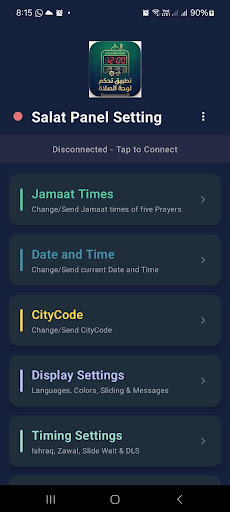
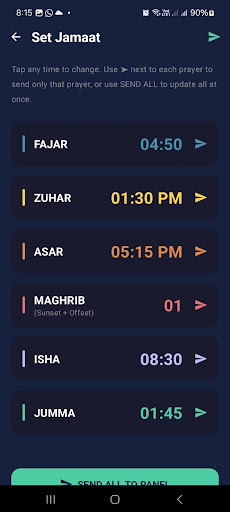
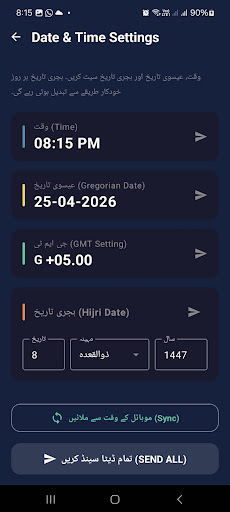
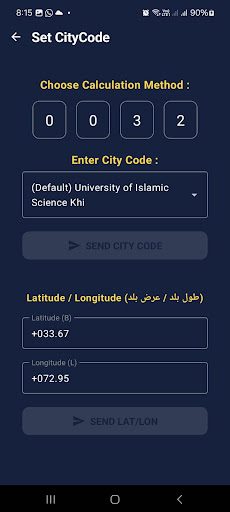
Masjid Salat Panel Manager is a comprehensive and user friendly application designed to give you full control over your Masjid’s digital prayer time display. Instead of relying on manual adjustments or external remotes, you can now manage every aspect of your prayer panel directly from your mobile device via a stable Bluetooth connection.
Total Control Over Prayer Timings
The app allows you to instantly update the Jamaat times for all five daily prayers. Whether you need to make seasonal adjustments or temporary changes, the "Jamaat Times" feature makes it a matter of seconds. You can also synchronize the panel’s internal clock with your phone’s current date and time to ensure perfect accuracy.
Location Based Accuracy
With the "CityCode" configuration, you can ensure the panel calculates prayer times accurately based on your specific geographical location. This feature is essential for Masjids located in different regions, providing peace of mind that the displayed times are always correct for your local community.
Advanced Display Customization
Every Masjid has its own preferences, and our "Display Settings" provide the flexibility you need. You can customize the visual aspects of the panel, including language options and color schemes. Additionally, you can manage sliding messages and notifications that appear on the screen, keeping the Musallis informed about important announcements.
Special Timing & System Settings
Beyond the basic five prayers, this app allows you to configure advanced timing settings. You can set and adjust timings for Ishraq and Zawal, manage "Slide Wait" durations, and enable or disable Daylight Saving Time (DLS) settings. This level of detail ensures that your digital board serves as a complete timekeeping solution for the Masjid.
Simple Connectivity
The app is designed with a "Tap to Connect" interface. Once paired via Bluetooth, you can send and receive data between your phone and the panel seamlessly. The interface is clean, professional, and built for people of all technical levels.
Safe and Secure
We value the privacy of our users. Masjid Salat Panel Manager works locally and does not require any personal information or account registration. It is a dedicated tool built solely for the service of Masjids.
مزید دکھائیں

1. MEmu انسٹالر ڈاؤن لوڈ کریں اور سیٹ اپ مکمل کریں

2. MEmu شروع کریں اسکے بعد ڈیسکٹاپ پر Google Play کھولیں

3. Google Play میں Masjid Salat Panel Manager تلاش کریں
Install
4. Masjid Salat Panel Manager ڈاؤن لوڈ کریں اور انسٹال کریں
5. انسٹال مکمل ہونے کے بعد سٹارٹ کرنے کے لیے آئیکن پر کلک کریں

6. MEmu کے ساتھ پی سی پر Masjid Salat Panel Manager کھیلنے کا لطف لیں
MEmu پلے بہترین اینڈرائڈ ایمولیٹر ہے اور 100 ملین لوگ اس کے زبردست اینڈرائڈ گیمنگ تجربہ سے لطف اندوز ہو رہے ہیں۔ MEmu کی ورچولائزیشن ٹیکنالوجی آپ کو اپنے PC پر ہزاروں اینڈرائڈ گیمز یہاں تک کہ انتہائی گرافک والے گیمز باسہولت کھیلنے کی طاقت دیتی ہے۔
بہتر گرافکس کے ساتھ بڑی اسکرین؛ طویل دورانیہ، بیٹری یا لامحدود موبائل ڈیٹا کے بغیر۔
کی بورڈ اور ماؤس یا گیم پیڈ کے عین مطابق کنٹرول کے لیے کی میپنگ کا پورا سپورٹ۔
کثیر مثالی منیجر کے ساتھ بیک وقت ایک پی سی پر متعدد گیم اکاؤنٹس یا ٹاسکس۔
پی سی پر درج ذیل مراحل پر عمل کرتے ہوئے پر Masjid Salat Panel Manager استعمال کریں: u003c/p>