PodEmu - iPod Emulator
تازہ کاری
موجودہ ورژن
3.0-67
پیشکش بذریعہ

اپنے موبائل فون پر PodEmu - iPod Emulator کا استعمال کرتے وقت زیادہ چارج ہونے کی فکر نہ کریں، خود کو چھوٹی اسکرین سے آزاد کریں اور ایپ کو زیادہ بڑے ڈسپلے پر استعمال کرنے کا لطف اٹھائیں۔ اس کے بعد سے کی بورڈ اور ماؤس کے ساتھ اپنے ایپ کا فل اسکرین کا تجربہ حاصل کریں۔ MEmu آپ کو وہ تمام حیران کن خصوصیات پیش کرتا ہے جن کی آپ کو توقع کرتے ہیں: فوری انسٹال اور آسان سیٹ اپ، وجدانی کنٹرول، مزید بیٹری، موبائل ڈیٹا کی کوئی حد نہیں اور اب مزید پریشان کن کالز نہیں۔ نئے برانڈ کا MEmu 9 آپ کے کمپیوٹر پر PodEmu - iPod Emulator استعمال کرنے کے لیے بہترین اختیار ہے۔ MEmu کثیر نظیری منیجر بیک وقت 2 یا اس سے زیادہ اکاؤنٹس کھولنا ممکن بناتا ہے۔ اور سب اہم بات، ہمارا خصوصی ایمولیشن انجن آپ کے پی سی کی پوری طاقت ریلیز کرتے ہوئے ہر چیز ہموار اور قابل تفریح بناتا ہے۔
مزید دکھائیں
Download PodEmu - iPod Emulator on PC with MEmu Android Emulator. Enjoy playing on big screen. IMPORTANT: if you download this app you really need to visit project GitHub page: https://github.
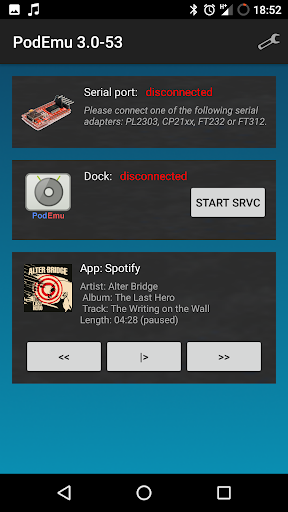
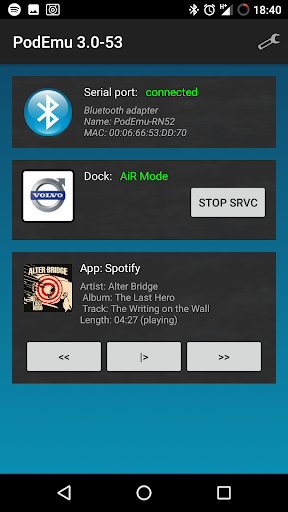
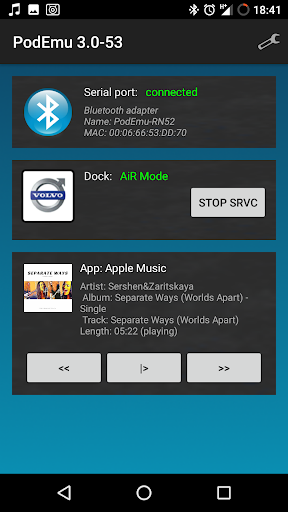
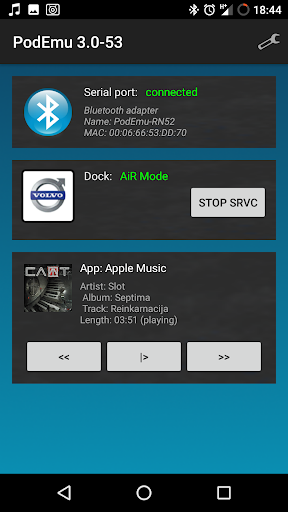
IMPORTANT: if you download this app you really need to visit project GitHub page: https://github.com/xtensa/PodEmu
PodEmu is Android application that allows you to connect your Android device to iPod docking station or your car audio system. PodEmu supports both AiR (Advanced) and Simple modes so you can control your Android music app directly from docking station or from your cars steering wheel. PodEmu uses serial protocol to communicate with iPod docking station so it will work only with "old" 30-pin iPod connectors. Lightning interface is not supported.
WARNING: this application requires do-it-yourself cable to work. You need some soldering skills to be able to create this cable. Please do not rate this app if you don't have such cable. For more details on how to create this cable please visit project GitHub page: https://github.com/xtensa/PodEmu
REQUIREMENTS
- DIY bluetooth dongle
or
- Android device with USB host support
- DIY cable. Unfortunately there is no ready to use cables available on the market so you need some soldering skills to assemble your own cable. All details on how to do that could be found on this XDA developers thread.
FEATURES
No root required
Display track/time information for currently playing song on your car audio system or docking station display.
Control your favourite Android music app (eg. Spotify, YouTube, Amazon Prime Music, Apple Music) directly from car's steering wheel or docking station remote control
Download docking station color image to android device. Car audios usually have this feature.
Support for Bluetooth serial devices. You can assemble the dongle and connect your android completely wirelesly.
Entirely Open Source :) You can modify and redistribute as long as you comply with GPLv3.
مزید دکھائیں

1. MEmu انسٹالر ڈاؤن لوڈ کریں اور سیٹ اپ مکمل کریں

2. MEmu شروع کریں اسکے بعد ڈیسکٹاپ پر Google Play کھولیں

3. Google Play میں PodEmu - iPod Emulator تلاش کریں
Install
4. PodEmu - iPod Emulator ڈاؤن لوڈ کریں اور انسٹال کریں
5. انسٹال مکمل ہونے کے بعد سٹارٹ کرنے کے لیے آئیکن پر کلک کریں

6. MEmu کے ساتھ پی سی پر PodEmu - iPod Emulator کھیلنے کا لطف لیں
MEmu پلے بہترین اینڈرائڈ ایمولیٹر ہے اور 100 ملین لوگ اس کے زبردست اینڈرائڈ گیمنگ تجربہ سے لطف اندوز ہو رہے ہیں۔ MEmu کی ورچولائزیشن ٹیکنالوجی آپ کو اپنے PC پر ہزاروں اینڈرائڈ گیمز یہاں تک کہ انتہائی گرافک والے گیمز باسہولت کھیلنے کی طاقت دیتی ہے۔
بہتر گرافکس کے ساتھ بڑی اسکرین؛ طویل دورانیہ، بیٹری یا لامحدود موبائل ڈیٹا کے بغیر۔
کی بورڈ اور ماؤس یا گیم پیڈ کے عین مطابق کنٹرول کے لیے کی میپنگ کا پورا سپورٹ۔
کثیر مثالی منیجر کے ساتھ بیک وقت ایک پی سی پر متعدد گیم اکاؤنٹس یا ٹاسکس۔
پی سی پر درج ذیل مراحل پر عمل کرتے ہوئے پر PodEmu - iPod Emulator استعمال کریں: u003c/p>