Primal's 3D Embryology
تازہ کاری
موجودہ ورژن
3.9.5
پیشکش بذریعہ

اپنے موبائل فون پر Primal's 3D Embryology کا استعمال کرتے وقت زیادہ چارج ہونے کی فکر نہ کریں، خود کو چھوٹی اسکرین سے آزاد کریں اور ایپ کو زیادہ بڑے ڈسپلے پر استعمال کرنے کا لطف اٹھائیں۔ اس کے بعد سے کی بورڈ اور ماؤس کے ساتھ اپنے ایپ کا فل اسکرین کا تجربہ حاصل کریں۔ MEmu آپ کو وہ تمام حیران کن خصوصیات پیش کرتا ہے جن کی آپ کو توقع کرتے ہیں: فوری انسٹال اور آسان سیٹ اپ، وجدانی کنٹرول، مزید بیٹری، موبائل ڈیٹا کی کوئی حد نہیں اور اب مزید پریشان کن کالز نہیں۔ نئے برانڈ کا MEmu 9 آپ کے کمپیوٹر پر Primal's 3D Embryology استعمال کرنے کے لیے بہترین اختیار ہے۔ MEmu کثیر نظیری منیجر بیک وقت 2 یا اس سے زیادہ اکاؤنٹس کھولنا ممکن بناتا ہے۔ اور سب اہم بات، ہمارا خصوصی ایمولیشن انجن آپ کے پی سی کی پوری طاقت ریلیز کرتے ہوئے ہر چیز ہموار اور قابل تفریح بناتا ہے۔
مزید دکھائیں
Download Primal's 3D Embryology on PC with MEmu Android Emulator. Enjoy playing on big screen. Primal's 3D Embryology app is the ultimate 3D interactive resource for all medical educators, practitioners and students.
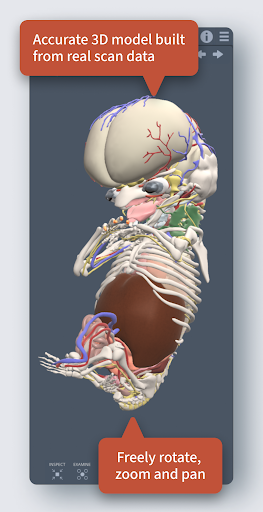
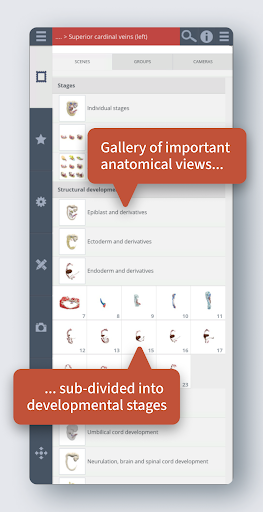
Primal's 3D Embryology app is the ultimate 3D interactive resource for all medical educators, practitioners and students. We have partnered with Amsterdam’s Academic Medical Centre (AMC) to meticulously build 3D models of embryos, sourced from micro-CT scans of the Carnegie Collection. The app provides accurate and visually stunning reconstructions of weeks 3 to 8 of development (Carnegie Stages 7 to 23).
The intuitive interface lets you choose precisely the embryos and developmental structures you want to see, from exactly the angle you want to see them. This flexibility is supported by a wealth of user-friendly tools to help you set up your ideal anatomical image, quickly and easily:
• The Gallery contains 18 pre-set scenes, designed by an in-house team of anatomical experts, to clearly and comprehensibly present in-depth systemic development of the embryo. Each scene is divided into fourteen layers to provide a step by step understanding of each stage of development. The scenes are accurately shown to scale, adding to your understanding of how the embryo develops through each Carnegie Stage.
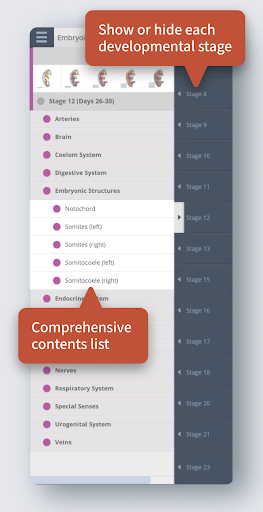
• The Contents folders arrange 300+ structures systemically, meaning you can browse by subcategory and switch all related structures on at once. It provides an excellent learning tool – for example, you can turn on all the developing structures of the brain or select all of the structures which contribute to the ear.
• The Contents layer controls split each Carnegie Stage into five layers – from deep to superficial. This allows you to quickly build up different systems to the depth you want to see.
**Save to Favorites**
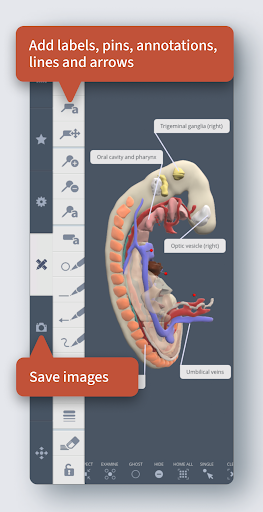
Save the unique views you create for later in the Favorites. Export your favorites list and share with other users. Save anything as an image to use in your PowerPoints, revision material or research papers. Create URL links to share your unique models with other users.
**Add Labels**
Use the pins, labels and drawing tools to customize your images for enlivened presentations, engaging course materials and handouts. Add custom, detailed descriptions in the labels for your own revision notes.
**Informative**
Select and highlight structures to reveal their anatomical names. Each structure name is aligned to Terminologia Embryologica (TE), a standardized contents of names produced by the Federative International Committee on Anatomical Terminology on behalf of the International Federation of Associations of Anatomists.
**Limitless Control**
Each structure can be selected, highlighted and hidden. Structures can be ghosted, to reveal anatomy that is hidden below, or inspected, to give a close up view of a structure in isolation. Use the orientation cube to rotate the models in any anatomical direction.
مزید دکھائیں

1. MEmu انسٹالر ڈاؤن لوڈ کریں اور سیٹ اپ مکمل کریں

2. MEmu شروع کریں اسکے بعد ڈیسکٹاپ پر Google Play کھولیں

3. Google Play میں Primal's 3D Embryology تلاش کریں
Install
4. Primal's 3D Embryology ڈاؤن لوڈ کریں اور انسٹال کریں
5. انسٹال مکمل ہونے کے بعد سٹارٹ کرنے کے لیے آئیکن پر کلک کریں

6. MEmu کے ساتھ پی سی پر Primal's 3D Embryology کھیلنے کا لطف لیں
MEmu پلے بہترین اینڈرائڈ ایمولیٹر ہے اور 100 ملین لوگ اس کے زبردست اینڈرائڈ گیمنگ تجربہ سے لطف اندوز ہو رہے ہیں۔ MEmu کی ورچولائزیشن ٹیکنالوجی آپ کو اپنے PC پر ہزاروں اینڈرائڈ گیمز یہاں تک کہ انتہائی گرافک والے گیمز باسہولت کھیلنے کی طاقت دیتی ہے۔
بہتر گرافکس کے ساتھ بڑی اسکرین؛ طویل دورانیہ، بیٹری یا لامحدود موبائل ڈیٹا کے بغیر۔
کی بورڈ اور ماؤس یا گیم پیڈ کے عین مطابق کنٹرول کے لیے کی میپنگ کا پورا سپورٹ۔
کثیر مثالی منیجر کے ساتھ بیک وقت ایک پی سی پر متعدد گیم اکاؤنٹس یا ٹاسکس۔
پی سی پر درج ذیل مراحل پر عمل کرتے ہوئے پر Primal's 3D Embryology استعمال کریں: u003c/p>