QUANTUM PAPER
تازہ کاری
موجودہ ورژن
7.7.7.7
پیشکش بذریعہ

اپنے موبائل فون پر QUANTUM PAPER کا استعمال کرتے وقت زیادہ چارج ہونے کی فکر نہ کریں، خود کو چھوٹی اسکرین سے آزاد کریں اور ایپ کو زیادہ بڑے ڈسپلے پر استعمال کرنے کا لطف اٹھائیں۔ اس کے بعد سے کی بورڈ اور ماؤس کے ساتھ اپنے ایپ کا فل اسکرین کا تجربہ حاصل کریں۔ MEmu آپ کو وہ تمام حیران کن خصوصیات پیش کرتا ہے جن کی آپ کو توقع کرتے ہیں: فوری انسٹال اور آسان سیٹ اپ، وجدانی کنٹرول، مزید بیٹری، موبائل ڈیٹا کی کوئی حد نہیں اور اب مزید پریشان کن کالز نہیں۔ نئے برانڈ کا MEmu 9 آپ کے کمپیوٹر پر QUANTUM PAPER استعمال کرنے کے لیے بہترین اختیار ہے۔ MEmu کثیر نظیری منیجر بیک وقت 2 یا اس سے زیادہ اکاؤنٹس کھولنا ممکن بناتا ہے۔ اور سب اہم بات، ہمارا خصوصی ایمولیشن انجن آپ کے پی سی کی پوری طاقت ریلیز کرتے ہوئے ہر چیز ہموار اور قابل تفریح بناتا ہے۔
مزید دکھائیں
Download QUANTUM PAPER on PC with MEmu Android Emulator. Enjoy playing on big screen. Welcome to the World of Quantum Paper, the world’s No.
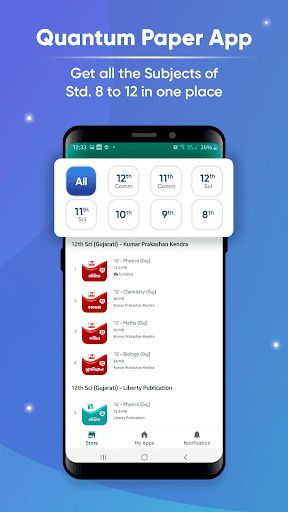
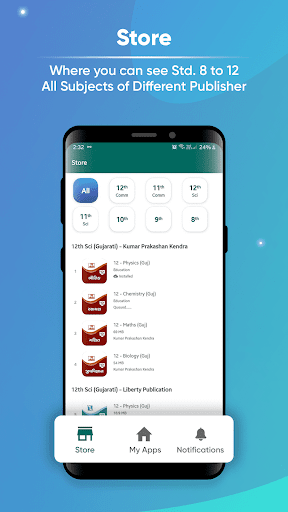
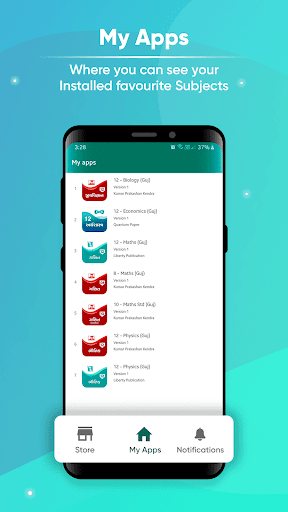
Welcome to the World of Quantum Paper, the world’s No. 1 & fastest question paper generating app, video creation tools, unique user interface, and much more.
Quantum Paper is not just an application, but it is a technology created by fellow Indians to uplift the methodology of the Indian Education System and infuse digitalisation practices that not only makes the teachers 'Atma-Nirbhar’, but also makes studying fun and easy for the students.
With more than 30+ Applications, each for one subject, Quantum Paper is an E-Text Book along with its plethora of unique features curated and created for the sole purpose of making teaching easier for the teachers.
Unique Features of Quantum Paper Application:
● E-book - The syllabus is divided into chapters which is further divided into type of questions as per the marks associated with it.
● Create Question Papers - World’s fastest offline question paper and video generator application which creates question paper 10 times faster than PC based software
● HD Quality PDF - The question papers created by Quantum Paper Application creates HD Quality PDF file in 1 second
● Answer key, Solution, OMR Sheet & 4 Paper Set - Along with the question paper, an Answer Key is created to point out exactly where the answers can be found. Along with it, the whole detailed solution to the question paper can also be created into a PDF which makes grading the answers easier, an option to create an OMR sheet for Multiple choice question, and an option to create 4 question papers’ set with the same questions in different order is also just a single click away.
● Design - The user interface is so easy to understand that it is easier to study from the app rather than the heavy textbooks
● Create Videos - A user can create Videos explaining a topic where they can record themselves using the Camera Features and Pen Features. Videos can be recorded with the click of a single button.
● Camera Features - The teachers can explain a topic/chapter/question using the camera and pen features. During the video, use the Front cam to interact with the students, use the rear cam to show an experiment or to show the notes or the board, use the profile picture tool to upload a picture to explain the topic more precisely, use your name, your photo or a banner to promote your school/classes. The possibilities are endless…
● Pen Features - Video creation is fun when it is interactive. Use the groundbreaking technology of the pen features which come into three categories
● Ad-free - No advertisement to distract you
● Offline Application - Quantum paper app, once installed and pro version activated, does not require an Internet connection.
● Practice - With Five Star and Scholar Paperset already available, students can practice as much as they want.
Benefits of QP for Students:
● Learn any subject with more than 30+ Subjects on the application,
● Read all the questions and answers on the mobile device or tablet
● Access the entire content of several publications in your palm
● Design question paper for self-evaluation
● Chapterwise scholar papers and Five Star paper set
● Interact with teachers and ask doubts, questions or difficult topics live by sharing pdf files
Benefits of QP for Teachers:
● Use Quantum Paper App to teach digitally in the classroom with the help of a projector
● Create online question papers
● Share question papers to a number of students from the mobile app or tablet
● Set customized watermark and/or paper title on your question paper
● Curate OMR sheets with solutions & 4 Paper sets
● Answer Key and Complete solution
● Live teaching with screen sharing process included via Google Meet, Jio, and Zoom Meet
● Record video lectures on several subjects and topics in this app
● Easy to revise syllabus by creating highlights within the paper
مزید دکھائیں

1. MEmu انسٹالر ڈاؤن لوڈ کریں اور سیٹ اپ مکمل کریں

2. MEmu شروع کریں اسکے بعد ڈیسکٹاپ پر Google Play کھولیں

3. Google Play میں QUANTUM PAPER تلاش کریں
Install
4. QUANTUM PAPER ڈاؤن لوڈ کریں اور انسٹال کریں
5. انسٹال مکمل ہونے کے بعد سٹارٹ کرنے کے لیے آئیکن پر کلک کریں

6. MEmu کے ساتھ پی سی پر QUANTUM PAPER کھیلنے کا لطف لیں
MEmu پلے بہترین اینڈرائڈ ایمولیٹر ہے اور 100 ملین لوگ اس کے زبردست اینڈرائڈ گیمنگ تجربہ سے لطف اندوز ہو رہے ہیں۔ MEmu کی ورچولائزیشن ٹیکنالوجی آپ کو اپنے PC پر ہزاروں اینڈرائڈ گیمز یہاں تک کہ انتہائی گرافک والے گیمز باسہولت کھیلنے کی طاقت دیتی ہے۔
بہتر گرافکس کے ساتھ بڑی اسکرین؛ طویل دورانیہ، بیٹری یا لامحدود موبائل ڈیٹا کے بغیر۔
کی بورڈ اور ماؤس یا گیم پیڈ کے عین مطابق کنٹرول کے لیے کی میپنگ کا پورا سپورٹ۔
کثیر مثالی منیجر کے ساتھ بیک وقت ایک پی سی پر متعدد گیم اکاؤنٹس یا ٹاسکس۔
پی سی پر درج ذیل مراحل پر عمل کرتے ہوئے پر QUANTUM PAPER استعمال کریں: u003c/p>