
Roadrnext
تازہ کاری
موجودہ ورژن
1.1.22
پیشکش بذریعہ

اپنے موبائل فون پر Roadrnext کا استعمال کرتے وقت زیادہ چارج ہونے کی فکر نہ کریں، خود کو چھوٹی اسکرین سے آزاد کریں اور ایپ کو زیادہ بڑے ڈسپلے پر استعمال کرنے کا لطف اٹھائیں۔ اس کے بعد سے کی بورڈ اور ماؤس کے ساتھ اپنے ایپ کا فل اسکرین کا تجربہ حاصل کریں۔ MEmu آپ کو وہ تمام حیران کن خصوصیات پیش کرتا ہے جن کی آپ کو توقع کرتے ہیں: فوری انسٹال اور آسان سیٹ اپ، وجدانی کنٹرول، مزید بیٹری، موبائل ڈیٹا کی کوئی حد نہیں اور اب مزید پریشان کن کالز نہیں۔ نئے برانڈ کا MEmu 9 آپ کے کمپیوٹر پر Roadrnext استعمال کرنے کے لیے بہترین اختیار ہے۔ MEmu کثیر نظیری منیجر بیک وقت 2 یا اس سے زیادہ اکاؤنٹس کھولنا ممکن بناتا ہے۔ اور سب اہم بات، ہمارا خصوصی ایمولیشن انجن آپ کے پی سی کی پوری طاقت ریلیز کرتے ہوئے ہر چیز ہموار اور قابل تفریح بناتا ہے۔
مزید دکھائیں
Download Roadrnext on PC with MEmu Android Emulator. Enjoy playing on big screen. Feature rich and blazing fast GPS Vehicle Tracking app for fleet owners and logistics operators.
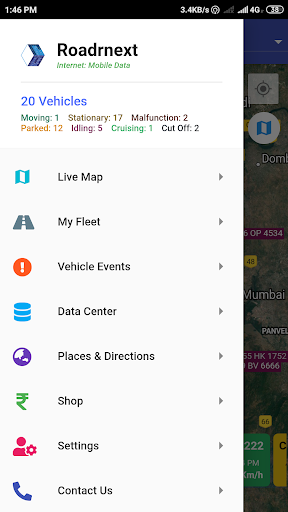
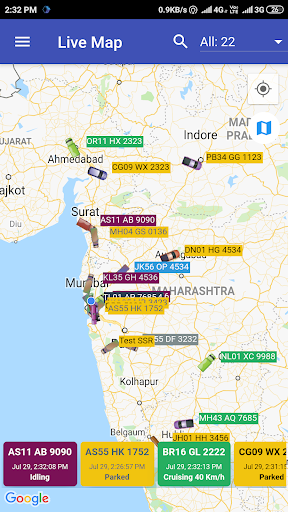
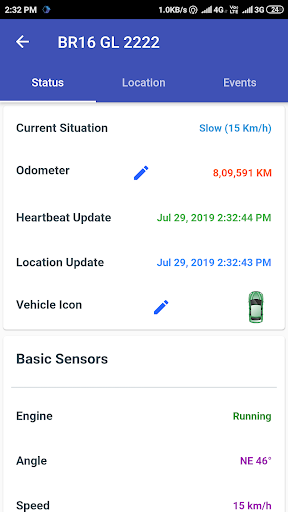
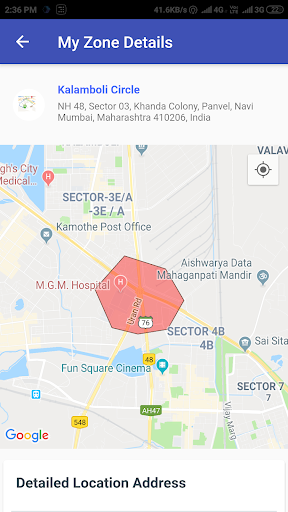
Feature rich and blazing fast GPS Vehicle Tracking app for fleet owners and logistics operators.
Comprehensive unlimited* Self activated trial with 20+ real live vehicles
Multi vehicle live GPS tracking on one screen
Easy search and filter to help manage large size fleet
Zoomed out views to show all assets together
Intensive focused view with animated icons and recent movement path
One tap access to last 24 hours action and live vehicle details
Customization vehicle icons for all types of vehicles with 100+ options
Vehicle Safety & Security Features
Engine Locking
Engine On-Off alerts
Location Entry-Exit alerts
Tracking Device Disconnection alerts
Customization Over-speed Alerts
Simple list view of all vehicles with search and filter
Comprehensive detailed information on vehicle's current status
Movement Status, Odometer and device data time
Detailed location address and list of nearby vehicles
Latest Events with detailed map view of event location and detailed address
Review vehicle movement history with animated track replay
List view of all journey segments, stops and events along the track with relevant details
15+ types of Data Reports
Share Data reports with third party directly from within the app
Easy to use Google navigation
From your location, any of your vehicles location, place marker or zone
To any of your vehicles location, place marker or zone
Built using the latest Google Flutter framework
Cutting edge performance with elegant material design
Super smooth user experience backed by high performance cloud servers
Compatible with all standard GPS Tracking Devices
Fully compatible with all AIS140 compliant devices
Protocol Integration services are available at cost
Customization of events, reports and many other features are available at cost
24x7 Emergency support is available in case of theft or any other vehicle security issue
Standard working hours support for any usage related issues
Live Contact Us page in app to show the support numbers available at any time
Tracking device support and field repairs are available at cost
*Engine Locking and Odometer Updating disabled in trial account
مزید دکھائیں

1. MEmu انسٹالر ڈاؤن لوڈ کریں اور سیٹ اپ مکمل کریں

2. MEmu شروع کریں اسکے بعد ڈیسکٹاپ پر Google Play کھولیں

3. Google Play میں Roadrnext تلاش کریں
Install
4. Roadrnext ڈاؤن لوڈ کریں اور انسٹال کریں
5. انسٹال مکمل ہونے کے بعد سٹارٹ کرنے کے لیے آئیکن پر کلک کریں

6. MEmu کے ساتھ پی سی پر Roadrnext کھیلنے کا لطف لیں
MEmu پلے بہترین اینڈرائڈ ایمولیٹر ہے اور 100 ملین لوگ اس کے زبردست اینڈرائڈ گیمنگ تجربہ سے لطف اندوز ہو رہے ہیں۔ MEmu کی ورچولائزیشن ٹیکنالوجی آپ کو اپنے PC پر ہزاروں اینڈرائڈ گیمز یہاں تک کہ انتہائی گرافک والے گیمز باسہولت کھیلنے کی طاقت دیتی ہے۔
بہتر گرافکس کے ساتھ بڑی اسکرین؛ طویل دورانیہ، بیٹری یا لامحدود موبائل ڈیٹا کے بغیر۔
کی بورڈ اور ماؤس یا گیم پیڈ کے عین مطابق کنٹرول کے لیے کی میپنگ کا پورا سپورٹ۔
کثیر مثالی منیجر کے ساتھ بیک وقت ایک پی سی پر متعدد گیم اکاؤنٹس یا ٹاسکس۔
پی سی پر درج ذیل مراحل پر عمل کرتے ہوئے پر Roadrnext استعمال کریں: u003c/p>