
RR Work - Tracker
تازہ کاری
موجودہ ورژن
3.1.8
پیشکش بذریعہ

اپنے موبائل فون پر RR Work - Tracker کا استعمال کرتے وقت زیادہ چارج ہونے کی فکر نہ کریں، خود کو چھوٹی اسکرین سے آزاد کریں اور ایپ کو زیادہ بڑے ڈسپلے پر استعمال کرنے کا لطف اٹھائیں۔ اس کے بعد سے کی بورڈ اور ماؤس کے ساتھ اپنے ایپ کا فل اسکرین کا تجربہ حاصل کریں۔ MEmu آپ کو وہ تمام حیران کن خصوصیات پیش کرتا ہے جن کی آپ کو توقع کرتے ہیں: فوری انسٹال اور آسان سیٹ اپ، وجدانی کنٹرول، مزید بیٹری، موبائل ڈیٹا کی کوئی حد نہیں اور اب مزید پریشان کن کالز نہیں۔ نئے برانڈ کا MEmu 9 آپ کے کمپیوٹر پر RR Work - Tracker استعمال کرنے کے لیے بہترین اختیار ہے۔ MEmu کثیر نظیری منیجر بیک وقت 2 یا اس سے زیادہ اکاؤنٹس کھولنا ممکن بناتا ہے۔ اور سب اہم بات، ہمارا خصوصی ایمولیشن انجن آپ کے پی سی کی پوری طاقت ریلیز کرتے ہوئے ہر چیز ہموار اور قابل تفریح بناتا ہے۔
مزید دکھائیں
Download RR Work - Tracker on PC with MEmu Android Emulator. Enjoy playing on big screen. Why use RR Worktracker?
Why use RR Worktracker?
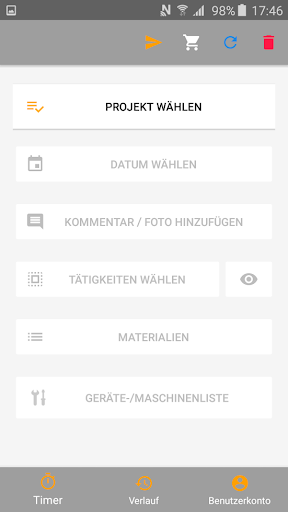
Time tracking has never been so easy in the construction industry! Work Tracker makes it easy to document and manage work assignments in real time, with just a few intuitive steps.
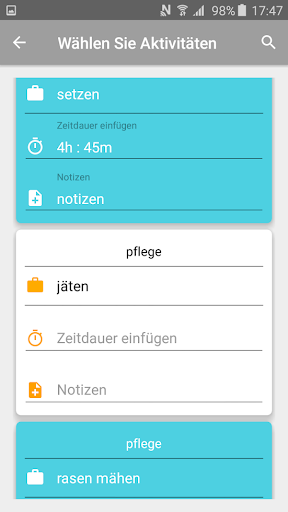
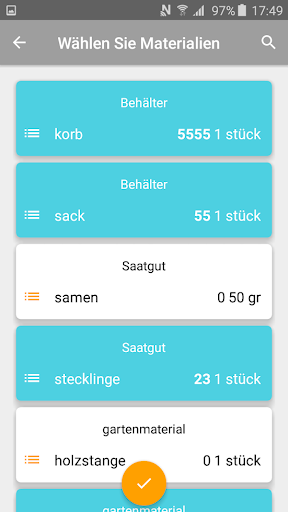
The Android application is designed to make work-tracking and employee attendance as easy as possible for companies and to provide them with data in real time. Employees can record the effective working hours on construction sites with their smartphones, and precise project-related activities, materials used, tools , pictures can be inserted with just a few clicks. Necessary materials and tools are simply put into the cart so that the order is transmitted in real time.
How is Worktracker set up?
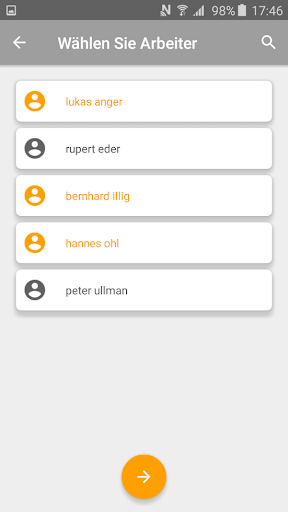
The project manager can easily store the following information in the webapp: employees, projects, materials, tools, activities. Additional information can be added at any time in the web frontend, and updated from the application through the data update in few seconds.
By means of precise pricing of materials, activities and tools, a real-time cost calculation is made possible.
Completed projects and former employees can be set to inactive with just one click from the web app.
Worktracker is now ready to use!
Once all the data from the previous step has been completed and the app has been downloaded on the smartphone , employees can enter real-time information (start and end dates, activities, used materials, etc.) making it possible to have exact employee activity-tracking an materials/tools-tracking.
The entered data are now visible via web frontend and can be immediately checked and processed.
Work assignment reports and export to Excel document feature :
With the Worktracker webapp it is possible to filter the entered data and to export it in Excel.
مزید دکھائیں

1. MEmu انسٹالر ڈاؤن لوڈ کریں اور سیٹ اپ مکمل کریں

2. MEmu شروع کریں اسکے بعد ڈیسکٹاپ پر Google Play کھولیں

3. Google Play میں RR Work - Tracker تلاش کریں
Install
4. RR Work - Tracker ڈاؤن لوڈ کریں اور انسٹال کریں
5. انسٹال مکمل ہونے کے بعد سٹارٹ کرنے کے لیے آئیکن پر کلک کریں

6. MEmu کے ساتھ پی سی پر RR Work - Tracker کھیلنے کا لطف لیں
MEmu پلے بہترین اینڈرائڈ ایمولیٹر ہے اور 100 ملین لوگ اس کے زبردست اینڈرائڈ گیمنگ تجربہ سے لطف اندوز ہو رہے ہیں۔ MEmu کی ورچولائزیشن ٹیکنالوجی آپ کو اپنے PC پر ہزاروں اینڈرائڈ گیمز یہاں تک کہ انتہائی گرافک والے گیمز باسہولت کھیلنے کی طاقت دیتی ہے۔
بہتر گرافکس کے ساتھ بڑی اسکرین؛ طویل دورانیہ، بیٹری یا لامحدود موبائل ڈیٹا کے بغیر۔
کی بورڈ اور ماؤس یا گیم پیڈ کے عین مطابق کنٹرول کے لیے کی میپنگ کا پورا سپورٹ۔
کثیر مثالی منیجر کے ساتھ بیک وقت ایک پی سی پر متعدد گیم اکاؤنٹس یا ٹاسکس۔
پی سی پر درج ذیل مراحل پر عمل کرتے ہوئے پر RR Work - Tracker استعمال کریں: u003c/p>