Select Auto Mart
تازہ کاری
موجودہ ورژن
1.21
پیشکش بذریعہ

اپنے موبائل فون پر Select Auto Mart کا استعمال کرتے وقت زیادہ چارج ہونے کی فکر نہ کریں، خود کو چھوٹی اسکرین سے آزاد کریں اور ایپ کو زیادہ بڑے ڈسپلے پر استعمال کرنے کا لطف اٹھائیں۔ اس کے بعد سے کی بورڈ اور ماؤس کے ساتھ اپنے ایپ کا فل اسکرین کا تجربہ حاصل کریں۔ MEmu آپ کو وہ تمام حیران کن خصوصیات پیش کرتا ہے جن کی آپ کو توقع کرتے ہیں: فوری انسٹال اور آسان سیٹ اپ، وجدانی کنٹرول، مزید بیٹری، موبائل ڈیٹا کی کوئی حد نہیں اور اب مزید پریشان کن کالز نہیں۔ نئے برانڈ کا MEmu 9 آپ کے کمپیوٹر پر Select Auto Mart استعمال کرنے کے لیے بہترین اختیار ہے۔ MEmu کثیر نظیری منیجر بیک وقت 2 یا اس سے زیادہ اکاؤنٹس کھولنا ممکن بناتا ہے۔ اور سب اہم بات، ہمارا خصوصی ایمولیشن انجن آپ کے پی سی کی پوری طاقت ریلیز کرتے ہوئے ہر چیز ہموار اور قابل تفریح بناتا ہے۔
مزید دکھائیں
Download Select Auto Mart on PC with MEmu Android Emulator. Enjoy playing on big screen. The process is very simple.
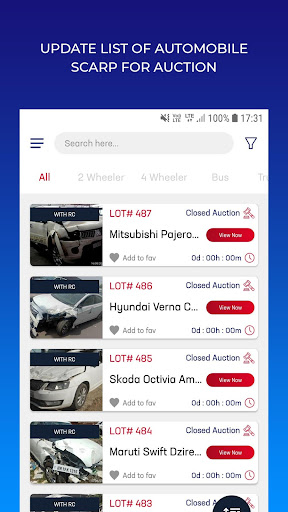
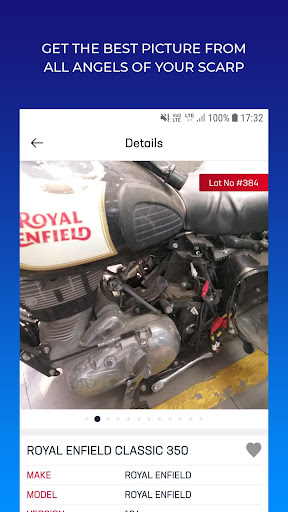
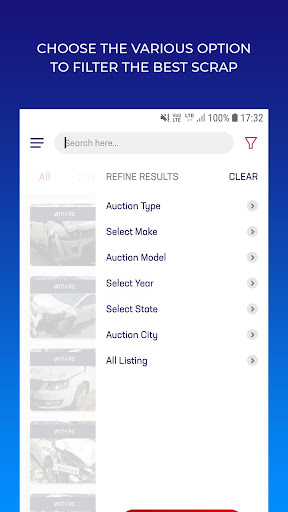
The process is very simple. At present SelectAutoMart offers two types of auctions.
A> Closed Auction : The insurance company does not disclose their rates. The buyer has to bid their maximum rate before the specified deadline on the website. Their rates will not be disclosed to the other buyers. The buyer with the highest ACTIVE bid is notified shortly after the deadline of being the highest.
B> Open Auction : The basic rate of the auction item is displayed on the website. The buyer has to place a bid on a vehicle before the specified deadline.
The buyer has to deposit Rs.5000/- or 10% of the bidding amount (which ever is higher).
The buyer with the highest ACTIVE bid is notified shortly after the deadline of being the highest. Next our affiliated dealers, on customer`s behalf, present your bid to the Insurance Auction (closed to the general public). If they win the vehicle at the Insurance Auction, our affiliated dealer acquires the vehicle for the customer, who is required to pay the balance within 2 business days. If the affiliated dealer does not acquire the item, the deposit is refunded to the customer upon request. Alternatively, the deposit can be applied towards an offer on another vehicle
Powered by: Innzes solutions pvt. ltd.
مزید دکھائیں

1. MEmu انسٹالر ڈاؤن لوڈ کریں اور سیٹ اپ مکمل کریں

2. MEmu شروع کریں اسکے بعد ڈیسکٹاپ پر Google Play کھولیں

3. Google Play میں Select Auto Mart تلاش کریں
Install
4. Select Auto Mart ڈاؤن لوڈ کریں اور انسٹال کریں
5. انسٹال مکمل ہونے کے بعد سٹارٹ کرنے کے لیے آئیکن پر کلک کریں

6. MEmu کے ساتھ پی سی پر Select Auto Mart کھیلنے کا لطف لیں
MEmu پلے بہترین اینڈرائڈ ایمولیٹر ہے اور 100 ملین لوگ اس کے زبردست اینڈرائڈ گیمنگ تجربہ سے لطف اندوز ہو رہے ہیں۔ MEmu کی ورچولائزیشن ٹیکنالوجی آپ کو اپنے PC پر ہزاروں اینڈرائڈ گیمز یہاں تک کہ انتہائی گرافک والے گیمز باسہولت کھیلنے کی طاقت دیتی ہے۔
بہتر گرافکس کے ساتھ بڑی اسکرین؛ طویل دورانیہ، بیٹری یا لامحدود موبائل ڈیٹا کے بغیر۔
کی بورڈ اور ماؤس یا گیم پیڈ کے عین مطابق کنٹرول کے لیے کی میپنگ کا پورا سپورٹ۔
کثیر مثالی منیجر کے ساتھ بیک وقت ایک پی سی پر متعدد گیم اکاؤنٹس یا ٹاسکس۔
پی سی پر درج ذیل مراحل پر عمل کرتے ہوئے پر Select Auto Mart استعمال کریں: u003c/p>