SIM Info and Contacts Transfer
تازہ کاری
موجودہ ورژن
3.50
پیشکش بذریعہ

اپنے موبائل فون پر SIM Info and Contacts Transfer کا استعمال کرتے وقت زیادہ چارج ہونے کی فکر نہ کریں، خود کو چھوٹی اسکرین سے آزاد کریں اور ایپ کو زیادہ بڑے ڈسپلے پر استعمال کرنے کا لطف اٹھائیں۔ اس کے بعد سے کی بورڈ اور ماؤس کے ساتھ اپنے ایپ کا فل اسکرین کا تجربہ حاصل کریں۔ MEmu آپ کو وہ تمام حیران کن خصوصیات پیش کرتا ہے جن کی آپ کو توقع کرتے ہیں: فوری انسٹال اور آسان سیٹ اپ، وجدانی کنٹرول، مزید بیٹری، موبائل ڈیٹا کی کوئی حد نہیں اور اب مزید پریشان کن کالز نہیں۔ نئے برانڈ کا MEmu 9 آپ کے کمپیوٹر پر SIM Info and Contacts Transfer استعمال کرنے کے لیے بہترین اختیار ہے۔ MEmu کثیر نظیری منیجر بیک وقت 2 یا اس سے زیادہ اکاؤنٹس کھولنا ممکن بناتا ہے۔ اور سب اہم بات، ہمارا خصوصی ایمولیشن انجن آپ کے پی سی کی پوری طاقت ریلیز کرتے ہوئے ہر چیز ہموار اور قابل تفریح بناتا ہے۔
مزید دکھائیں
Download SIM Info and Contacts Transfer on PC with MEmu Android Emulator. Enjoy playing on big screen. SIM Card and Contacts Transfer is the best application in Google Play for extracting information from your SIM card such as phone numbers and contacts.
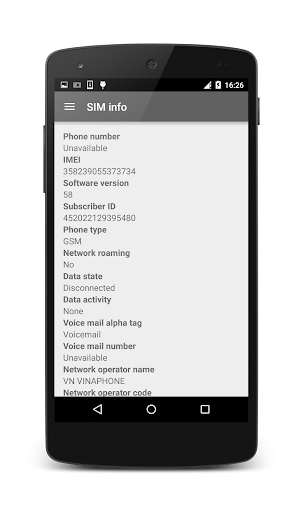
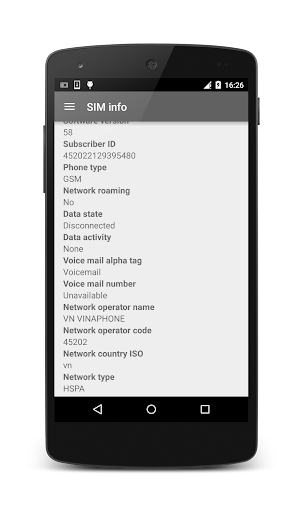
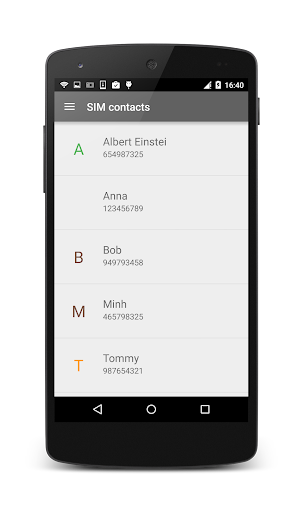
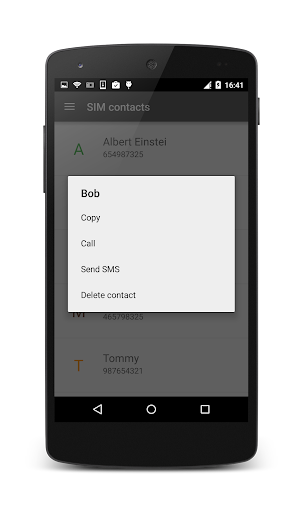
SIM Card and Contacts Transfer is the best application in Google Play for extracting information from your SIM card such as phone numbers and contacts. This application also support copying contacts from SIM card to your smartphone and vice versa. Moreover, you will enjoy Android's latest features with Material Design.
Main features:
* Copying contacts from SIM card to phone
* Copying contacts from phone to SIM card
* Get device infomation:
- Whether the device supports configuring the DTMF tone length.
- Whether making changes to modem configurations will trigger device reboot.
- State of all calls on the device.
- The card ID of the default eUICC card.
- Carrier id based on sim MCCMNC only.
- Type of activity on a data connection (cellular).
- The radio technology (network type) currently in use on the device for data transmission.
- The current data connection state (cellular).
- The unique device ID
- The software version number for the device, for example, the IMEI/SV for GSM phones.
- Forbidden PLMNs from the USIM App
- The Group Identifier Level1 for a GSM phone.
- IMEI (International Mobile Equipment Identity).
- The phone number string for line 1, for example, the MSISDN for a GSM phone.
- The Manufacturer Code from the MEID.
- The MEID (Mobile Equipment Identifier).
- The MMS user agent profile URL.
- The MMS user agent.
- The Network Access Identifier (NAI).
- The ISO country code equivalent of the MCC (Mobile Country Code) of the current registered operator or the cell nearby, if available.
- The numeric name (MCC+MNC) of current registered operator.
- The alphabetic name of current registered operator.
- The network specifier of the subscription ID pinned to the TelephonyManager.
- The network type for current data connection.
- Number of SIM cards.
- The device phone type.
- Get preferred opportunistic data subscription Id.
- Carrier id of the current subscription.
- Carrier id name of the current subscription.
- The ISO country code equivalent for the SIM provider's country code.
- The MCC+MNC (mobile country code + mobile network code) of the provider of the SIM.
- The Service Provider Name (SPN).
- The serial number of the SIM, if applicable.
- Fine-grained carrier ID of the current subscription.
- User-facing name of the specific carrier id.
- The state of the default SIM card.
- The unique subscriber ID, for example, the IMSI for a GSM phone.
- The Type Allocation Code from the IMEI.
- The package responsible of processing visual voicemail for the subscription ID pinned to the TelephonyManager.
- Retrieves the alphabetic identifier associated with the voice mail number.
- The voice mail number.
- The network type for voice
- Has the calling application been granted carrier privileges by the carrier.
- Has ICC card.
- Whether the device is currently on a technology.
- Whether mobile data is enabled or not per user setting.
- Whether mobile data roaming is enabled on the subscription.
- Whether the phone supports hearing aid compatibility.
- Whether multi SIM is supported.
- Whether the device is considered roaming on the current network, for GSM purposes.
- Whether the device currently supports RTT (Real-time text).
- Whether the current device supports sms service.
- Whether TTY is supported on this device.
- Whether the current device is "voice capable".
- Whether the device is a world phone.
* Support Android Q
* Press on any piece of information to copy it into the clipboard.
* This application does not support dual SIM card
Permissions:
* READ_PHONE_STATE - to read information from the SIM card
* READ_CONTACTS - to obtain the SIM card contact list
* WRITE_CONTACTS - to delete the selected contact
* INTERNET_ACCESS - for displaying ads
مزید دکھائیں

1. MEmu انسٹالر ڈاؤن لوڈ کریں اور سیٹ اپ مکمل کریں

2. MEmu شروع کریں اسکے بعد ڈیسکٹاپ پر Google Play کھولیں

3. Google Play میں SIM Info and Contacts Transfer تلاش کریں
Install
4. SIM Info and Contacts Transfer ڈاؤن لوڈ کریں اور انسٹال کریں
5. انسٹال مکمل ہونے کے بعد سٹارٹ کرنے کے لیے آئیکن پر کلک کریں

6. MEmu کے ساتھ پی سی پر SIM Info and Contacts Transfer کھیلنے کا لطف لیں
MEmu پلے بہترین اینڈرائڈ ایمولیٹر ہے اور 100 ملین لوگ اس کے زبردست اینڈرائڈ گیمنگ تجربہ سے لطف اندوز ہو رہے ہیں۔ MEmu کی ورچولائزیشن ٹیکنالوجی آپ کو اپنے PC پر ہزاروں اینڈرائڈ گیمز یہاں تک کہ انتہائی گرافک والے گیمز باسہولت کھیلنے کی طاقت دیتی ہے۔
بہتر گرافکس کے ساتھ بڑی اسکرین؛ طویل دورانیہ، بیٹری یا لامحدود موبائل ڈیٹا کے بغیر۔
کی بورڈ اور ماؤس یا گیم پیڈ کے عین مطابق کنٹرول کے لیے کی میپنگ کا پورا سپورٹ۔
کثیر مثالی منیجر کے ساتھ بیک وقت ایک پی سی پر متعدد گیم اکاؤنٹس یا ٹاسکس۔
پی سی پر درج ذیل مراحل پر عمل کرتے ہوئے پر SIM Info and Contacts Transfer استعمال کریں: u003c/p>