SimonsVoss MobileKey
تازہ کاری
موجودہ ورژن
4.2.0
پیشکش بذریعہ

اپنے موبائل فون پر SimonsVoss MobileKey کا استعمال کرتے وقت زیادہ چارج ہونے کی فکر نہ کریں، خود کو چھوٹی اسکرین سے آزاد کریں اور ایپ کو زیادہ بڑے ڈسپلے پر استعمال کرنے کا لطف اٹھائیں۔ اس کے بعد سے کی بورڈ اور ماؤس کے ساتھ اپنے ایپ کا فل اسکرین کا تجربہ حاصل کریں۔ MEmu آپ کو وہ تمام حیران کن خصوصیات پیش کرتا ہے جن کی آپ کو توقع کرتے ہیں: فوری انسٹال اور آسان سیٹ اپ، وجدانی کنٹرول، مزید بیٹری، موبائل ڈیٹا کی کوئی حد نہیں اور اب مزید پریشان کن کالز نہیں۔ نئے برانڈ کا MEmu 9 آپ کے کمپیوٹر پر SimonsVoss MobileKey استعمال کرنے کے لیے بہترین اختیار ہے۔ MEmu کثیر نظیری منیجر بیک وقت 2 یا اس سے زیادہ اکاؤنٹس کھولنا ممکن بناتا ہے۔ اور سب اہم بات، ہمارا خصوصی ایمولیشن انجن آپ کے پی سی کی پوری طاقت ریلیز کرتے ہوئے ہر چیز ہموار اور قابل تفریح بناتا ہے۔
مزید دکھائیں
Download SimonsVoss MobileKey on PC with MEmu Android Emulator. Enjoy playing on big screen. MobileKey app to manage DM status, access lists, remote openings, Key4Friends, programming and reception of messages from event management.
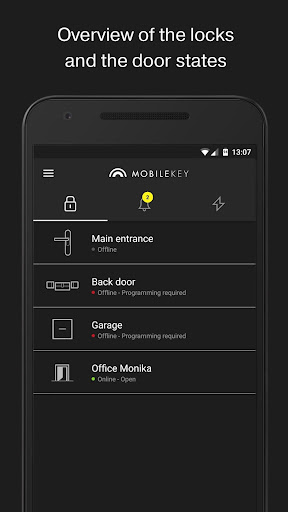
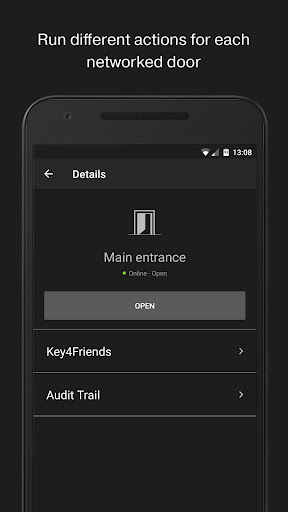
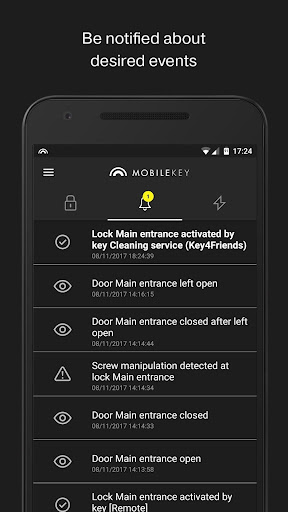
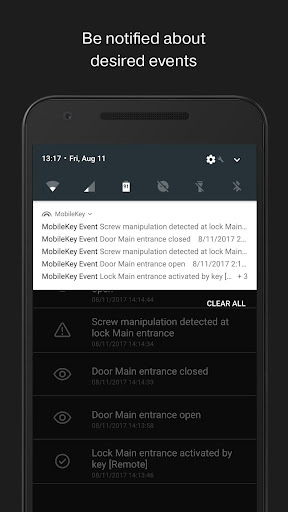
MobileKey app to manage DM status, access lists, remote openings, Key4Friends, programming and reception of messages from event management.
- Overview of door statuses (if DM cylinder used).
- Remote openings.
- Sending of Key4Friends authorisations.
- Reading and display of access list.
- Reception of push messages from event management.
- Use of touch ID for security-related actions (disable remote opening, Key4Friends, push messages).
- Keys and locks programmed using the USB config device.
The locking plan is fully managed on the MobileKey web application only, which you will find at www.my-mobilekey-com.
Extra information:
- The app requires valid log-in data for a MobileKey locking system. You need to have a MobileKey account to be able to use the account. You can register free of charge at www.my-mobilekey-com.
- Your mobile device needs to have a stable Internet connection to operate the app, such as wireless LAN or 3/4G.
- Many functions are only available with the online add-on (SmartBridge).
- Programming is only possible using an optional OTG cable, which connects the USB config device with your smartphone. Your smartphone must support this function.
Security takes top priority:
Your data is stored on an audited SimonsVoss server in Munich. You do not need to worry about data security and backups. We will do it for you and to a high standard.
Instructions:
- Create a free MobileKey account for your use.
- Obtain all MobileKey components, such as keys and locks.
- Set up the MobileKey components in the web application. You will find the precise procedure in the MobileKey manual.
- Programme the components.
- Test the components.
- Fit the components. You will find more help in the enclosed manuals.
مزید دکھائیں

1. MEmu انسٹالر ڈاؤن لوڈ کریں اور سیٹ اپ مکمل کریں

2. MEmu شروع کریں اسکے بعد ڈیسکٹاپ پر Google Play کھولیں

3. Google Play میں SimonsVoss MobileKey تلاش کریں
Install
4. SimonsVoss MobileKey ڈاؤن لوڈ کریں اور انسٹال کریں
5. انسٹال مکمل ہونے کے بعد سٹارٹ کرنے کے لیے آئیکن پر کلک کریں

6. MEmu کے ساتھ پی سی پر SimonsVoss MobileKey کھیلنے کا لطف لیں
MEmu پلے بہترین اینڈرائڈ ایمولیٹر ہے اور 100 ملین لوگ اس کے زبردست اینڈرائڈ گیمنگ تجربہ سے لطف اندوز ہو رہے ہیں۔ MEmu کی ورچولائزیشن ٹیکنالوجی آپ کو اپنے PC پر ہزاروں اینڈرائڈ گیمز یہاں تک کہ انتہائی گرافک والے گیمز باسہولت کھیلنے کی طاقت دیتی ہے۔
بہتر گرافکس کے ساتھ بڑی اسکرین؛ طویل دورانیہ، بیٹری یا لامحدود موبائل ڈیٹا کے بغیر۔
کی بورڈ اور ماؤس یا گیم پیڈ کے عین مطابق کنٹرول کے لیے کی میپنگ کا پورا سپورٹ۔
کثیر مثالی منیجر کے ساتھ بیک وقت ایک پی سی پر متعدد گیم اکاؤنٹس یا ٹاسکس۔
پی سی پر درج ذیل مراحل پر عمل کرتے ہوئے پر SimonsVoss MobileKey استعمال کریں: u003c/p>