Spatial Film
تازہ کاری
موجودہ ورژن
1.25
پیشکش بذریعہ

اپنے موبائل فون پر Spatial Film کا استعمال کرتے وقت زیادہ چارج ہونے کی فکر نہ کریں، خود کو چھوٹی اسکرین سے آزاد کریں اور ایپ کو زیادہ بڑے ڈسپلے پر استعمال کرنے کا لطف اٹھائیں۔ اس کے بعد سے کی بورڈ اور ماؤس کے ساتھ اپنے ایپ کا فل اسکرین کا تجربہ حاصل کریں۔ MEmu آپ کو وہ تمام حیران کن خصوصیات پیش کرتا ہے جن کی آپ کو توقع کرتے ہیں: فوری انسٹال اور آسان سیٹ اپ، وجدانی کنٹرول، مزید بیٹری، موبائل ڈیٹا کی کوئی حد نہیں اور اب مزید پریشان کن کالز نہیں۔ نئے برانڈ کا MEmu 9 آپ کے کمپیوٹر پر Spatial Film استعمال کرنے کے لیے بہترین اختیار ہے۔ MEmu کثیر نظیری منیجر بیک وقت 2 یا اس سے زیادہ اکاؤنٹس کھولنا ممکن بناتا ہے۔ اور سب اہم بات، ہمارا خصوصی ایمولیشن انجن آپ کے پی سی کی پوری طاقت ریلیز کرتے ہوئے ہر چیز ہموار اور قابل تفریح بناتا ہے۔
مزید دکھائیں
MEmu Play کے ساتھ PC پر Spatial Film استعمال کرنے کے شاندار تجربے سے لطف اٹھائیں۔ یہ ایک طاقتور مفت اینڈرائیڈ ایمولیٹر ہے جو آپ کو ان کے ڈیسک ٹاپ ورژن کے لیے ہزاروں اینڈرائیڈ ایپس فراہم کرتا ہے۔ دوستوں کے ساتھ جڑنے اور اعلی کارکردگی کے ساتھ اپنے کام کو چمکانے کا لطف اٹھائیں! Spatial Film is the high-performance immersive video player designed exclusively for Android XR and the Samsung Galaxy XR.
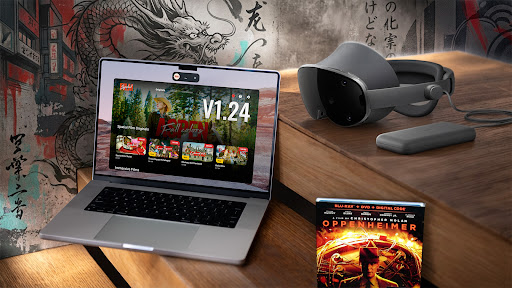
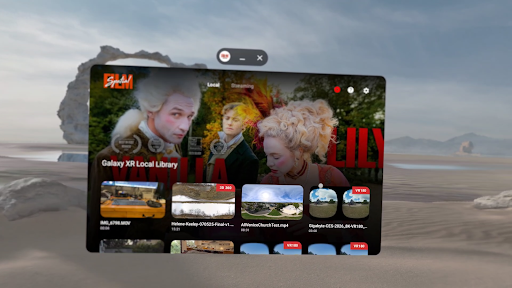
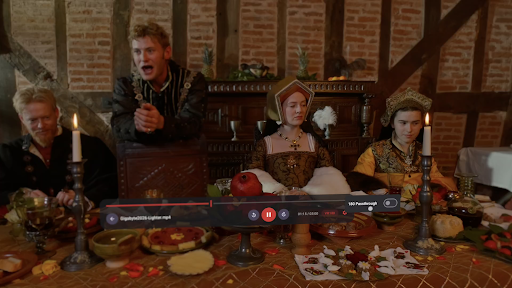
Spatial Film is the high-performance immersive video player designed exclusively for Android XR and the Samsung Galaxy XR. Unlike standard players, Spatial Film is engineered to leverage the full power of Android XR, delivering pristine 8K playback for local files and wireless streaming from your Mac or PC.
[ New ] Curved Screen Mode
Watch 2D movies on a curved virtual display that wraps around your field of view. YouTube app has a curved screen, but it doesn't let you adjust the size or tilt - we do. Adjusts automatically with your Cinema Size setting from a gentle 60° curve up to a full 130° wrap.
[ New ] Sphere Tilt
Tilt the entire video world up or down by up to 90°. Watch comfortably while lying down, reclining, or from any position. Like your personal Sphere / COSM.
[ New ] Custom Screen Size
Fine-tune your virtual screen with a slider - from a cozy Normal size all the way up to beyond IMAX. No more choosing between just two sizes.
[ New ] Air Stream 1.2.0 - Subfolder Browsing
Browse your video library with its original folder structure intact.
[ New ] 2D 180 Video Support
Play 180-degree non-3D immersive videos in full 180° mode, including footage shot on the latest Canon EOS VR system. (Exclusive feature)
[ Spatial Film Air Stream - Wireless Cinema from Your Computer ]
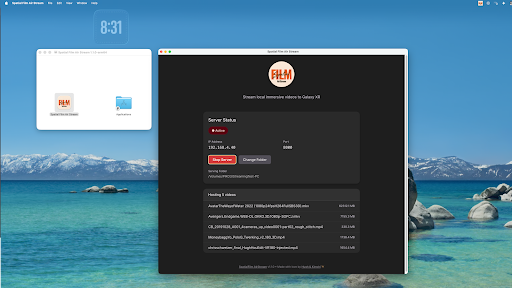
Stream Your Library: Wirelessly play your entire collection of 3D movies and immersive videos directly from your Mac or Windows PC.
Zero-Config Setup: Install our free desktop companion app, select your folders, and watch instantly.
3D MKV Support: Full support for your 3D movie collection, including Half-SBS, Full-SBS, and MKV formats.
IMAX & Custom viewing modes for 3D Cinema and Spatial Video.
8K 60fps Quality: Stream at up to 250Mbps for zero-compromise visual fidelity.
[ Key Features ]
Universal Format Support: Plays VR180, Mono 180, 3D Half/Full SBS (MKV/MP4/MOV), 3D 360°, 2D Video, 2D Moive and Spatial Videos (MV-HEVC) captured on Galaxy XR or iPhone 15/16/17 Pro.
Dual Viewing Modes:
Full Space Mode: Immerse yourself completely in the action with a distraction-free environment.
Home Space Mode: Watch Spatial Videos in a floating window with elegant edge feathering while staying aware of your surroundings (Passthrough).
8K High-Fidelity Playback: Optimized for high-bitrate content up to 8K (8192 x 4096) at 60fps, ensuring every pixel looks razor-sharp.
Kiosk / Presentation Mode: Perfect for trade shows and demos. Automatically loops playback and resets for the next viewer without manual interaction.
[ Immersive Film Library ]
Spatial Film includes a growing library of 20+ original immersive 3D 180 films - from travel documentaries to live music performances to cinematic short films. New titles added monthly. Available for unlock inside the app.
[ How to Use Air Stream ]
- Download the free Spatial Film Air Stream Companion app for Mac or Windows here: https://www.patreon.com/collection/1982804
- Add your movie folders to the companion app.
- Open Spatial Film on your headset and verify you are on the same Wi-Fi.
- Your library appears instantly in the "Air Stream" tab - browse folders and click to play!
Spatial Film is free and always will be. Built with love by filmmakers, for filmmakers. We believe the best immersive video player should be accessible to everyone - creators and viewers alike.
مزید دکھائیں

1. MEmu انسٹالر ڈاؤن لوڈ کریں اور سیٹ اپ مکمل کریں

2. MEmu شروع کریں اسکے بعد ڈیسکٹاپ پر Google Play کھولیں

3. Google Play میں Spatial Film تلاش کریں
Install
4. Spatial Film ڈاؤن لوڈ کریں اور انسٹال کریں
5. انسٹال مکمل ہونے کے بعد سٹارٹ کرنے کے لیے آئیکن پر کلک کریں

6. MEmu کے ساتھ پی سی پر Spatial Film کھیلنے کا لطف لیں
MEmu پلے بہترین اینڈرائڈ ایمولیٹر ہے اور 100 ملین لوگ اس کے زبردست اینڈرائڈ گیمنگ تجربہ سے لطف اندوز ہو رہے ہیں۔ MEmu کی ورچولائزیشن ٹیکنالوجی آپ کو اپنے PC پر ہزاروں اینڈرائڈ گیمز یہاں تک کہ انتہائی گرافک والے گیمز باسہولت کھیلنے کی طاقت دیتی ہے۔
بہتر گرافکس کے ساتھ بڑی اسکرین؛ طویل دورانیہ، بیٹری یا لامحدود موبائل ڈیٹا کے بغیر۔
کی بورڈ اور ماؤس یا گیم پیڈ کے عین مطابق کنٹرول کے لیے کی میپنگ کا پورا سپورٹ۔
کثیر مثالی منیجر کے ساتھ بیک وقت ایک پی سی پر متعدد گیم اکاؤنٹس یا ٹاسکس۔
پی سی پر درج ذیل مراحل پر عمل کرتے ہوئے پر Spatial Film استعمال کریں: u003c/p>