VesselFinder
تازہ کاری
موجودہ ورژن
5.8.0
پیشکش بذریعہ

اپنے موبائل فون پر VesselFinder کا استعمال کرتے وقت زیادہ چارج ہونے کی فکر نہ کریں، خود کو چھوٹی اسکرین سے آزاد کریں اور ایپ کو زیادہ بڑے ڈسپلے پر استعمال کرنے کا لطف اٹھائیں۔ اس کے بعد سے کی بورڈ اور ماؤس کے ساتھ اپنے ایپ کا فل اسکرین کا تجربہ حاصل کریں۔ MEmu آپ کو وہ تمام حیران کن خصوصیات پیش کرتا ہے جن کی آپ کو توقع کرتے ہیں: فوری انسٹال اور آسان سیٹ اپ، وجدانی کنٹرول، مزید بیٹری، موبائل ڈیٹا کی کوئی حد نہیں اور اب مزید پریشان کن کالز نہیں۔ نئے برانڈ کا MEmu 9 آپ کے کمپیوٹر پر VesselFinder استعمال کرنے کے لیے بہترین اختیار ہے۔ MEmu کثیر نظیری منیجر بیک وقت 2 یا اس سے زیادہ اکاؤنٹس کھولنا ممکن بناتا ہے۔ اور سب اہم بات، ہمارا خصوصی ایمولیشن انجن آپ کے پی سی کی پوری طاقت ریلیز کرتے ہوئے ہر چیز ہموار اور قابل تفریح بناتا ہے۔
مزید دکھائیں
Download VesselFinder on PC with MEmu Android Emulator. Enjoy playing on big screen. VesselFinder is the most popular vessel tracking app, providing real-time data on the positions and movements of vessels, utilising a large network of satellites and terrestrial AIS receivers.
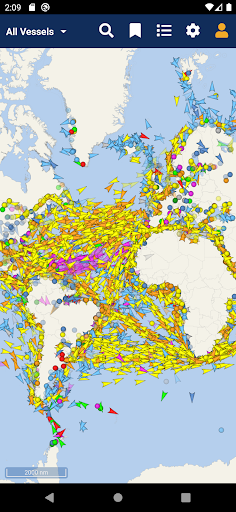
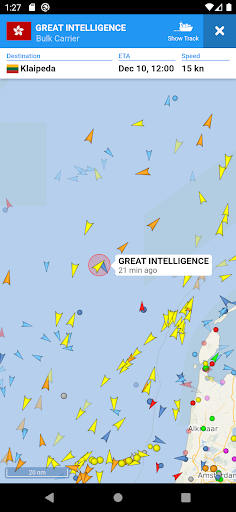
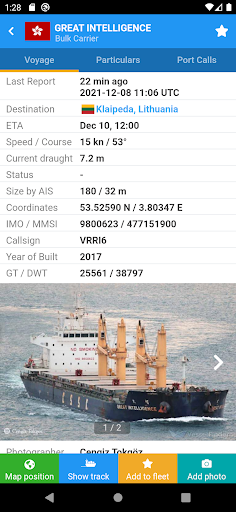
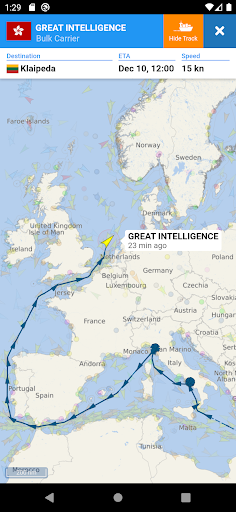
VesselFinder is the most popular vessel tracking app, providing real-time data on the positions and movements of vessels, utilising a large network of satellites and terrestrial AIS receivers.
VesselFinder features include:
- Real-time tracking of over 200,000 ships every day
- Ship search by Name, IMO number or MMSI number
- Ship movements history
- Ship details - name, flag, type, IMO, MMSI, destination, ETA, draught, course, speed, gross tonnage, year of built, size and more
- Port search by Name or LOCODE
- Port Calls per ship – time of arrival and stay in ports
- Port Calls per port – detailed list of all vessels Expected, Arrivals, Departures and currently In Port
- My Fleet - add your favourite vessels to "My Fleet," synchronised with your VesselFinder account
- My Views - save your favourite map views for quick navigation
- Ship photos contributed by VesselFinder users
- Simple, Detailed, Dark and Satellite maps
- Weather layers (temperature, wind, waves)
- See Your Location feature
- Distance Measure tool
IMPORTANT:
If you experience any problem with the App, please fill this form to contact us http://www.vesselfinder.com/contact instead of writing a review here. We will do our best to solve it. Thanks!
Visibility of vessels in the App depends on AIS signal availability. If a particular vessel is out of our AIS coverage zone, VesselFinder displays her last reported position and updates it as soon as the vessel comes into range. Completeness and accuracy of the information provided cannot be guaranteed.
Connect with VesselFinder
- on Facebook: http://www.facebook.com/vesselfinder
- on Twitter http://www.twitter.com/vesselfinder
مزید دکھائیں

1. MEmu انسٹالر ڈاؤن لوڈ کریں اور سیٹ اپ مکمل کریں

2. MEmu شروع کریں اسکے بعد ڈیسکٹاپ پر Google Play کھولیں

3. Google Play میں VesselFinder تلاش کریں
Install
4. VesselFinder ڈاؤن لوڈ کریں اور انسٹال کریں
5. انسٹال مکمل ہونے کے بعد سٹارٹ کرنے کے لیے آئیکن پر کلک کریں

6. MEmu کے ساتھ پی سی پر VesselFinder کھیلنے کا لطف لیں
MEmu پلے بہترین اینڈرائڈ ایمولیٹر ہے اور 100 ملین لوگ اس کے زبردست اینڈرائڈ گیمنگ تجربہ سے لطف اندوز ہو رہے ہیں۔ MEmu کی ورچولائزیشن ٹیکنالوجی آپ کو اپنے PC پر ہزاروں اینڈرائڈ گیمز یہاں تک کہ انتہائی گرافک والے گیمز باسہولت کھیلنے کی طاقت دیتی ہے۔
بہتر گرافکس کے ساتھ بڑی اسکرین؛ طویل دورانیہ، بیٹری یا لامحدود موبائل ڈیٹا کے بغیر۔
کی بورڈ اور ماؤس یا گیم پیڈ کے عین مطابق کنٹرول کے لیے کی میپنگ کا پورا سپورٹ۔
کثیر مثالی منیجر کے ساتھ بیک وقت ایک پی سی پر متعدد گیم اکاؤنٹس یا ٹاسکس۔
پی سی پر درج ذیل مراحل پر عمل کرتے ہوئے پر VesselFinder استعمال کریں: u003c/p>