Voice Changer AI Effects
تازہ کاری
موجودہ ورژن
1.1.2
پیشکش بذریعہ

اپنے موبائل فون پر Voice Changer AI Effects کا استعمال کرتے وقت زیادہ چارج ہونے کی فکر نہ کریں، خود کو چھوٹی اسکرین سے آزاد کریں اور ایپ کو زیادہ بڑے ڈسپلے پر استعمال کرنے کا لطف اٹھائیں۔ اس کے بعد سے کی بورڈ اور ماؤس کے ساتھ اپنے ایپ کا فل اسکرین کا تجربہ حاصل کریں۔ MEmu آپ کو وہ تمام حیران کن خصوصیات پیش کرتا ہے جن کی آپ کو توقع کرتے ہیں: فوری انسٹال اور آسان سیٹ اپ، وجدانی کنٹرول، مزید بیٹری، موبائل ڈیٹا کی کوئی حد نہیں اور اب مزید پریشان کن کالز نہیں۔ نئے برانڈ کا MEmu 9 آپ کے کمپیوٹر پر Voice Changer AI Effects استعمال کرنے کے لیے بہترین اختیار ہے۔ MEmu کثیر نظیری منیجر بیک وقت 2 یا اس سے زیادہ اکاؤنٹس کھولنا ممکن بناتا ہے۔ اور سب اہم بات، ہمارا خصوصی ایمولیشن انجن آپ کے پی سی کی پوری طاقت ریلیز کرتے ہوئے ہر چیز ہموار اور قابل تفریح بناتا ہے۔
مزید دکھائیں
Download Voice Changer AI Effects on PC with MEmu Android Emulator. Enjoy playing on big screen. Voice Changer - AI Effects: Transforming Audio with Fun and Ease.
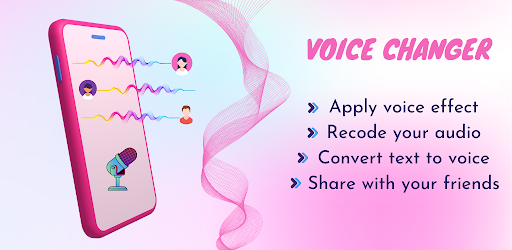
Voice Changer - AI Effects: Transforming Audio with Fun and Ease.
Voice Changer - AI Effects is a versatile and user-friendly mobile application that allows you to fine-tune audio files and the audio of video files with ease. Whether you're a content creator, a prankster, or simply someone looking to add a touch of humor to your recordings, this app offers a plethora of features and effects to enhance your audio experience. With its intuitive interface and an extensive collection of voice effects, Voice Changer - AI Effects empowers users to create hilarious and entertaining content effortlessly.
✔ Fine-tuning Audio and Video Files:
Free Voice Changer Editor app excels in its ability to fine-tune both audio and video files. With this app, you gain complete control over your sound recordings, enabling you to transform them into something truly unique. Whether it's a podcast, a voiceover, or a personal video, the app offers a seamless editing experience, allowing you to enhance your audio to perfection.
✔ Free Funny Voice Changer App:
Standout among its peers, Funny Voice Changer - Voice Effect is a free app, ensuring accessibility to a wide range of users. Now, you can explore the endless possibilities of transforming your voice without any cost limitations.
✔ Extensive Collection of Voice Effects:
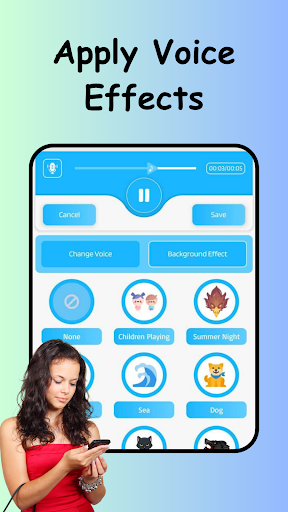
Voice Changer - AI Effects boasts an extensive collection of voice effects, providing you with a wide range of options to create the funniest audio imaginable. From traditional high-pitched helium voices to deep and resonating robot voices, the app offers a comprehensive library of effects that will undoubtedly leave you spoilt for choice. Experimenting with different voice effects has never been easier, allowing you to craft your audio to match your creative vision.
✔ Easy Voice Change for Videos:
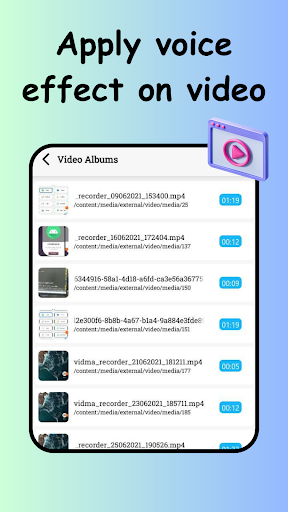
In addition to audio files, Voice Changer - AI Effects provides a seamless way to modify the voice in video files as well. This feature opens up a whole new world of possibilities for content creators, enabling them to enhance their videos with personalized and entertaining voiceovers. With just a few simple steps, you can transform the audio of any video and give it a fresh and humorous touch.
✔ Apply Background Voice Effects:
Voice Changer - AI Effects takes your audio and video editing to the next level with its background voice effects. These effects allow you to add an additional layer of audio to your recordings, creating a more immersive and captivating experience. Whether you want to simulate a bustling street, a concert crowd, or even an alien invasion, the app provides an array of background voice effects to enhance the ambiance and atmosphere of your recordings.
✔ Save and Share Your Creations:
Voice Changer - AI Effects recognizes the importance of sharing your creativity with your loved ones. With just a few taps, you can save your audio or video creations to your device and share them across various social media platforms or messaging apps.
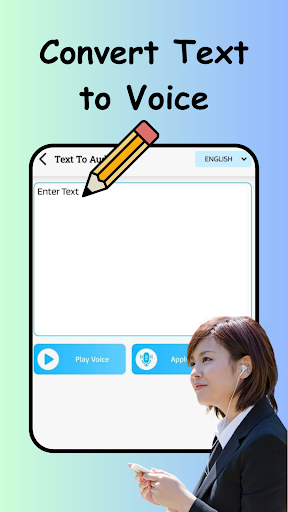
✔ Convert Text to Audio and Apply Effects Directly:
With Voice Changer - AI Effects, you can even convert text to audio and apply effects directly to it. Whether you want to narrate a story, create a personalized message, or add a unique twist to your audio content, the app streamlines the process, making it quick and convenient.
✔ Record Your Voice with Funny and Background Effects:
Voice Changer - Free Audio Effects enables you to record your voice directly within the app and apply funny and background effects to it. This feature allows you to unleash your creativity on the spot, capturing spontaneous moments and enhancing them with entertaining effects. Whether you're looking to entertain yourself or engage in interactive conversations, the app provides a seamless recording experience, ensuring that your voice is infused with laughter and amusement.
* If you find any issues or suggestions, feel free to let us know at mailto:mystrylabapp@gmail.com
مزید دکھائیں

1. MEmu انسٹالر ڈاؤن لوڈ کریں اور سیٹ اپ مکمل کریں

2. MEmu شروع کریں اسکے بعد ڈیسکٹاپ پر Google Play کھولیں

3. Google Play میں Voice Changer AI Effects تلاش کریں
Install
4. Voice Changer AI Effects ڈاؤن لوڈ کریں اور انسٹال کریں
5. انسٹال مکمل ہونے کے بعد سٹارٹ کرنے کے لیے آئیکن پر کلک کریں

6. MEmu کے ساتھ پی سی پر Voice Changer AI Effects کھیلنے کا لطف لیں
MEmu پلے بہترین اینڈرائڈ ایمولیٹر ہے اور 100 ملین لوگ اس کے زبردست اینڈرائڈ گیمنگ تجربہ سے لطف اندوز ہو رہے ہیں۔ MEmu کی ورچولائزیشن ٹیکنالوجی آپ کو اپنے PC پر ہزاروں اینڈرائڈ گیمز یہاں تک کہ انتہائی گرافک والے گیمز باسہولت کھیلنے کی طاقت دیتی ہے۔
بہتر گرافکس کے ساتھ بڑی اسکرین؛ طویل دورانیہ، بیٹری یا لامحدود موبائل ڈیٹا کے بغیر۔
کی بورڈ اور ماؤس یا گیم پیڈ کے عین مطابق کنٹرول کے لیے کی میپنگ کا پورا سپورٹ۔
کثیر مثالی منیجر کے ساتھ بیک وقت ایک پی سی پر متعدد گیم اکاؤنٹس یا ٹاسکس۔
پی سی پر درج ذیل مراحل پر عمل کرتے ہوئے پر Voice Changer AI Effects استعمال کریں: u003c/p>