Volume Styles - Custom control
تازہ کاری
موجودہ ورژن
4.4.1
پیشکش بذریعہ

اپنے موبائل فون پر Volume Styles - Custom control کا استعمال کرتے وقت زیادہ چارج ہونے کی فکر نہ کریں، خود کو چھوٹی اسکرین سے آزاد کریں اور ایپ کو زیادہ بڑے ڈسپلے پر استعمال کرنے کا لطف اٹھائیں۔ اس کے بعد سے کی بورڈ اور ماؤس کے ساتھ اپنے ایپ کا فل اسکرین کا تجربہ حاصل کریں۔ MEmu آپ کو وہ تمام حیران کن خصوصیات پیش کرتا ہے جن کی آپ کو توقع کرتے ہیں: فوری انسٹال اور آسان سیٹ اپ، وجدانی کنٹرول، مزید بیٹری، موبائل ڈیٹا کی کوئی حد نہیں اور اب مزید پریشان کن کالز نہیں۔ نئے برانڈ کا MEmu 9 آپ کے کمپیوٹر پر Volume Styles - Custom control استعمال کرنے کے لیے بہترین اختیار ہے۔ MEmu کثیر نظیری منیجر بیک وقت 2 یا اس سے زیادہ اکاؤنٹس کھولنا ممکن بناتا ہے۔ اور سب اہم بات، ہمارا خصوصی ایمولیشن انجن آپ کے پی سی کی پوری طاقت ریلیز کرتے ہوئے ہر چیز ہموار اور قابل تفریح بناتا ہے۔
مزید دکھائیں
Download Volume Styles - Custom control on PC with MEmu Android Emulator. Enjoy playing on big screen. Take full control of your volume sliders with the most advanced volume app on the Play Store.
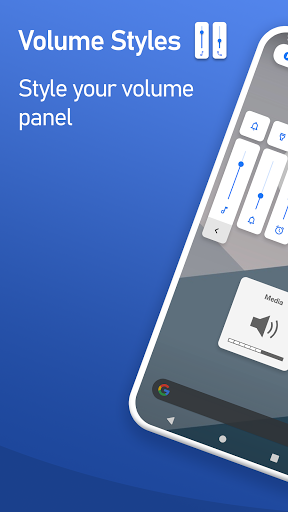
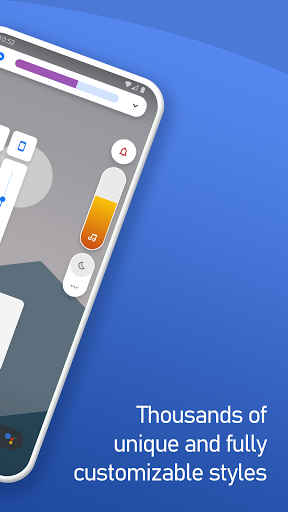
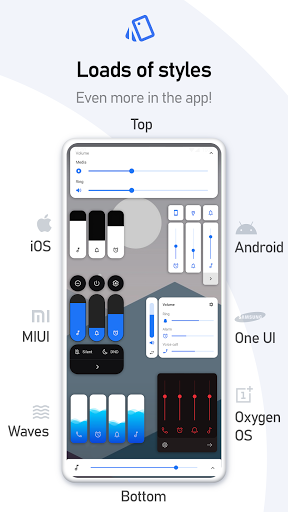
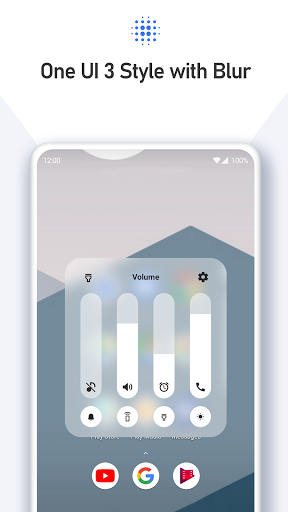
Take full control of your volume sliders with the most advanced volume app on the Play Store.
Volume Styles lets you fully customize your phone's volume panel and sliders.
Change the colors, apply different themes such as iOS & MIUI, change the position, and more! You have full control.
You can even add additional shortcuts in the volume panel, and change the brightness, to make accessing things faster.
STYLES
Easily apply any style to your volume slider in just one tap:
• Android 10
• iOS 13
• Xiaomi MIUI
• Samsung One UI
• OnePlus OxygenOS
• Android Oreo horizontal sliders
• Huawei EMUI
• Windows 10
• RGB
• Color OS
• Paranoid Android
• Vivo Funtouch OS
• Realme UI
• iOS 12
• Windows Phone
• Volume knob
• ... and thousands of more styles inside the app
Volume Styles also includes a custom Style Creator where you can customize things to the extreme.
When you have designed your perfect style, you can submit it to the Style Feed along with thousands of other styles created by the community.
Simply favorite a style in the Style Feed to save it for later, or apply it instantly with a single tap.
SLIDERS
Change which volume sliders are shown. You can even add a brightness slider!
• Media volume
• Ring volume
• Notification volume
• Alarm volume
• Voice call volume
• System volume
• Bluetooth volume
• Cast volume
• Brightness
CUSTOMIZE
Style the volume panel exactly how you like:
• Apply the colors you want
• Auto dark mode
• Change the corner radius
• Volume control panel position on screen
• Volume panel show duration
• ... and more!
ADD SHORTCUTS
• Live Caption
• Toggle rotation
• Flashlight / Torch
• Screenshot
• Split screen
• Settings shortcut
• Turn off screen
• Open sound settings
• Toggle Do Not Disturb
• Toggle sound mode ( silent / vibrate / ring )
• Toggle auto brightness
• Toggle media volume
• Toggle notification volume
• Toggle alarm volume
• Toggle voice call volume
• Toggle system volume
Volume Styles uses Accessibility Services to override the volume buttons.
LINKS
• Frequently Asked Questions: tombayley.dev/apps/volume-styles/faq/
• Twitter: twitter.com/tombayleyapps
• Telegram: t.me/joinchat/Kcx0ChlfocHjvUuzI1w0ZA
• Email: support@tombayley.dev
مزید دکھائیں

1. MEmu انسٹالر ڈاؤن لوڈ کریں اور سیٹ اپ مکمل کریں

2. MEmu شروع کریں اسکے بعد ڈیسکٹاپ پر Google Play کھولیں

3. Google Play میں Volume Styles - Custom control تلاش کریں
Install
4. Volume Styles - Custom control ڈاؤن لوڈ کریں اور انسٹال کریں
5. انسٹال مکمل ہونے کے بعد سٹارٹ کرنے کے لیے آئیکن پر کلک کریں

6. MEmu کے ساتھ پی سی پر Volume Styles - Custom control کھیلنے کا لطف لیں
MEmu پلے بہترین اینڈرائڈ ایمولیٹر ہے اور 100 ملین لوگ اس کے زبردست اینڈرائڈ گیمنگ تجربہ سے لطف اندوز ہو رہے ہیں۔ MEmu کی ورچولائزیشن ٹیکنالوجی آپ کو اپنے PC پر ہزاروں اینڈرائڈ گیمز یہاں تک کہ انتہائی گرافک والے گیمز باسہولت کھیلنے کی طاقت دیتی ہے۔
بہتر گرافکس کے ساتھ بڑی اسکرین؛ طویل دورانیہ، بیٹری یا لامحدود موبائل ڈیٹا کے بغیر۔
کی بورڈ اور ماؤس یا گیم پیڈ کے عین مطابق کنٹرول کے لیے کی میپنگ کا پورا سپورٹ۔
کثیر مثالی منیجر کے ساتھ بیک وقت ایک پی سی پر متعدد گیم اکاؤنٹس یا ٹاسکس۔
پی سی پر درج ذیل مراحل پر عمل کرتے ہوئے پر Volume Styles - Custom control استعمال کریں: u003c/p>