WebAura Browser & Downloader
تازہ کاری
موجودہ ورژن
1.4.8
پیشکش بذریعہ

اپنے موبائل فون پر WebAura Browser & Downloader کا استعمال کرتے وقت زیادہ چارج ہونے کی فکر نہ کریں، خود کو چھوٹی اسکرین سے آزاد کریں اور ایپ کو زیادہ بڑے ڈسپلے پر استعمال کرنے کا لطف اٹھائیں۔ اس کے بعد سے کی بورڈ اور ماؤس کے ساتھ اپنے ایپ کا فل اسکرین کا تجربہ حاصل کریں۔ MEmu آپ کو وہ تمام حیران کن خصوصیات پیش کرتا ہے جن کی آپ کو توقع کرتے ہیں: فوری انسٹال اور آسان سیٹ اپ، وجدانی کنٹرول، مزید بیٹری، موبائل ڈیٹا کی کوئی حد نہیں اور اب مزید پریشان کن کالز نہیں۔ نئے برانڈ کا MEmu 9 آپ کے کمپیوٹر پر WebAura Browser & Downloader استعمال کرنے کے لیے بہترین اختیار ہے۔ MEmu کثیر نظیری منیجر بیک وقت 2 یا اس سے زیادہ اکاؤنٹس کھولنا ممکن بناتا ہے۔ اور سب اہم بات، ہمارا خصوصی ایمولیشن انجن آپ کے پی سی کی پوری طاقت ریلیز کرتے ہوئے ہر چیز ہموار اور قابل تفریح بناتا ہے۔
مزید دکھائیں
MEmu Play کے ساتھ PC پر WebAura Browser & Downloader استعمال کرنے کے شاندار تجربے سے لطف اٹھائیں۔ یہ ایک طاقتور مفت اینڈرائیڈ ایمولیٹر ہے جو آپ کو ان کے ڈیسک ٹاپ ورژن کے لیے ہزاروں اینڈرائیڈ ایپس فراہم کرتا ہے۔ دوستوں کے ساتھ جڑنے اور اعلی کارکردگی کے ساتھ اپنے کام کو چمکانے کا لطف اٹھائیں! WebAura is a private browser, smart downloader and full audio player built for faster browsing, easier saving and better listening across the web.
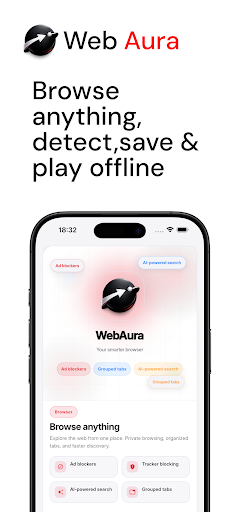
WebAura is a private browser, smart downloader and full audio player built for faster browsing, easier saving and better listening across the web.
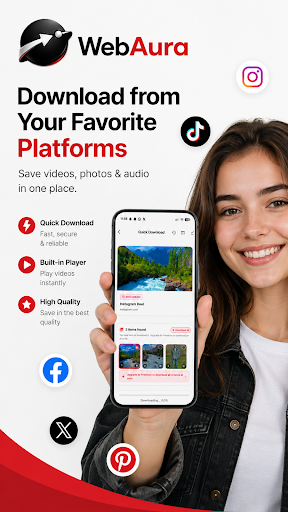
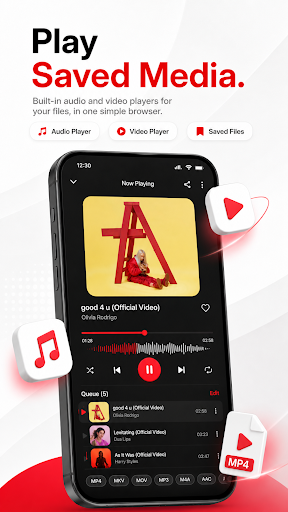
Browse pages, detect media and save videos, audio, images and files from many websites in one place. WebAura is especially useful on pages that do not show a visible download button, helping you find and save supported content more easily. Saved audio plays in a built-in library with playlists, favourites and background playback — so the music you collect stays organised and keeps playing while you use other apps.
Why users choose WebAura
• Private browser with a clean modern interface
• Smart media detection for video, audio and downloadable files
• Save content from many websites and supported platforms
• Works well on pages with no visible save or download button
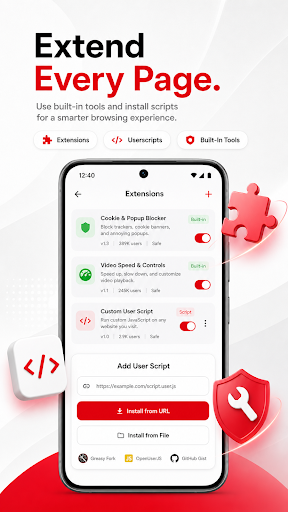
• Browser extensions support to expand what the app can do
• Built-in audio library with playlists and favourites
• Background audio playback with lock-screen and notification controls
• Add audio from direct links and have it saved into a "From Links" playlist
• Plays music from your phone's on-device library as well as saved files
• Filter and sort your library by app downloads, phone audio, name, size or recent
• Picture-in-picture video playback on supported devices
• Quality options for video saves (standard, HD, Full HD)
• Ad blocking and tracker blocking for a cleaner browsing experience
• Powerful search with smart suggestions and AI-assisted options
• Secure browsing tools, including Secure DNS
• Save links for later with built-in link management and storage
• Grouped tabs and navigation preferences for better organisation
• In-browser player for audio and video playback
• Offline pages for content you want to revisit later
• Performance boost up to 6× for faster tasks
• Support for many languages
Made for browsing, saving and listening
WebAura combines a browser, downloader, player, link manager and extensions in one app. Open a page, browse normally, detect available media, preview it in the built-in player and save what you need without jumping between different apps. Music and audio files live in a dedicated library with playlists, favourites and a proper player screen — with shuffle, repeat, speed control and artwork.
Built for modern web pages
Some websites make downloads easy. Others do not show a save option at all. WebAura is designed to help on both, with smart detection, secure browsing tools, extension support and better organisation for saved links and files.
Your audio library, always ready
Every track you save appears in the audio library with smart filters for app downloads and phone music. Create playlists, heart favourites and add tracks directly from a link — WebAura detects supported audio URLs and saves them into a playlist for easy access later. The player runs in the background with lock-screen controls, headset support and notification playback, so a podcast or album keeps going while you switch tasks.
Main features
• Browser downloader
• Video downloader
• Audio downloader
• Browser extensions support
• Audio library with playlists and favourites
• Add from link — save supported audio URLs directly
• Background playback with lock-screen controls
• Phone music integration
• Media saver
• Private browsing
• Ad blocker
• Tracker blocker
• Offline pages
• Grouped tabs
• Link storage
• In-browser player
• Picture-in-picture video playback
• Secure DNS
• Smart search
• Multi-language support
• Premium option for an ad-free experience and additional audio features
WebAura is a strong choice for users who want a private browser with downloader tools, extension support, a proper audio library and easier saving from supported pages across the web.
مزید دکھائیں

1. MEmu انسٹالر ڈاؤن لوڈ کریں اور سیٹ اپ مکمل کریں

2. MEmu شروع کریں اسکے بعد ڈیسکٹاپ پر Google Play کھولیں

3. Google Play میں WebAura Browser & Downloader تلاش کریں
Install
4. WebAura Browser & Downloader ڈاؤن لوڈ کریں اور انسٹال کریں
5. انسٹال مکمل ہونے کے بعد سٹارٹ کرنے کے لیے آئیکن پر کلک کریں

6. MEmu کے ساتھ پی سی پر WebAura Browser & Downloader کھیلنے کا لطف لیں
MEmu پلے بہترین اینڈرائڈ ایمولیٹر ہے اور 100 ملین لوگ اس کے زبردست اینڈرائڈ گیمنگ تجربہ سے لطف اندوز ہو رہے ہیں۔ MEmu کی ورچولائزیشن ٹیکنالوجی آپ کو اپنے PC پر ہزاروں اینڈرائڈ گیمز یہاں تک کہ انتہائی گرافک والے گیمز باسہولت کھیلنے کی طاقت دیتی ہے۔
بہتر گرافکس کے ساتھ بڑی اسکرین؛ طویل دورانیہ، بیٹری یا لامحدود موبائل ڈیٹا کے بغیر۔
کی بورڈ اور ماؤس یا گیم پیڈ کے عین مطابق کنٹرول کے لیے کی میپنگ کا پورا سپورٹ۔
کثیر مثالی منیجر کے ساتھ بیک وقت ایک پی سی پر متعدد گیم اکاؤنٹس یا ٹاسکس۔
پی سی پر درج ذیل مراحل پر عمل کرتے ہوئے پر WebAura Browser & Downloader استعمال کریں: u003c/p>