Whisperian: AI Voice to Text
تازہ کاری
موجودہ ورژن
پیشکش بذریعہ

اپنے موبائل فون پر Whisperian: AI Voice to Text کا استعمال کرتے وقت زیادہ چارج ہونے کی فکر نہ کریں، خود کو چھوٹی اسکرین سے آزاد کریں اور ایپ کو زیادہ بڑے ڈسپلے پر استعمال کرنے کا لطف اٹھائیں۔ اس کے بعد سے کی بورڈ اور ماؤس کے ساتھ اپنے ایپ کا فل اسکرین کا تجربہ حاصل کریں۔ MEmu آپ کو وہ تمام حیران کن خصوصیات پیش کرتا ہے جن کی آپ کو توقع کرتے ہیں: فوری انسٹال اور آسان سیٹ اپ، وجدانی کنٹرول، مزید بیٹری، موبائل ڈیٹا کی کوئی حد نہیں اور اب مزید پریشان کن کالز نہیں۔ نئے برانڈ کا MEmu 9 آپ کے کمپیوٹر پر Whisperian: AI Voice to Text استعمال کرنے کے لیے بہترین اختیار ہے۔ MEmu کثیر نظیری منیجر بیک وقت 2 یا اس سے زیادہ اکاؤنٹس کھولنا ممکن بناتا ہے۔ اور سب اہم بات، ہمارا خصوصی ایمولیشن انجن آپ کے پی سی کی پوری طاقت ریلیز کرتے ہوئے ہر چیز ہموار اور قابل تفریح بناتا ہے۔
مزید دکھائیں
MEmu Play کے ساتھ PC پر Whisperian: AI Voice to Text استعمال کرنے کے شاندار تجربے سے لطف اٹھائیں۔ یہ ایک طاقتور مفت اینڈرائیڈ ایمولیٹر ہے جو آپ کو ان کے ڈیسک ٹاپ ورژن کے لیے ہزاروں اینڈرائیڈ ایپس فراہم کرتا ہے۔ دوستوں کے ساتھ جڑنے اور اعلی کارکردگی کے ساتھ اپنے کام کو چمکانے کا لطف اٹھائیں! Whisperian is a voice dictation tool made for developers, project managers, writers, and anyone who doesn't like typing and wants to bring their advanced speech-to-text workflows to their Android devices.
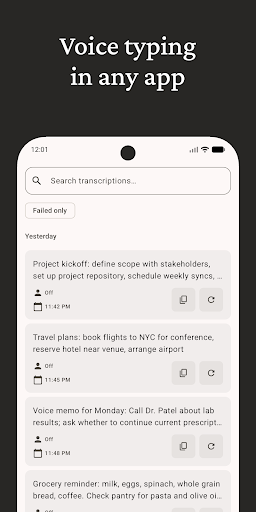
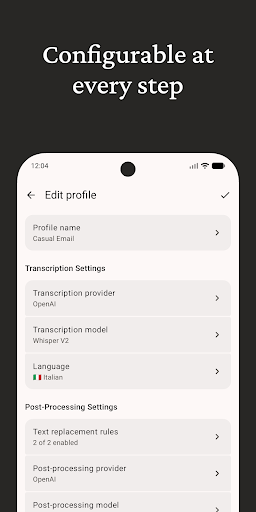
Whisperian is a voice dictation tool made for developers, project managers, writers, and anyone who doesn't like typing and wants to bring their advanced speech-to-text workflows to their Android devices.
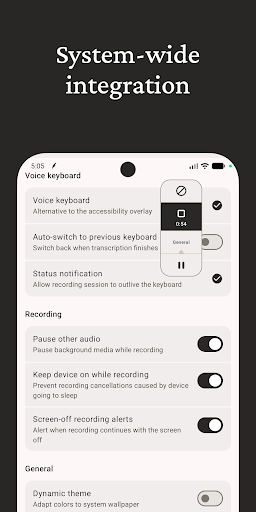
The app integrates with the Android system either as a voice keyboard or as a compact, system-wide overlay that stays out of the way when you don’t need it.
Whisperian includes most of the features you’d expect from modern dictation tools, as seen in apps like Superwhisper, as long as they fit the app’s philosophy: avoiding putting limitations on user freedom.
The app's goal is to provide basic building blocks necessary for creating advanced workflows (e.g., custom command modes).
We will exclusively focus on improving the dictation experience instead of trying to duplicate functionality better handled by dedicated apps (e.g., note-taking).
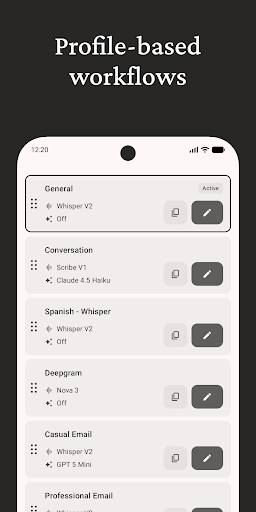
Dictation settings are mostly managed through profiles. Each profile allows you to configure the transcription and post-processing provider/model, language, custom prompts, and text replacement rules.
The app includes continuously evolving default configurations that are ready to use out of the box but can also serve as a starting reference point for experimentation.
The app is currently in early access, and we are offering all the features for free during this period.
The only way to use the app is by providing your own API keys for the services you want to use for processing.
There is no sign-up required, and there are no cloud features yet.
To make the system-wide integration possible, Whisperian uses an Accessibility service to show the system-wide overlay. The accessibility service is used to detect when the keyboard is visible to show or hide the overlay, start the recording session on user action, and read the active text field and cursor position to insert text. It also is used to identify input field types to avoid appearing for fields where dictation doesn't make sense, like password or number fields.
No data accessed via this service is stored or shared.
مزید دکھائیں

1. MEmu انسٹالر ڈاؤن لوڈ کریں اور سیٹ اپ مکمل کریں

2. MEmu شروع کریں اسکے بعد ڈیسکٹاپ پر Google Play کھولیں

3. Google Play میں Whisperian: AI Voice to Text تلاش کریں
Install
4. Whisperian: AI Voice to Text ڈاؤن لوڈ کریں اور انسٹال کریں
5. انسٹال مکمل ہونے کے بعد سٹارٹ کرنے کے لیے آئیکن پر کلک کریں

6. MEmu کے ساتھ پی سی پر Whisperian: AI Voice to Text کھیلنے کا لطف لیں
MEmu پلے بہترین اینڈرائڈ ایمولیٹر ہے اور 100 ملین لوگ اس کے زبردست اینڈرائڈ گیمنگ تجربہ سے لطف اندوز ہو رہے ہیں۔ MEmu کی ورچولائزیشن ٹیکنالوجی آپ کو اپنے PC پر ہزاروں اینڈرائڈ گیمز یہاں تک کہ انتہائی گرافک والے گیمز باسہولت کھیلنے کی طاقت دیتی ہے۔
بہتر گرافکس کے ساتھ بڑی اسکرین؛ طویل دورانیہ، بیٹری یا لامحدود موبائل ڈیٹا کے بغیر۔
کی بورڈ اور ماؤس یا گیم پیڈ کے عین مطابق کنٹرول کے لیے کی میپنگ کا پورا سپورٹ۔
کثیر مثالی منیجر کے ساتھ بیک وقت ایک پی سی پر متعدد گیم اکاؤنٹس یا ٹاسکس۔
پی سی پر درج ذیل مراحل پر عمل کرتے ہوئے پر Whisperian: AI Voice to Text استعمال کریں: u003c/p>