All Dubs
更新日期
当前版本
1.10.0
提供者

爱玩All Dubs的你,双手不应该被束缚在手机的小屏幕上。像职业选手一样用键盘和滑鼠来全面控制你的游戏吧。在电脑上下载、安装All Dubs并尽情游玩。再也不用担心剩余电量、流量消耗和烦人的来电。全新的逍遥模拟器8是你在电脑上游玩All Dubs的好选择!我们用心准备,完美的按键映射系统让All Dubs宛如电脑游戏;
更多
透过逍遥模拟器,在电脑上下载All Dubs,享受大荧屏的畅快体验。 Can you build the perfect team and finish the season undefeated?



Can you build the perfect team and finish the season undefeated?
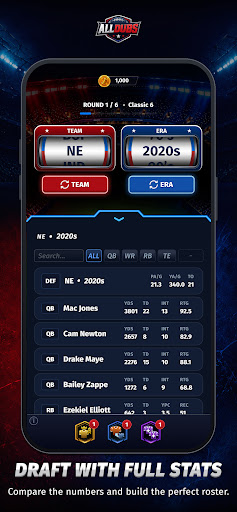
ALL DUBS is the football roster-building game where every pick matters. Spin for a random team and era, draft the best player available, build your ultimate offense and defense, and see if your squad has what it takes to complete a perfect season.
Choose superstars, compare eras, test your football knowledge, and chase the ultimate goal: ALL DUBS.
Build your dream squad
Spin teams and eras
Build your offense and defense
Simulate your season record
Chase the perfect season
Share your results with friends
Whether you’re a casual fan, football history nerd, fantasy football addict, or just love debating all-time teams, ALL DUBS is built for you.
Draft smart. Trust your instincts. Build greatness.
Can you go ALL DUBS?
更多

1. 下载逍遥安装器并完成设置

2. 启动逍遥后打开位于桌面上的谷歌商店

3. 在谷歌商店中搜索All Dubs
Install
4. 下载并安装All Dubs
5. 下载完成后点击图标来启动

6. 通过逍遥在电脑上享受All Dubs
逍遥安卓是优秀的安卓模拟器,全球超过5000万用户的优先选择。逍遥安卓以虚拟化技术为核心,为用户打造突破手机配置局限的游戏平台!
大屏精细展示;无限待机,超越电池和流量限制
键鼠、手把操作全面支持,操作更精准
用逍遥多开同时运行多个游戏、应用。
Play All Dubs on PC by following steps: