Blade War:Three Kingdoms
更新日期
当前版本
6.1.7.0
提供者

爱玩Blade War:Three Kingdoms的你,双手不应该被束缚在手机的小屏幕上。像职业选手一样用键盘和滑鼠来全面控制你的游戏吧。在电脑上下载、安装Blade War:Three Kingdoms并尽情游玩。再也不用担心剩余电量、流量消耗和烦人的来电。全新的逍遥模拟器8是你在电脑上游玩Blade War:Three Kingdoms的好选择!我们用心准备,完美的按键映射系统让Blade War:Three Kingdoms宛如电脑游戏;
更多
透过逍遥模拟器,在电脑上下载Blade War:Three Kingdoms,享受大荧屏的畅快体验。 凛冽的寒风席卷三国,一段全新的故事等待着你的笔触!


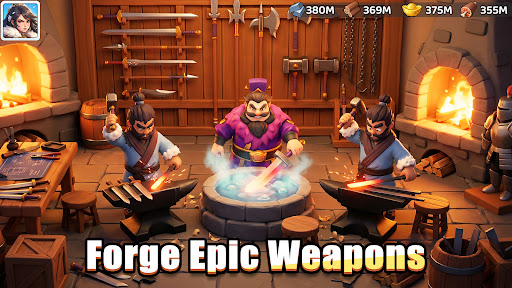

凛冽的寒风席卷三国,一段全新的故事等待着你的笔触!
作为一位仁慈的领主,敞开大门,接纳流浪的难民,并与免费 SSR 英雄貂蝉携手并肩。
你们将共同踏上一段温暖人心的旅程,点燃希望之火,在古代世界的冰封边疆建立一座温馨繁荣的小镇!
救援与庇护:给予温暖,收获力量
难民们冒着暴风雪,寻找着一个家。
欢迎他们,点燃篝火,让他们找到归属感!
每一位新来者都拥有独特的才能——为他们分配角色,见证你冰封的村庄如何绽放出温暖繁荣的光芒!
放置与收益:源源不断的奖励
只需轻轻一点,即可让你的村民砍柴、锻造工具、储备物资,然后回来就能看到堆积如山的货物,为你的下一次大规模扩张做好准备——一切都轻松无压力。
播种与建设:从冰封的田野到温馨的家园
清除积雪,耕耘土地,在冰天雪地上播下你的第一批作物!
收获新鲜的农产品来养活你的人民,然后收集木材和石头来建造温暖的小屋、热闹的作坊和宏伟的大厅。
你播下的每一粒种子,你盖起的每一座屋顶,都将为你的小镇带来新的生机!
计划与搭配:英雄组合
所有英雄等级相同,因此你可以轻松升级和更换,无需反复刷怪。
混合搭配他们的技能,打造终极组合,保护你的人民免受严寒侵袭!
团结与繁荣:共享温暖
加入联盟,共享物资,在冰雪中伸出援手,共同成长。
邻里互助——这就是我们战胜严寒、共同繁荣的秘诀!
更多

1. 下载逍遥安装器并完成设置

2. 启动逍遥后打开位于桌面上的谷歌商店

3. 在谷歌商店中搜索Blade War:Three Kingdoms
Install
4. 下载并安装Blade War:Three Kingdoms
5. 下载完成后点击图标来启动

6. 通过逍遥在电脑上享受Blade War:Three Kingdoms
逍遥安卓是优秀的安卓模拟器,全球超过5000万用户的优先选择。逍遥安卓以虚拟化技术为核心,为用户打造突破手机配置局限的游戏平台!
大屏精细展示;无限待机,超越电池和流量限制
键鼠、手把操作全面支持,操作更精准
用逍遥多开同时运行多个游戏、应用。
Play Blade War:Three Kingdoms on PC by following steps: