Cake Coloring 3D
更新日期
当前版本
1.42
提供者

爱玩Cake Coloring 3D的你,双手不应该被束缚在手机的小屏幕上。像职业选手一样用键盘和滑鼠来全面控制你的游戏吧。在电脑上下载、安装Cake Coloring 3D并尽情游玩。再也不用担心剩余电量、流量消耗和烦人的来电。全新的逍遥模拟器8是你在电脑上游玩Cake Coloring 3D的好选择!我们用心准备,完美的按键映射系统让Cake Coloring 3D宛如电脑游戏;
更多
透过逍遥模拟器,在电脑上下载Cake Coloring 3D,享受大荧屏的畅快体验。 通过为各个部分着色,以 3D 形式绘制漂亮的蛋糕。


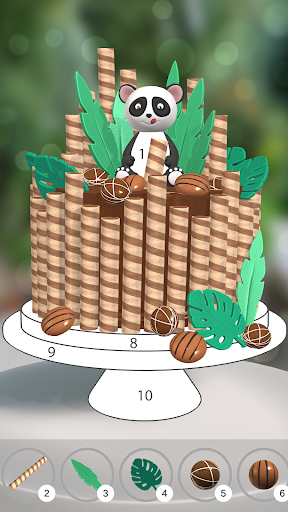
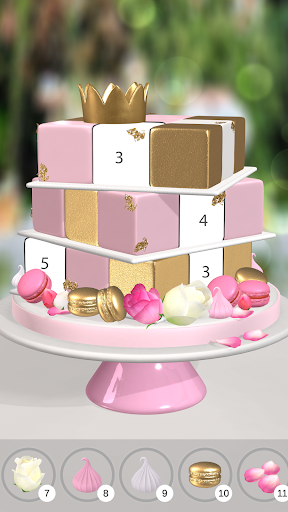
通过为各个部分着色,以 3D 形式绘制漂亮的蛋糕。就像涂色书游戏一样,您可以按数字绘画。从调色板中选择一种颜色,然后按数字为每个元素着色,直到蛋糕完全着色。
我们的蛋糕是全3D的。滑动以旋转,然后点击以在找到此着色拼图的所有碎片时进行绘画。使用提示快速找到隐藏的对象。
我们的蛋糕看起来逼真,对成年人和蛋糕爱好者很有吸引力。从我们惊人的蛋糕设计中获取灵感。
绘画是平静和放松的。启用黑暗模式绘画,在睡觉前在床上放松。放松身心,享受我们美丽的蛋糕!
更多

1. 下载逍遥安装器并完成设置

2. 启动逍遥后打开位于桌面上的谷歌商店

3. 在谷歌商店中搜索Cake Coloring 3D
Install
4. 下载并安装Cake Coloring 3D
5. 下载完成后点击图标来启动

6. 通过逍遥在电脑上享受Cake Coloring 3D
逍遥安卓是优秀的安卓模拟器,全球超过5000万用户的优先选择。逍遥安卓以虚拟化技术为核心,为用户打造突破手机配置局限的游戏平台!
大屏精细展示;无限待机,超越电池和流量限制
键鼠、手把操作全面支持,操作更精准
用逍遥多开同时运行多个游戏、应用。
Play Cake Coloring 3D on PC by following steps:





![リアル麻雀 雀龍門M [麻雀ゲーム]电脑版](https://dl.memuplay.com/new_market/img/jp.co.ncjapan.janryumon.icon.2025-06-14-13-53-44.png)