Zeeverse电脑版

Zeeverse电脑版下载

Zeeverse电脑版
  • 更新日期

  • 当前版本

    1.14.0

  • 提供者

    Zeeverse电脑版

Zeeverse电脑版简介

爱玩Zeeverse的你,双手不应该被束缚在手机的小屏幕上。像职业选手一样用键盘和滑鼠来全面控制你的游戏吧。在电脑上下载、安装Zeeverse并尽情游玩。再也不用担心剩余电量、流量消耗和烦人的来电。全新的逍遥模拟器8是你在电脑上游玩Zeeverse的好选择!我们用心准备,完美的按键映射系统让Zeeverse宛如电脑游戏;

更多

Zeeverse电脑版截图&视频

透过逍遥模拟器,在电脑上下载Zeeverse,享受大荧屏的畅快体验。 Zeeverse is an open-world creature collecting RPG where you explore magical realms, hatch spirit creatures, battle in strategic team combat, craft powerful gear, and shape a player-driven economy in a living online adventure.

游戏信息

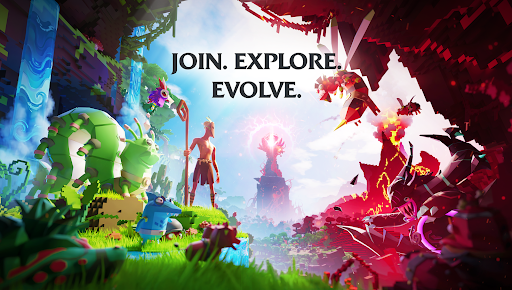
Zeeverse is an open-world creature collecting RPG where you explore magical realms, hatch spirit creatures, battle in strategic team combat, craft powerful gear, and shape a player-driven economy in a living online adventure. Play solo or join friends in co-op quests as you uncover the mysteries of the Spirit Realm and build your perfect creature squad.

Explore a Magical Open World

Travel through enchanted islands, mystical forests, ancient ruins, and spirit-filled zones. Every area is packed with secrets, resources, creatures to tame, quests to complete, and adventures to discover. Whether you enjoy a cozy exploration experience or fast-paced action, Zeeverse offers a fantasy open world shaped by your decisions.

Collect, Hatch & Train Unique Creatures

Find eggs, hatch magical creatures, and build a team of spirit companions with unique abilities, elements, and personalities. Train your creatures, evolve their skills, and create your ultimate creature squad. With elemental combinations, creature roles, and strategic depth, every battle feels fresh and rewarding.

Strategic Team Battles

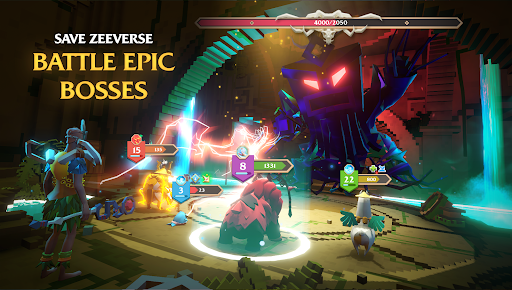
Battle wild creatures, bosses, and rival tamers using turn-based combat designed for both new players and RPG veterans. Form a team that leverages elemental synergies, creature roles, buffs, debuffs, and combos. Build your perfect creature team builder fantasy and master the spirit battle system.

Play With Friends in Co-Op Multiplayer

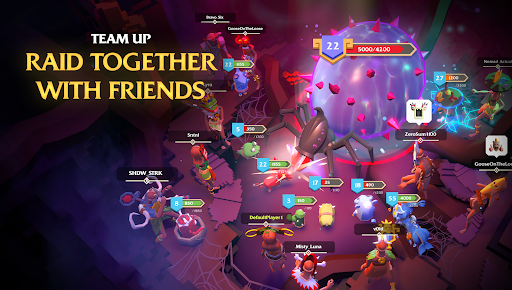
Join friends in co-op adventures, complete team quests, explore dungeons, and take down world bosses together. Zeeverse is a multiplayer RPG experience where teamwork matters. Form groups, create parties, join guilds, and experience an online creature adventure built around community.

Crafting, Gathering & Player Economy

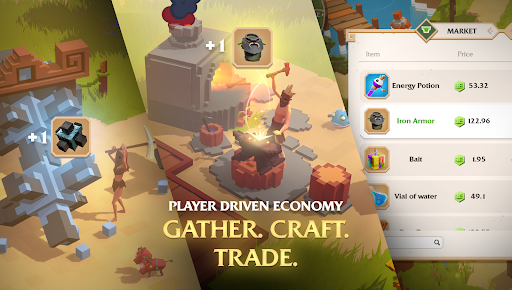
Gather resources across the world, craft items, upgrade gear, and trade with other players in a dynamic player-driven economy. Every resource you collect has value. Whether you enjoy being a gatherer, crafter, trader, merchant, or explorer, Zeeverse lets you shape your own economic path. Craft, trade, sell, and create your own market identity.

Master Skills & Progress Your Character

Level up your abilities across gathering, crafting, battling, and exploration. Master multiple skills and build your ideal playstyle. Whether you prefer being a spirit tamer, creature trainer, explorer, crafter, or co-op adventurer, you’ll always be improving and unlocking new gameplay possibilities.

A Magical World With No Pay-to-Win

Zeeverse is built around fair progression. No pay-to-win mechanics. Your success comes from strategy, exploration, skill mastery, and smart creature team building—not purchases. Enjoy a fair, competitive creature RPG experience.

A Growing Online Adventure

Regular updates bring new creatures, new quests, new events, new islands, crafting recipes, seasonal content, and more. The world evolves with the community.

更多

在电脑上下载Zeeverse

  • Zeeverse电脑版

    1. 下载逍遥安装器并完成设置

  • Zeeverse电脑版

    2. 启动逍遥后打开位于桌面上的谷歌商店

  • Zeeverse电脑版

    3. 在谷歌商店中搜索Zeeverse

  • Zeeverse电脑版 Install

    4. 下载并安装Zeeverse

  • Zeeverse电脑版

    5. 下载完成后点击图标来启动

  • Zeeverse电脑版
    Zeeverse电脑版 Zeeverse电脑版

    6. 通过逍遥在电脑上享受Zeeverse

为什么用逍遥体验Zeeverse

逍遥安卓是优秀的安卓模拟器,全球超过5000万用户的优先选择。逍遥安卓以虚拟化技术为核心,为用户打造突破手机配置局限的游戏平台!

  • 大屏精细展示;无限待机,超越电池和流量限制

  • 键鼠、手把操作全面支持,操作更精准

  • 用逍遥多开同时运行多个游戏、应用。

准备好游玩了吗?

热门话题

Zeeverse - FAQs

  • How to play Zeeverse on PC?

    Play Zeeverse on PC by following steps:

    • Download MEmu, then install and launch it
    • Login to Google Play Store, install the game
    • Enjoy playing the game on PC with MEmu
  • What are the minimum system requirements to run Zeeverse on PC?
    • Intel or AMD Processor
    • Microsoft Windows 7 and above
    • 2GB of memory
    • 5GB of free disk space
    • Hardware Virtualization Technology