Weltkrieg 1: Firestorm
更新日期
当前版本
提供者

爱玩Weltkrieg 1: Firestorm的你,双手不应该被束缚在手机的小屏幕上。像职业选手一样用键盘和滑鼠来全面控制你的游戏吧。在电脑上下载、安装Weltkrieg 1: Firestorm并尽情游玩。再也不用担心剩余电量、流量消耗和烦人的来电。全新的逍遥模拟器8是你在电脑上游玩Weltkrieg 1: Firestorm的好选择!我们用心准备,完美的按键映射系统让Weltkrieg 1: Firestorm宛如电脑游戏;
更多
透过逍遥模拟器,在电脑上下载Weltkrieg 1: Firestorm,享受大荧屏的畅快体验。 Weltkrieg 1: Firestorm — World War I Multiplayer Shooter.
Weltkrieg 1: Firestorm — World War I Multiplayer Shooter
Weltkrieg 1: Firestorm is a mobile multiplayer shooter inspired by the battles and atmosphere of World War I. Step into a new kind of historical warfare built for mobile devices — where teamwork, tactics, and skill define every match.
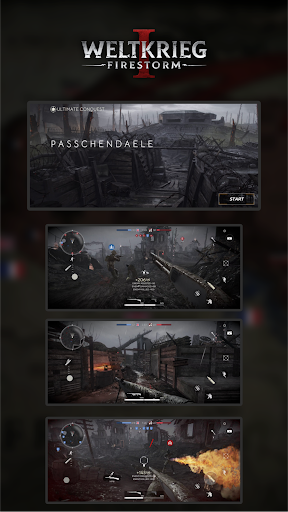
Join intense online battles where you fight side by side with your squad, capture key positions, defend strategic areas, and push through the frontline. Every match is designed to feel dynamic and competitive, with constant action and moments of tactical decision-making.
ONLINE MULTIPLAYER COMBAT
Experience large-scale online matches designed for fast gameplay and strong team interaction:
6v6 and 10v10 multiplayer battles
dynamic fights with squads and teamwork
smooth controls built for mobile shooters
fast-paced action with tactical depth
Whether you prefer aggressive frontline gameplay or supporting your teammates from a smart position, Weltkrieg 1 offers a team-based battlefield experience where coordination matters.
HISTORICAL WWI-INSPIRED LOCATIONS
Weltkrieg 1: Firestorm takes players into immersive environments inspired by iconic World War I battlefields. Fight on war-torn landscapes filled with trenches, mud, craters, broken trees, ruined structures, and frontline fortifications.
Maps are carefully crafted to deliver:
strong WW1 atmosphere and immersion
detailed locations inspired by real battlefields
balanced combat flow for both small and large team fights
multiple routes and tactical positions for different playstyles
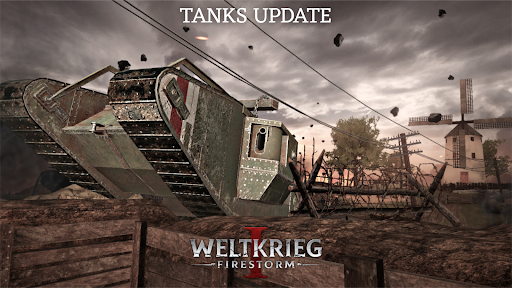
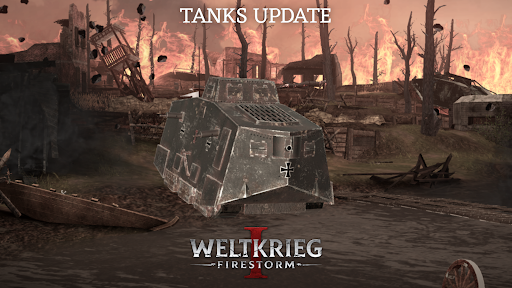
TANKS OF THE WORLD WAR I ERA
Weltkrieg 1 is not only about infantry. The battlefield also features tanks from the World War I era, and players can enter combat as armored vehicles.
Tanks allow you to:
support your team during key moments
push through defensive lines
change the rhythm of the battle
create new strategic opportunities
Playing as a tank feels powerful and impactful, while still staying balanced and fair within the match flow.
UNIQUE FACTIONS & SPECIAL CLASSES
Weltkrieg 1 is built around faction identity and team roles. Each faction features its own atmosphere, visuals, and combat style — including special classes unique to that side.
Special classes give your team new tactical options and can strongly influence key moments of the match, offering different roles beyond standard infantry gameplay.
POPULAR GAME MODES
Choose your preferred mode and fight for victory in classic multiplayer formats:
Team Deathmatch — constant action where every elimination matters
Ultimate Conquest — large-scale battles focused on controlling objectives and territory
Each mode brings a different rhythm and requires different coordination — from fast combat rotations to objective-based teamwork.
CHOOSE YOUR ROLE AND PLAY YOUR STYLE
The battlefield needs more than just firepower. Choose a soldier class that fits your style and helps the team win:
frontline fighters who lead the push
tactical support roles that keep the squad effective
objective-focused gameplay based on teamwork
Weltkrieg 1 is designed around team play, so every role matters.
MADE FOR MOBILE PERFORMANCE
Weltkrieg 1: Firestorm is built with mobile performance in mind, aiming to provide:
smooth gameplay
stable online matches
optimized experience across different devices
Weltkrieg 1: Firestorm brings World War I multiplayer battles to mobile — with atmosphere, action, teamwork, and large-scale online matches.
Download now and join the fight.
更多

1. 下载逍遥安装器并完成设置

2. 启动逍遥后打开位于桌面上的谷歌商店

3. 在谷歌商店中搜索Weltkrieg 1: Firestorm
Install
4. 下载并安装Weltkrieg 1: Firestorm
5. 下载完成后点击图标来启动

6. 通过逍遥在电脑上享受Weltkrieg 1: Firestorm
逍遥安卓是优秀的安卓模拟器,全球超过5000万用户的优先选择。逍遥安卓以虚拟化技术为核心,为用户打造突破手机配置局限的游戏平台!
大屏精细展示;无限待机,超越电池和流量限制
键鼠、手把操作全面支持,操作更精准
用逍遥多开同时运行多个游戏、应用。
Play Weltkrieg 1: Firestorm on PC by following steps: