
Airgap: Private AI Chat
更新日期
当前版本
1.24.0
提供者

想体验Airgap: Private AI Chat,可是手机屏幕太小,用一会就变烫,怎么办?使用逍遥模拟器,在电脑的大屏幕上畅快体验!在电脑上下载安装Airgap: Private AI Chat,不用担心电量问题,想体验多久就多久,顺畅用一天~全新的逍遥模拟器9,绝对是您体验Airgap: Private AI Chat电脑版的好选择。完美的按键映射系统让Airgap: Private AI Chat如PC端般运行;强大的多开功能可同时使用多个应用;独家虚拟化技术更能彻底发挥电脑效能,保障长时间稳定运作。我们致力于不让设备限制您的体验,用起来轻松高效,畅快无比!
更多
使用逍遙模擬器在電腦上享受Airgap: Private AI Chat的卓越體驗。這是一款功能強大的免費安卓模擬器,為您提供數千款安卓應用程式的桌面版本。與好友互動,有效率完成工作,盡情享受! Airgap is the private LLM client for Android — connect to any AI model, self-hosted on your own server or through a hosted provider like OpenRouter, OpenAI, or Groq.
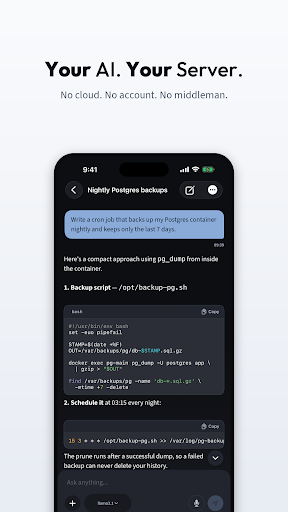
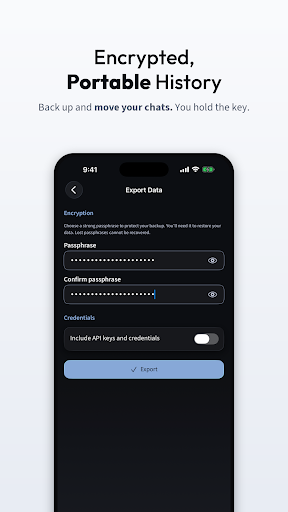
Airgap is the private LLM client for Android — connect to any AI model, self-hosted on your own server or through a hosted provider like OpenRouter, OpenAI, or Groq. No middleman: your device connects directly to the endpoint you choose. No data collection.
Connect any OpenAI-compatible endpoint and Airgap is the mobile client you've been missing.
WHO IS THIS FOR?
Airgap works with any OpenAI-compatible endpoint — your own server or a hosted provider.
• Developers running Ollama or LM Studio on a home machine
• Users connecting to OpenRouter, OpenAI, or Groq without a middleman app
• Privacy-first users who want direct, unproxied AI access
• Home lab and self-hosting enthusiasts
• Teams evaluating private LLM deployments
CONNECT IN SECONDS
1. Start your LLM server or get an API key from a hosted provider
2. Enter the endpoint address in Airgap
3. Pick a model
4. Chat from your phone — anywhere
COMPATIBLE ENDPOINTS
Local servers:
• Ollama
• LM Studio
• vLLM
• llama.cpp server
• LocalAI
• text-generation-webui
Hosted providers:
• OpenRouter (routes to many model providers)
• OpenAI, Together AI, Fireworks, Groq
• Any OpenAI-compatible API
POWERFUL CHAT EXPERIENCE
• Real-time streaming responses
• Markdown rendering with code syntax highlighting
• One-tap copy for messages and code blocks
• Model selection and instant switching
• Image and file attachments (vision-model dependent)
• Token usage tracking per message
• Thinking/reasoning model support
• Voice input for hands-free prompting
• Chat history with local storage
DEVICE TOOLS — YOUR AI, HANDS-ON [PRO]
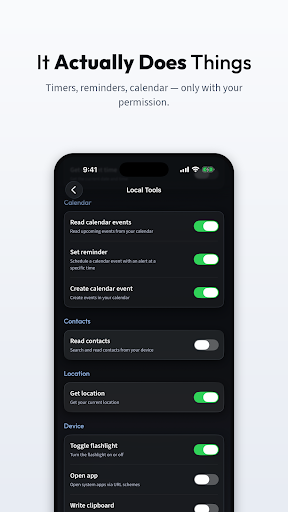
Give your AI real-world capabilities. Airgap can connect your model to native Android features — with your explicit permission and confirmation for every action.
Calendar & Reminders
• Read upcoming events
• Create calendar events
• Set reminders with notifications
Communication
• Send SMS messages
• Read contacts
• View recent call history
Device Control
• Set alarms and timers
• Toggle flashlight
• Adjust volume (media, ring, alarm)
• Toggle Do Not Disturb
Information
• Get device status (battery, storage, connectivity)
• Get current location
• Search files on your device
• Read notifications
• Read and write clipboard
Utilities
• Launch any installed app by name
Every write action requires your confirmation. Every permission is requested individually. You stay in control.
PRIVACY BY ARCHITECTURE
Airgap is not "privacy-focused" as a feature — it's private by design.
• No relay — your device connects directly to the provider you choose
• No app account or sign-up required
• No chat content collected by Airgap — only sent to your configured server
• No analytics on conversation content
• API keys encrypted and stored locally
• Open connection — you see exactly where your data goes
WHY AIRGAP?
Most AI apps route your prompts through corporate servers. Airgap does the opposite — it talks directly to the provider you choose.
Whether you're running a 7B model on a Raspberry Pi, a 70B model on a multi-GPU rig, or using OpenRouter for hosted models, Airgap gives you a polished mobile interface without the middleman.
No middleman. Airgap doesn't relay or store your chats. Just your device and the endpoint you choose.
更多

1. 下载逍遥安装器并完成设置

2. 启动逍遥后打开位于桌面上的谷歌商店

3. 在谷歌商店中搜索Airgap: Private AI Chat
Install
4. 下载并安装Airgap: Private AI Chat
5. 下载完成后点击图标来启动

6. 通过逍遥在电脑上享受Airgap: Private AI Chat
逍遥安卓是优秀的安卓模拟器,全球超过5000万用户的优先选择。逍遥安卓以虚拟化技术为核心,为用户打造突破手机配置局限的游戏平台!
大屏精细展示;无限待机,超越电池和流量限制
键鼠、手把操作全面支持,操作更精准
用逍遥多开同时运行多个游戏、应用。
Use Airgap: Private AI Chat on PC by following steps: