Clipboard Manager - ClipChain
更新日期
当前版本
2.0.2
提供者

想体验Clipboard Manager - ClipChain,可是手机屏幕太小,用一会就变烫,怎么办?使用逍遥模拟器,在电脑的大屏幕上畅快体验!在电脑上下载安装Clipboard Manager - ClipChain,不用担心电量问题,想体验多久就多久,顺畅用一天~全新的逍遥模拟器9,绝对是您体验Clipboard Manager - ClipChain电脑版的好选择。完美的按键映射系统让Clipboard Manager - ClipChain如PC端般运行;强大的多开功能可同时使用多个应用;独家虚拟化技术更能彻底发挥电脑效能,保障长时间稳定运作。我们致力于不让设备限制您的体验,用起来轻松高效,畅快无比!
更多
使用逍遙模擬器在電腦上享受Clipboard Manager - ClipChain的卓越體驗。這是一款功能強大的免費安卓模擬器,為您提供數千款安卓應用程式的桌面版本。與好友互動,有效率完成工作,盡情享受! Auto-save what you copy, keep snippet notes, and paste with one tap without switching apps.
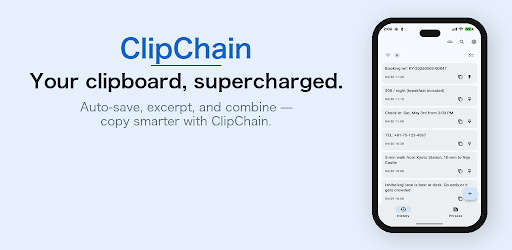
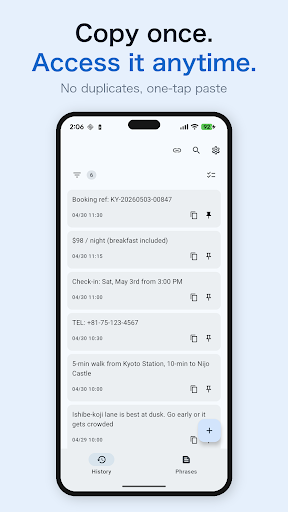
Auto-save what you copy, keep snippet notes, and paste with one tap without switching apps.
No ads, ever. All features free for 7 days, then a one-time purchase to keep using it (no monthly fees).
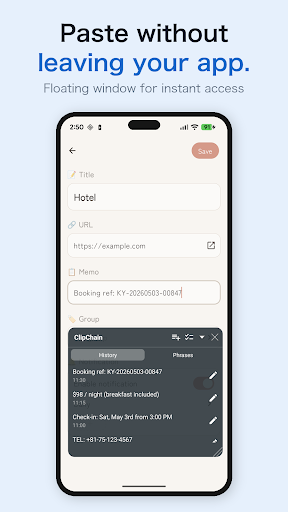
Keep bits of articles as notes to search later, or save signatures as snippets for quick emails. Paste from a small window without leaving your app. Snippets can come from copied text and go into folders.
Your text stays on your device (unless you set up Google Drive backup).
◆ Pricing: 7 days free, then a one-time purchase
• No ads, during the trial or after
• All features free for 7 days from first launch
• Never charged automatically; not a subscription
• Purchase carries over to new devices via your Google account
• The trial is tracked per device; reinstalling doesn't restart it
• Internet is needed to confirm the trial; if not confirmed within 24 hours, use pauses until you connect
◆ Features
■ Automatic copy history
Everything you copy is saved, without duplicates.
■ One-tap paste from a small window
Tap an item to paste it into the text field. Resize and move the window anytime.
■ Quick access
Open the window from a movable floating button, or show it only when a text field is focused.
■ Snippet notepad in folders
Save greetings and templates like notes in folders; paste with one tap. History items can become snippets.
◆ Getting started
1. Allow "Notifications", "Accessibility", and "Display over other apps"
2. Copy as usual; text is saved automatically
3. Tap the floating button, then tap text to paste
Turn off battery optimization for reliable operation.
◆ More features
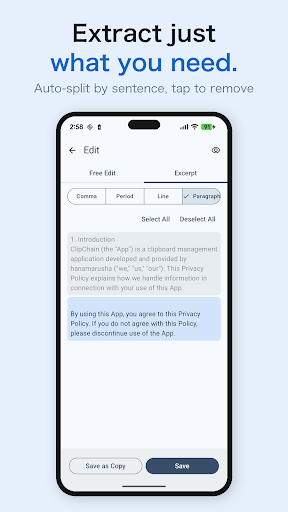
■ Excerpt mode: split long text by sentence, line, or paragraph
■ Combined paste: paste several items joined by line breaks, spaces, or custom separators
■ Search & pin: full-text search; pin favorites
■ Sorting: by date, last copied, text or title, or copy count; drag in "Custom"
■ Auto-save on/off & manual save
■ Notification & Quick Settings tile to see or save the latest clip
■ History limit & auto-delete (pinned items stay)
■ Trash: restore within 30 days
■ Backup: export/import and Google Drive; daily or weekly auto backup (last 5 auto and 5 manual kept)
■ Dark theme: light, dark, or system, dark floating window, dynamic and accent colors, font sizes
◆ Great for when you want to…
• Use a PC-style clipboard history on your phone
• Reuse greetings and reply templates
• Paste your address or email into forms
• Extract just the paragraphs you need from long text
◆ When your keyboard's clipboard isn't enough
Keyboard clipboards keep few items and clear them. ClipChain keeps a lasting, searchable history, plus excerpt and combined paste.
◆ Privacy
• Data stays on your device
• Google Drive backup only if you set it up, in an app-only area of your Drive
• For passwords, turn off auto-save and save manually
◆ Before you start
• Auto-save and the floating window require the AccessibilityService
◆ FAQ
Q. Is my data deleted when the trial ends?
A. No. The app stops, but data stays and you continue after purchase. Export still works.
Q. Is there a monthly fee?
A. No. You pay once.
Q. Is copied text sent outside my device?
A. No. It's stored only on your device.
* Google Drive backup, if set up, saves to an app-only area of your own Drive.
◆ About the AccessibilityService API
Used to save copied text automatically and to show the floating window. No data is collected or shared through it.
更多

1. 下载逍遥安装器并完成设置

2. 启动逍遥后打开位于桌面上的谷歌商店

3. 在谷歌商店中搜索Clipboard Manager - ClipChain
Install
4. 下载并安装Clipboard Manager - ClipChain
5. 下载完成后点击图标来启动

6. 通过逍遥在电脑上享受Clipboard Manager - ClipChain
逍遥安卓是优秀的安卓模拟器,全球超过5000万用户的优先选择。逍遥安卓以虚拟化技术为核心,为用户打造突破手机配置局限的游戏平台!
大屏精细展示;无限待机,超越电池和流量限制
键鼠、手把操作全面支持,操作更精准
用逍遥多开同时运行多个游戏、应用。
Use Clipboard Manager - ClipChain on PC by following steps: