FahrPlaner
更新日期
当前版本
7.0.1 (98)
提供者

想体验FahrPlaner,可是手机屏幕太小,用一会就变烫,怎么办?使用逍遥模拟器,在电脑的大屏幕上畅快体验!在电脑上下载安装FahrPlaner,不用担心电量问题,想体验多久就多久,顺畅用一天~全新的逍遥模拟器9,绝对是您体验FahrPlaner电脑版的好选择。完美的按键映射系统让FahrPlaner如PC端般运行;强大的多开功能可同时使用多个应用;独家虚拟化技术更能彻底发挥电脑效能,保障长时间稳定运作。我们致力于不让设备限制您的体验,用起来轻松高效,畅快无比!
更多
透过逍遥模拟器,在电脑上下载FahrPlaner,享受大荧屏的畅快体验。 FahrPlaner app for limitless individual mobility: public transport, bike-sharing, car-sharing, taxi or on foot.
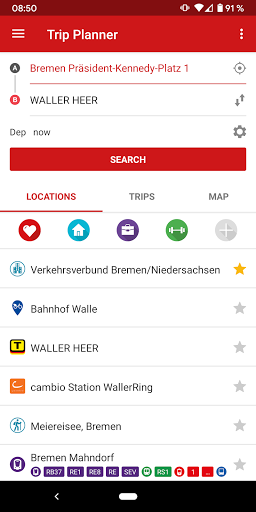
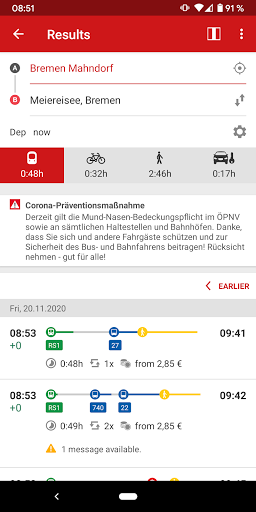
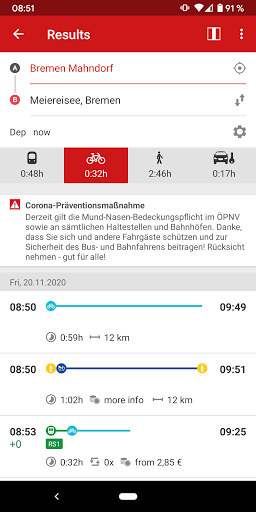
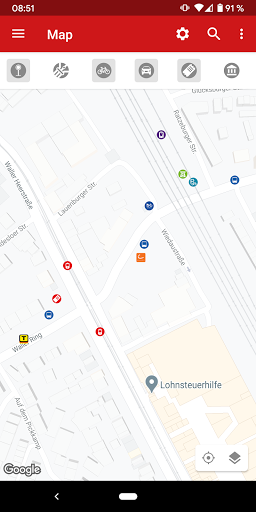
FahrPlaner app for limitless individual mobility: public transport, bike-sharing, car-sharing, taxi or on foot. Regional and countrywide, accurate to the meter and to the minute.
Mobile tickets are available for all of Germany with Deutschland-Ticket as well as for all public transport services within the Bremen/Northern Saxony transport association (VBN), South-Lower Saxony transport association (VSN), regional trains within the Niedersachsentarif (Lower Saxony).
RoutePLANING: places, destinations, addresses or stops within Bremen, Lower Saxony, Bremen, Hamburg and Rostock with train information for all of Germany
RouteCHOICE: train, bus, tram, footpath, bike, bike-sharing (nextbike), car-sharing (cambio), Taxi Deutschland (Taxi-Ruf Bremen), parking buildings, bikes and pedestrian routes
RouteWAY: all booking offices and points of interest (POI) along your selected route
RouteTIME: connections and departures with real-time forecasts
RouteALARM: push messages on the current traffic situation for your subscribed connections - also available as commuter alarm!
RouteCOST: price information for public transport tickets of Niedersachsentarif (Lower Saxony), VBN (Bremen/Lower Saxony) and other transport associations.
Further information on FahrPlaner and on the booking of germany-wide Deutschland-Ticket is available at www.fahrplaner.info.
Information about access rights:
The app can access your contacts so that you will be able to select an address as starting point or destination for the connection search function. You can change this access right at any time via the settings.
The access to the camera is needed to personalise icons with own photos used for “My addresses” as well as to be able to add own photos to send via feedback form in the app.
Based on your location the app can show you preferred stations and connections in your vicinity.
Should you decide to subscribe to the push service an anonymous device ID will be stored on our server in order to allow us to send you the requested information.
These access rights will not be used for any other purpose. You can change your consent anytime via app or system settings. More information about our privacy policy is available within the app and at our website www.vbn.de/privacy-fahrplaner-app.
The FahrPlaner app was realised with funding from Bundesministeriums für Digitales und Verkehr, Landesnahverkehrsgesellschaft Niedersachsen GmbH, Zweckverband Verkehrsverbund Bremen/Niedersachsen und Senatorin für Bau, Mobilität und Stadtentwicklung in Bremen.
The integration of the airport data was realised in the Green Sustainable Airports project as part of the European Interreg IV B North Sea Programme, supported by the European Union with funds from the European Regional Development Fund.
The data for the Points of Interest is derived from Openstreetmap (https://www.openstreetmap.org/) "© OpenStreetMap contributors". The data is licensed under the Open Database Licence (https://opendatacommons.org/licenses/odbl/).
Source and licence details for excursion destinations
Data: © OpenStreetMap (openstreetmap.org) and its contributors
Licence: Open Data Commons Open Database License (opendatacommons.org/licenses/odbl)
All information without guarantee.
© 2024 Verkehrsverbund Bremen Niedersachsen,
Niedersachsentarif GmbH, HaCon Ingenieurgesellschaft mbH, eos.uptrade GmbH
更多

1. 下载逍遥安装器并完成设置

2. 启动逍遥后打开位于桌面上的谷歌商店

3. 在谷歌商店中搜索FahrPlaner
Install
4. 下载并安装FahrPlaner
5. 下载完成后点击图标来启动

6. 通过逍遥在电脑上享受FahrPlaner
逍遥安卓是优秀的安卓模拟器,全球超过5000万用户的优先选择。逍遥安卓以虚拟化技术为核心,为用户打造突破手机配置局限的游戏平台!
大屏精细展示;无限待机,超越电池和流量限制
键鼠、手把操作全面支持,操作更精准
用逍遥多开同时运行多个游戏、应用。
Use FahrPlaner on PC by following steps: