Funimation
更新日期
当前版本
3.10.2
提供者

想体验Funimation,可是手机屏幕太小,用一会就变烫,怎么办?使用逍遥模拟器,在电脑的大屏幕上畅快体验!在电脑上下载安装Funimation,不用担心电量问题,想体验多久就多久,顺畅用一天~全新的逍遥模拟器9,绝对是您体验Funimation电脑版的好选择。完美的按键映射系统让Funimation如PC端般运行;强大的多开功能可同时使用多个应用;独家虚拟化技术更能彻底发挥电脑效能,保障长时间稳定运作。我们致力于不让设备限制您的体验,用起来轻松高效,畅快无比!
更多
透过逍遥模拟器,在电脑上下载Funimation,享受大荧屏的畅快体验。 流动漫。


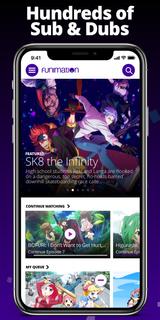
流动漫。任何时候。任何地方。在 Android 版 Funimation 应用程序上开始观看来自日本的最大的英文配音动画集和数百个带字幕的节目。根据您的时间和地点进行直播。立即开始 14 天免费试用!Funimation 拥有丰富的高清、无广告动漫库,其中包括电影、OVA、临时演员以及最热门、最热门的节目,例如《恶魔杀手》、《水果篮子》、《黑色四叶草》和《进击的巨人》。还有《钢之炼金术师:兄弟会》和《黑执事》等经典游戏,或者《我的英雄学院》等热门游戏!你的动漫冒险即将开始!其他好处包括:观看无广告播放数百部新的和经典的动漫,没有那些烦人的商业中断。低音炮和配音直接从日本同步播出 - 加上在日本播出后两周内的新配音剧集。完全控制迷上了新节目吗?将其和您的收藏夹添加到队列中,以十秒的增量向前或向后跳跃。请勿出售我的信息(仅限美国用户):https://privacyportal-cdn.onetrust.com/dsarwebform/d19e506f-1a64-463d-94e4-914dd635817d/b9eb997c-9ede-451b-8fd4-29891782a928.html
更多

1. 下载逍遥安装器并完成设置

2. 启动逍遥后打开位于桌面上的谷歌商店

3. 在谷歌商店中搜索Funimation
Install
4. 下载并安装Funimation
5. 下载完成后点击图标来启动

6. 通过逍遥在电脑上享受Funimation
逍遥安卓是优秀的安卓模拟器,全球超过5000万用户的优先选择。逍遥安卓以虚拟化技术为核心,为用户打造突破手机配置局限的游戏平台!
大屏精细展示;无限待机,超越电池和流量限制
键鼠、手把操作全面支持,操作更精准
用逍遥多开同时运行多个游戏、应用。
Use Funimation on PC by following steps: