Gamepad Remote Game Controller
更新日期
当前版本
1.1.0
提供者

想体验Gamepad Remote Game Controller,可是手机屏幕太小,用一会就变烫,怎么办?使用逍遥模拟器,在电脑的大屏幕上畅快体验!在电脑上下载安装Gamepad Remote Game Controller,不用担心电量问题,想体验多久就多久,顺畅用一天~全新的逍遥模拟器9,绝对是您体验Gamepad Remote Game Controller电脑版的好选择。完美的按键映射系统让Gamepad Remote Game Controller如PC端般运行;强大的多开功能可同时使用多个应用;独家虚拟化技术更能彻底发挥电脑效能,保障长时间稳定运作。我们致力于不让设备限制您的体验,用起来轻松高效,畅快无比!
更多
使用逍遙模擬器在電腦上享受Gamepad Remote Game Controller的卓越體驗。這是一款功能強大的免費安卓模擬器,為您提供數千款安卓應用程式的桌面版本。與好友互動,有效率完成工作,盡情享受! Turn your Android phone into a wireless gamepad for your Smart TV.
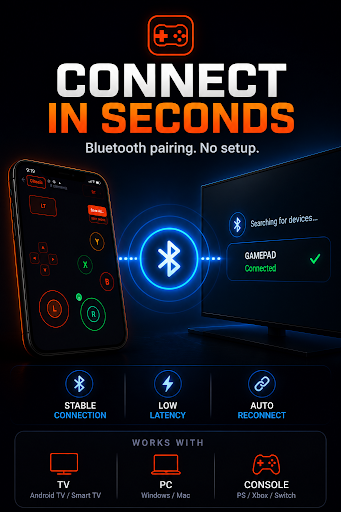
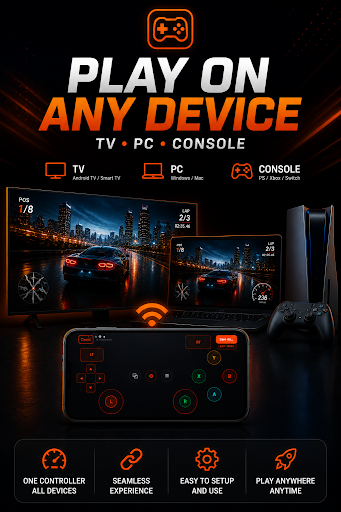
Turn your Android phone into a wireless gamepad for your Smart TV. No extra hardware. No cables. No subscription. Just launch the app, connect, and play — in under a minute.
Whether you're gaming on Android TV, Samsung Tizen, LG webOS, or Amazon Fire TV, Gamepad Remote gives you real controller input directly from your phone screen.
――――――――――――――――――――――――――――――――
5 READY-TO-USE CONTROLLER LAYOUTS
Classic Gamepad — The full console experience on your phone. D-pad, dual analog sticks, ABXY face buttons, left and right bumpers, triggers, Start and Select. Everything you expect from a gamepad, optimized for touch.
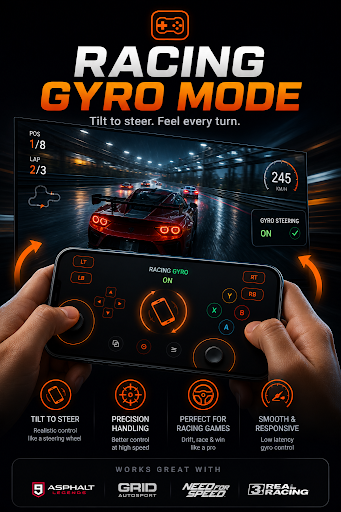
Racing Controller — Tilt your phone left and right to steer. Gyroscope-powered steering responds to real physical movement, with a large accelerator pedal and brake button for natural, immersive racing control. Works great with any racing game on Android TV.
Arcade Joystick — A large virtual joystick with 6 action buttons. Built for retro games, arcade emulators, beat-em-ups, and fighting games. Responsive and comfortable in landscape mode.
Touchpad Mode — A smooth, scrollable trackpad surface with left and right click support. Perfect for navigating Smart TV home screens, streaming apps, YouTube, Netflix, and web browsers from the couch.
Mouse Mode — Full precision pointer control. Move the cursor anywhere on your TV just like a mouse, with complete click support. Ideal for navigating complex TV interfaces.
――――――――――――――――――――――――――――――――
BUILD YOUR OWN LAYOUT
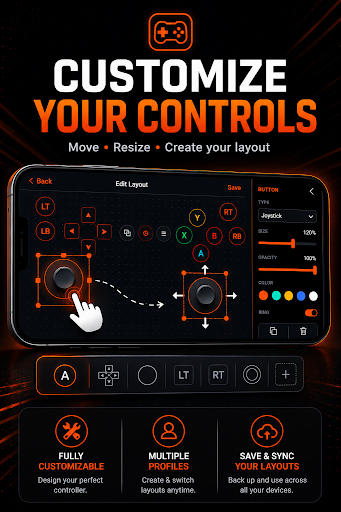
Not happy with the presets? Design a fully custom controller from scratch. Place buttons, analog joysticks, and touchpads exactly where you want them on screen. Resize, reposition, and label each element. Save your layout and switch to it anytime from the layout picker.
――――――――――――――――――――――――――――――――
SMART BLUETOOTH CONNECTION
Pairs directly over Bluetooth — no internet required, no server in the middle, no account to create. Once connected, input is transmitted instantly with minimal latency, making it reliable enough for real-time gameplay.
Wi-Fi scanning lets you discover nearby devices before pairing. The app shows available TVs and Android devices on your network so you can connect with a single tap. No setup wizard, no pairing codes — just scan and connect.
――――――――――――――――――――――――――――――――
HOW IT WORKS
Open Gamepad Remote on your Android phone
Tap "Connect" and scan for nearby devices
Select your Smart TV or Android device from the list
Choose a controller layout that fits your game
Start playing — your phone is now a wireless gamepad
――――――――――――――――――――――――――――――――
DESIGNED FOR GAMING
Haptic feedback on every button press for tactile response
Gyroscope steering for racing games and motion controls
Full-screen landscape immersive mode — no system UI in the way
Keep-screen-on option so your controller never sleeps mid-game
Adjustable button size to fit your hand size and preference
Works completely offline after pairing — no internet needed
Dark UI designed for low-light gaming sessions
No login, no account, no permissions beyond Bluetooth
COMPATIBLE WITH
Android TV and Google TV
Samsung Smart TV (Tizen OS)
LG Smart TV (webOS)
Amazon Fire TV and Fire TV Stick
Any Android phone or tablet as a second screen
Raspberry Pi and Android-based media players
Set-top boxes and Android mini PCs
WHY GAMEPAD REMOTE?
Most TV remote apps are built for navigation menus — not gaming. Gamepad Remote is designed from the ground up as a controller. Every layout is optimized for touch input with large, tap-friendly buttons. Every feature is built around low latency and comfort during long sessions.
You don't need a physical Bluetooth controller collecting dust, and you don't need to leave the couch to find the TV remote. Your phone is always in your hand — now it's also your gamepad.
No subscription. No account. No unnecessary permissions.
Download it, connect, and play in under a minute.
更多

1. 下载逍遥安装器并完成设置

2. 启动逍遥后打开位于桌面上的谷歌商店

3. 在谷歌商店中搜索Gamepad Remote Game Controller
Install
4. 下载并安装Gamepad Remote Game Controller
5. 下载完成后点击图标来启动

6. 通过逍遥在电脑上享受Gamepad Remote Game Controller
逍遥安卓是优秀的安卓模拟器,全球超过5000万用户的优先选择。逍遥安卓以虚拟化技术为核心,为用户打造突破手机配置局限的游戏平台!
大屏精细展示;无限待机,超越电池和流量限制
键鼠、手把操作全面支持,操作更精准
用逍遥多开同时运行多个游戏、应用。
Use Gamepad Remote Game Controller on PC by following steps: