
Pro IPTV: Online & Live Player
更新日期
当前版本
1.0
提供者

想体验Pro IPTV: Online & Live Player,可是手机屏幕太小,用一会就变烫,怎么办?使用逍遥模拟器,在电脑的大屏幕上畅快体验!在电脑上下载安装Pro IPTV: Online & Live Player,不用担心电量问题,想体验多久就多久,顺畅用一天~全新的逍遥模拟器9,绝对是您体验Pro IPTV: Online & Live Player电脑版的好选择。完美的按键映射系统让Pro IPTV: Online & Live Player如PC端般运行;强大的多开功能可同时使用多个应用;独家虚拟化技术更能彻底发挥电脑效能,保障长时间稳定运作。我们致力于不让设备限制您的体验,用起来轻松高效,畅快无比!
更多
使用逍遙模擬器在電腦上享受Pro IPTV: Online & Live Player的卓越體驗。這是一款功能強大的免費安卓模擬器,為您提供數千款安卓應用程式的桌面版本。與好友互動,有效率完成工作,盡情享受! Pro IPTV: Online & Live Player is an easy-to-use IPTV media player that lets you stream content from your own playlists.
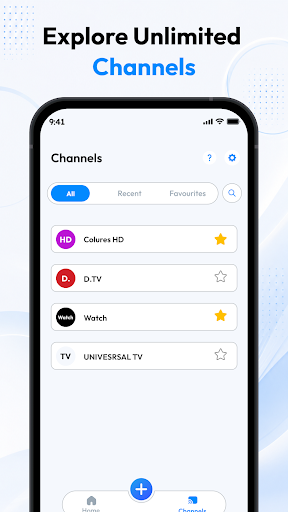
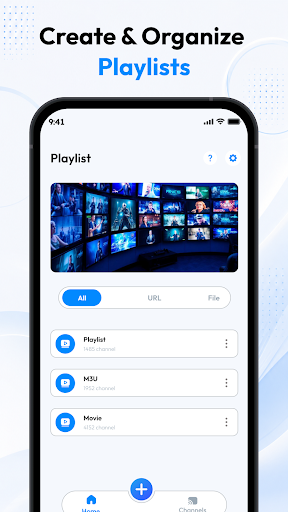


Pro IPTV: Online & Live Player is an easy-to-use IPTV media player that lets you stream content from your own playlists. Import your M3U or M3U8 playlists using a URL or local file and enjoy live TV channels, movies, and series on your Android device.
▶ Smooth Video Playback
Enjoy reliable streaming with support for multiple playback qualities. The player is designed to deliver a smooth viewing experience using the playlist sources you provide.
Organize Your Playlists
Manage your playlists with simple built-in tools.
Import M3U and M3U8 playlists
Add playlists using a URL or local file
Create and organize playlists
Access your saved playlists anytime
Stream Your Own Content
Watch live TV channels, movies, and series using your own IPTV imported playlists. Simply import your playlist and start watching.
Quick Search & Navigation
Finding your content is easy.
• Search playlists quickly
• Browse channels with a clean interface
• Navigate your content with ease
Simple Setup
Start streaming in just a few steps.
• Import playlists from a URL
• Load playlists from local storage
• Open and play your content instantly
Disclaimer
Pro IPTV: Online & Live Player does not provide, host, sell, or distribute any TV channels, movies, series, or other media content.
Users are responsible for providing their own playlists and ensuring they have the legal rights to access the content they stream.
This application is intended only as a media player for user-provided content and does not promote or support una
更多

1. 下载逍遥安装器并完成设置

2. 启动逍遥后打开位于桌面上的谷歌商店

3. 在谷歌商店中搜索Pro IPTV: Online & Live Player
Install
4. 下载并安装Pro IPTV: Online & Live Player
5. 下载完成后点击图标来启动

6. 通过逍遥在电脑上享受Pro IPTV: Online & Live Player
逍遥安卓是优秀的安卓模拟器,全球超过5000万用户的优先选择。逍遥安卓以虚拟化技术为核心,为用户打造突破手机配置局限的游戏平台!
大屏精细展示;无限待机,超越电池和流量限制
键鼠、手把操作全面支持,操作更精准
用逍遥多开同时运行多个游戏、应用。
Use Pro IPTV: Online & Live Player on PC by following steps: