sweetgreen
更新日期
当前版本
6.251.0
提供者

想体验sweetgreen,可是手机屏幕太小,用一会就变烫,怎么办?使用逍遥模拟器,在电脑的大屏幕上畅快体验!在电脑上下载安装sweetgreen,不用担心电量问题,想体验多久就多久,顺畅用一天~全新的逍遥模拟器9,绝对是您体验sweetgreen电脑版的好选择。完美的按键映射系统让sweetgreen如PC端般运行;强大的多开功能可同时使用多个应用;独家虚拟化技术更能彻底发挥电脑效能,保障长时间稳定运作。我们致力于不让设备限制您的体验,用起来轻松高效,畅快无比!
更多
透过逍遥模拟器,在电脑上下载sweetgreen,享受大荧屏的畅快体验。 The sweetgreen app is the #1 most convenient way to get craveable, feel-good food on-demand — download the app to join our free loyalty program, Sweetpass, and earn rewards, birthday gifts, menu exclusives and more.

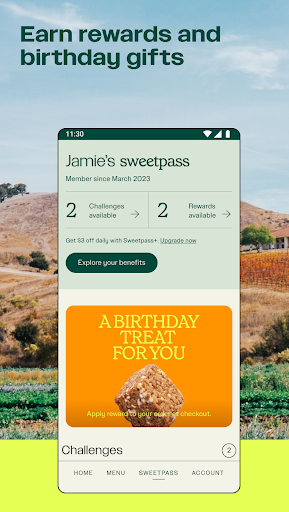


The sweetgreen app is the #1 most convenient way to get craveable, feel-good food on-demand — download the app to join our free loyalty program, Sweetpass, and earn rewards, birthday gifts, menu exclusives and more.
1. Earn rewards — participate in personalized challenges to savor more rewards and claim birthday gifts.
2. Access Sweetpass Exclusives — get special access to online-only exclusive menu items worth every last bite.
3. Order Easily — pre-order for pickup, scan to pay in-store, or get delivery.
4. Make It Yours — create your own, modify our signature menu, or try seasonal specials.
5. Track in Real Time — receive order status notifications for pickup and delivery, and follow live updates in the app.
6. Enjoy Effortlessly — reorder your favorites on the home screen, send nutrition details to your Health app, flag dietary preferences, and find your nearest location.
Find us on Instagram (@sweetgreen), Facebook (facebook.com/sweetgreen), and Twitter.
更多

1. 下载逍遥安装器并完成设置

2. 启动逍遥后打开位于桌面上的谷歌商店

3. 在谷歌商店中搜索sweetgreen
Install
4. 下载并安装sweetgreen
5. 下载完成后点击图标来启动

6. 通过逍遥在电脑上享受sweetgreen
逍遥安卓是优秀的安卓模拟器,全球超过5000万用户的优先选择。逍遥安卓以虚拟化技术为核心,为用户打造突破手机配置局限的游戏平台!
大屏精细展示;无限待机,超越电池和流量限制
键鼠、手把操作全面支持,操作更精准
用逍遥多开同时运行多个游戏、应用。
Use sweetgreen on PC by following steps: