
TimeJot - Event timeline log
更新日期
当前版本
2.10.2
提供者

想体验TimeJot - Event timeline log,可是手机屏幕太小,用一会就变烫,怎么办?使用逍遥模拟器,在电脑的大屏幕上畅快体验!在电脑上下载安装TimeJot - Event timeline log,不用担心电量问题,想体验多久就多久,顺畅用一天~全新的逍遥模拟器9,绝对是您体验TimeJot - Event timeline log电脑版的好选择。完美的按键映射系统让TimeJot - Event timeline log如PC端般运行;强大的多开功能可同时使用多个应用;独家虚拟化技术更能彻底发挥电脑效能,保障长时间稳定运作。我们致力于不让设备限制您的体验,用起来轻松高效,畅快无比!
更多
使用逍遙模擬器在電腦上享受TimeJot - Event timeline log的卓越體驗。這是一款功能強大的免費安卓模擬器,為您提供數千款安卓應用程式的桌面版本。與好友互動,有效率完成工作,盡情享受! 有没有想过您上次做某事或发生某事但很难记住是什么时候?
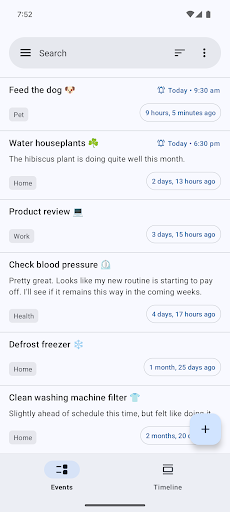
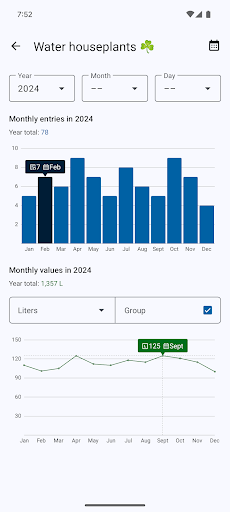
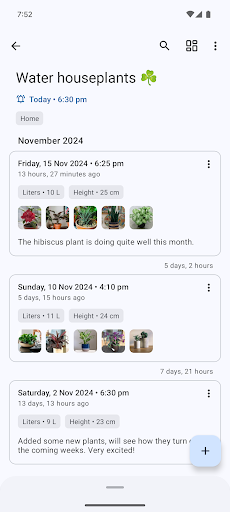
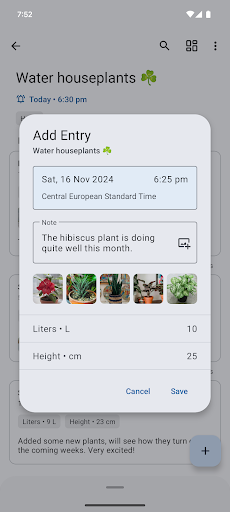
有没有想过您上次做某事或发生某事但很难记住是什么时候? TimeJot 为您保留清晰的时间表,让您永远不会忘记。
简单、简约的界面
TimeJot 应用程序有一个非常简单的界面,不会分散您对其核心功能的注意力,并且非常易于使用,有浅色和深色主题。
增压事件时间表
在每个事件条目中添加注释和照片。查看条目之间的时间以及每个条目创建以来的时间。按日期范围或注释搜索条目。
智能提醒
安排警报或通知以提醒您发生的事件。自适应提醒会智能地适应您上次输入的每个事件,并在正确的时间提醒您。
闪亮的仪表板
在图表上查看您的条目如何随时间变化。按小时、天、月或年轻松比较您的条目。
事件变量
为您的事件创建数字属性,可以将其添加到每个条目中以进一步阐明您的输入。比较仪表板页面中的变量。
小部件
漂亮的小部件提供浅色和深色主题,可将您的活动放在主屏幕上,以便它们始终在您面前。轻松地从小部件添加条目。
事件类别
对相关事件进行分组,以便您可以在需要时轻松查找或更新它们。按上次条目、事件名称或创建日期对事件进行排序。
自动操作
配置应用程序以对您周围的事件做出反应,并通过 Tasker 插件集成执行自动输入。
无广告且注重隐私
应用程序中没有广告、行为跟踪或侵入性权限。该应用程序是免费的,完全离线工作,并且不需要互联网连接。
获取开发更新:https://twitter.com/timejot
帮助翻译应用程序:https://timejot.app/translate
更多

1. 下载逍遥安装器并完成设置

2. 启动逍遥后打开位于桌面上的谷歌商店

3. 在谷歌商店中搜索TimeJot - Event timeline log
Install
4. 下载并安装TimeJot - Event timeline log
5. 下载完成后点击图标来启动

6. 通过逍遥在电脑上享受TimeJot - Event timeline log
逍遥安卓是优秀的安卓模拟器,全球超过5000万用户的优先选择。逍遥安卓以虚拟化技术为核心,为用户打造突破手机配置局限的游戏平台!
大屏精细展示;无限待机,超越电池和流量限制
键鼠、手把操作全面支持,操作更精准
用逍遥多开同时运行多个游戏、应用。
Use TimeJot - Event timeline log on PC by following steps: