AGames PS2 PS3 PSP Pro
تم التحديث
الإصدار الحالي
1.2
تقديم

لا داعي للقلق بشأن الشحن الزائد عند استخدام AGames PS2 PS3 PSP Pro على هاتفك. تحرر من قيود الشاشة الصغيرة واستمتع به على شاشة أكبر باستخدام لوحة المفاتيح والفأرة. يوفر MEmu جميع الميزات الرائعة التي تتوقعها: تثبيت سريع، إعداد سهل، أدوات تحكم بديهية، ودون قيود على عمر البطارية، أو استخدام البيانات، أو المكالمات الواردة. يُعد MEmu 9 الجديد الخيار الأمثل لتجربة AGames PS2 PS3 PSP Pro على جهاز الكمبيوتر. بفضل تقنية التشفير الفريدة، يتيح لك مدير الحسابات المتعددة تشغيل حسابين أو أكثر في وقت واحد. والأهم من ذلك، أن محرك المحاكاة الفريد يستغل أداء جهاز الكمبيوتر بالكامل، مما يُحسّن تجربة التطبيق ويجعل كل شيء سلسًا للغاية.
أظهر المزيد
استمتع بتجربة رائعة لاستخدام AGames PS2 PS3 PSP Pro على جهاز الكمبيوتر مع MEmu Play. إنه محاكي أندرويد قوي ومجاني يوفر لك آلاف تطبيقات أندرويد لإصدار سطح المكتب. استمتع بالتواصل مع أصدقائك وحسّن عملك بكفاءة أعلى! AGames pro The ultimate PS2 & PS3 Emulator Play Pro experience on Android.
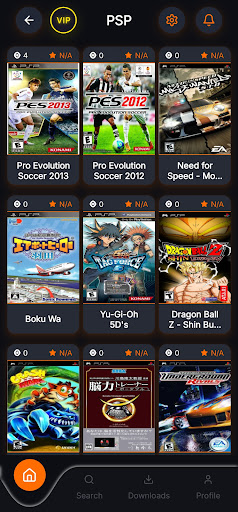
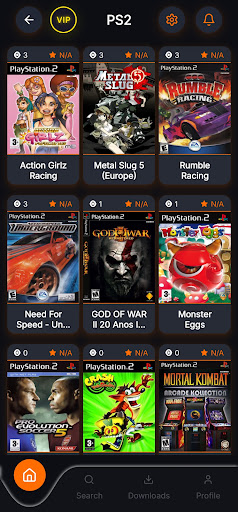
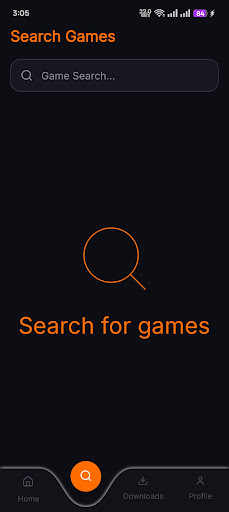
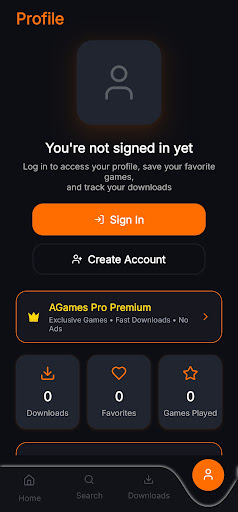
AGames pro The ultimate PS2 & PS3 Emulator Play Pro experience on Android
AGames is a next-generation software engineered to run your favorite classic games with maximum speed and precision. We have developed a professional-grade core that functions as a comprehensive PS2 and PS3 emulator, while also supporting a wide range of other legendary consoles.
Enjoy your personal backup library with enhanced graphics, smooth frame rates, and modern features in one powerful application.
Supported Consoles & Systems:
Our engine is optimized to provide a "Pro" level performance for:
The Powerhouses: Experience the full potential of PlayStation 3 (PS3), PlayStation 2 (PS2) and Nintendo Wii with high-definition rendering.
The Retro Classics: Revisit the golden era of PSX (PS1) and NES with perfect accuracy.
The Handhelds: Play PSP and Game Boy Advance (GBA) games anywhere, exactly as you remember them.
Why Choose Our Emulator
HD Graphics: Upscale textures and resolution for a crisp look on modern screens.
Smart Library: Automatically scans and organizes your .PKG, .ISO, .CSO, and ROM files by system (PS3, PS2, Wii, GBA, etc.).
Custom Controls: Fully adjustable touch layout and support for external Bluetooth controllers.
Save State: Pause and resume your game instantly at any moment.
Optimized Performance:
AGames is built for stability. Whether you are running a heavy 3D game on the PS3 or PS2 engine or a classic 2D platformer on GBA, the app adapts to your device to ensure smooth gameplay without lag.
Download AGames now and start your Pro gaming journey!
COMPLIANCE & LEGAL DISCLAIMER:
No Games Included: AGames is strictly an emulator. It does NOT contain, distribute, or provide any games, ROMs, PKG, or ISO files.
User Responsibility: Users must provide their own legally obtained game files.
Trademarks: This app is not affiliated with, endorsed by, or licensed by Sony, Nintendo, or any other console manufacturers. All trademarks (such as PS3, PS2, PSP, PSX, Wii, NES, GBA) are the property of their respective owners and are used solely to describe compatibility.
أظهر المزيد

1. قم بتنزيل برنامج MEmu واكمال تثبيته

2. قم بتشغيل برنامج MEmu وفتح Google Play على الصفحة الرئيسية

3. ابح AGames PS2 PS3 PSP Pro في Google Play
Install
4. تنزيل وتثبيت AGames PS2 PS3 PSP Pro
5. انقر على الرمز للتشغيل بعد اكتمال التثبيت

6. استخدم MEmu لتجربة AGames PS2 PS3 PSP Pro على جهاز الكمبيوتر الخاص بك.
تطبيق MEmuهو افضل محاكى اندرويد مجانى وبالفعل 50 مليون شخص يستمتعون حاليا بتجربه اللعب عليه. تمكّنك تقنية MEmu الافتراضية من تشغيل آلاف ألعاب Android بسلاسة على الكمبيوتر الشخصي ، حتى أكثرها استخدامًا للرسومات.
شاشة أكبر وجرافيك افضل ووقت أطول بدون حدود البطارية وباقة التليفون
لوحة مفاتيح كاملة تدعم تحكم كامل عن طريق لوحة المفاتيح و الفأره وجيم باد
عدة العاب وحسابات ومهمات علي جهاز الكمبيوتر في وقت معين عن طريق Memu متعدد النوافذ
Use AGames PS2 PS3 PSP Pro on PC by following steps: