
BeBo Video player
تم التحديث
الإصدار الحالي
1.0.5.8
تقديم

لا داعي للقلق بشأن الشحن الزائد عند استخدام BeBo Video player على هاتفك. تحرر من قيود الشاشة الصغيرة واستمتع به على شاشة أكبر باستخدام لوحة المفاتيح والفأرة. يوفر MEmu جميع الميزات الرائعة التي تتوقعها: تثبيت سريع، إعداد سهل، أدوات تحكم بديهية، ودون قيود على عمر البطارية، أو استخدام البيانات، أو المكالمات الواردة. يُعد MEmu 9 الجديد الخيار الأمثل لتجربة BeBo Video player على جهاز الكمبيوتر. بفضل تقنية التشفير الفريدة، يتيح لك مدير الحسابات المتعددة تشغيل حسابين أو أكثر في وقت واحد. والأهم من ذلك، أن محرك المحاكاة الفريد يستغل أداء جهاز الكمبيوتر بالكامل، مما يُحسّن تجربة التطبيق ويجعل كل شيء سلسًا للغاية.
أظهر المزيد
قم بتنزيل BeBo Video player على الكمبيوتر بإستخدام جهاز مقلد أندروز MEmu.استمتع بمتعة اللعب على الشاشة الكبيرة. Step into the future of video playback with our cutting-edge video player app, designed to captivate and delight users with its exceptional features.
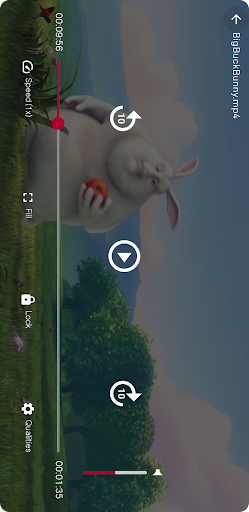
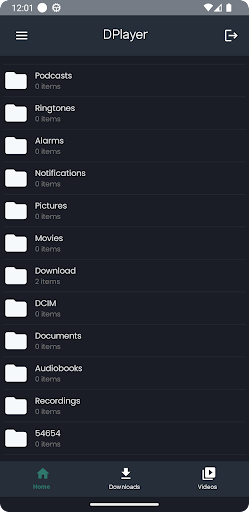
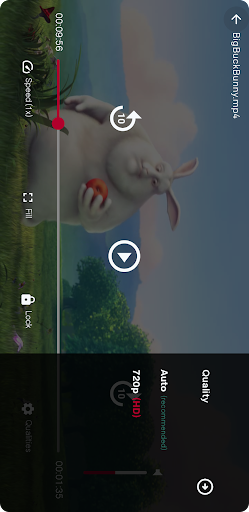
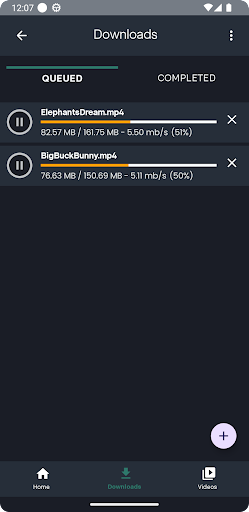
Step into the future of video playback with our cutting-edge video player app, designed to captivate and delight users with its exceptional features. Immerse yourself in the breathtaking world of high-resolution content, from stunning 8K masterpieces to crystal-clear 4K, 2K, and Full HD videos.
Our app doesn't just play videos - it elevates your viewing experience to new heights. Lose yourself in the mesmerizing clarity and vibrant detail of every frame, optimized for seamless playback on your device. Whether you're streaming the latest blockbuster or reliving cherished memories in stunning resolution, our player ensures every moment is a visual feast.
Compatibility concerns are a thing of the past, as our app effortlessly supports a wide range of video formats. MP4, AVI, MKV, MOV - you name it, we play it, so you can enjoy your entire video library with ease.
But it's not just about playback quality - it's about the experience. Our user-friendly interface puts you in control, with intuitive controls and customizable settings that make navigating your video collection a breeze. From adjusting playback speed to fine-tuning aspect ratios, we give you the power to tailor your viewing experience to your liking.
أظهر المزيد

1. قم بتنزيل برنامج MEmu واكمال تثبيته

2. قم بتشغيل برنامج MEmu وفتح Google Play على الصفحة الرئيسية

3. ابح BeBo Video player في Google Play
Install
4. تنزيل وتثبيت BeBo Video player
5. انقر على الرمز للتشغيل بعد اكتمال التثبيت

6. استخدم MEmu لتجربة BeBo Video player على جهاز الكمبيوتر الخاص بك.
تطبيق MEmuهو افضل محاكى اندرويد مجانى وبالفعل 50 مليون شخص يستمتعون حاليا بتجربه اللعب عليه. تمكّنك تقنية MEmu الافتراضية من تشغيل آلاف ألعاب Android بسلاسة على الكمبيوتر الشخصي ، حتى أكثرها استخدامًا للرسومات.
شاشة أكبر وجرافيك افضل ووقت أطول بدون حدود البطارية وباقة التليفون
لوحة مفاتيح كاملة تدعم تحكم كامل عن طريق لوحة المفاتيح و الفأره وجيم باد
عدة العاب وحسابات ومهمات علي جهاز الكمبيوتر في وقت معين عن طريق Memu متعدد النوافذ
Use BeBo Video player on PC by following steps: