BlueDriver OBD2 Scan Tool
تم التحديث
الإصدار الحالي
7.14.5
تقديم

لا داعي للقلق بشأن الشحن الزائد عند استخدام BlueDriver OBD2 Scan Tool على هاتفك. تحرر من قيود الشاشة الصغيرة واستمتع به على شاشة أكبر باستخدام لوحة المفاتيح والفأرة. يوفر MEmu جميع الميزات الرائعة التي تتوقعها: تثبيت سريع، إعداد سهل، أدوات تحكم بديهية، ودون قيود على عمر البطارية، أو استخدام البيانات، أو المكالمات الواردة. يُعد MEmu 9 الجديد الخيار الأمثل لتجربة BlueDriver OBD2 Scan Tool على جهاز الكمبيوتر. بفضل تقنية التشفير الفريدة، يتيح لك مدير الحسابات المتعددة تشغيل حسابين أو أكثر في وقت واحد. والأهم من ذلك، أن محرك المحاكاة الفريد يستغل أداء جهاز الكمبيوتر بالكامل، مما يُحسّن تجربة التطبيق ويجعل كل شيء سلسًا للغاية.
أظهر المزيد
قم بتنزيل BlueDriver OBD2 Scan Tool على الكمبيوتر بإستخدام جهاز مقلد أندروز MEmu.استمتع بمتعة اللعب على الشاشة الكبيرة. BlueDriver® is a Premium Diagnostic OBD2 Scan Tool.
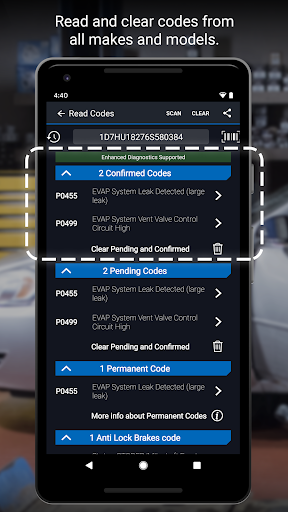
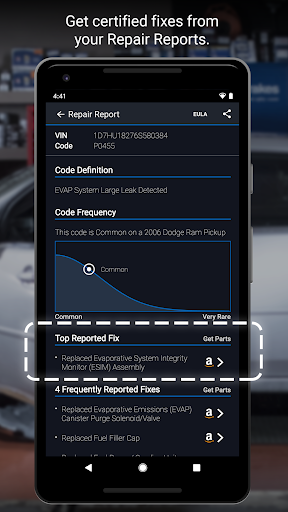
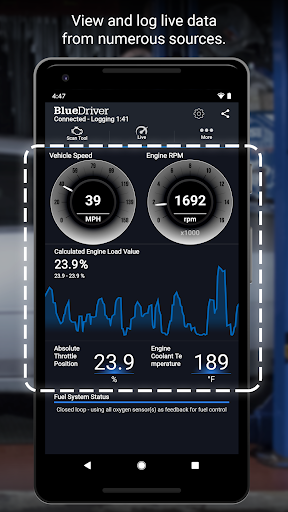
BlueDriver® is a Premium Diagnostic OBD2 Scan Tool. It is used by professional mechanics, auto enthusiasts, and everyday vehicle owners who want to know more about how their vehicle is operating and how their vehicle can be fixed if the Check Engine Light comes on.
Features:
• Generate, print, and share Repair Reports (details below)
• Scan For Trouble Codes
• Clear Trouble Codes
• Enhanced Diagnostics (e.g. ABS, Airbag, Transmission, etc.) for
- GM, Ford, Chrysler, Toyota, Nissan, Mazda, Mercedes (2005 models and newer), Mitsubishi (2008 models and newer), Hyundai/Kia (2012 models and newer) (available worldwide)
- BMW/Mini, Honda/Acura, Volkswagen/Audi (available in North America)
- Subaru (available in United States)
• Mode 6 (On-Board Monitoring Test Results)
• Smog Readiness Check
• Freeze Frame Data
• Multi data (PID) interactive graphing and logging
• No Wires! Communicates with your vehicle wirelessly
• Metric and Imperial settings
••••••••BlueDriver Repair Report Information••••••••
The BlueDriver Repair Database contains over 30 million experienced-based Reported Fixes for Trouble Codes (DTC's). Ranked as Top Reported Fixes, Frequently Reported Fixes and Other Reported Fixes, a BlueDriver Repair Report is specific to your vehicle's year, make and model. The detailed report goes well beyond providing a cryptic code definition by giving you validated fixes for your trouble codes. Save time by using BlueDriver to prioritize how your vehicle can be repaired. Preview a sample Repair Report in App.
••••••••IMPORTANT INFO••••••••
BlueDriver is a professional diagnostic scan tool and the App is free to install but does require the purchase of the BlueDriver Bluetooth® OBD2 Sensor to communicate with your vehicle. The Sensor is sold separately under the 'More' tab in App or at www.BlueDriver.com. Repair Reports can be generated without purchasing a Sensor by tapping 'Repair Reports' > 'New Report' and entering the VIN and Trouble Code.
The BlueDriver Sensor simply connects to your data port located inside your car near the steering wheel. Every car made since 1996 has a data port. BlueDriver has global vehicle compatibility and can be used anywhere in the world.
Check out what thousands of BlueDriver users and Fans are raving about at www.facebook.com/BlueDriver.f
Follow us on Twitter @BlueDriver_tw
أظهر المزيد

1. قم بتنزيل برنامج MEmu واكمال تثبيته

2. قم بتشغيل برنامج MEmu وفتح Google Play على الصفحة الرئيسية

3. ابح BlueDriver OBD2 Scan Tool في Google Play
Install
4. تنزيل وتثبيت BlueDriver OBD2 Scan Tool
5. انقر على الرمز للتشغيل بعد اكتمال التثبيت

6. استخدم MEmu لتجربة BlueDriver OBD2 Scan Tool على جهاز الكمبيوتر الخاص بك.
تطبيق MEmuهو افضل محاكى اندرويد مجانى وبالفعل 50 مليون شخص يستمتعون حاليا بتجربه اللعب عليه. تمكّنك تقنية MEmu الافتراضية من تشغيل آلاف ألعاب Android بسلاسة على الكمبيوتر الشخصي ، حتى أكثرها استخدامًا للرسومات.
شاشة أكبر وجرافيك افضل ووقت أطول بدون حدود البطارية وباقة التليفون
لوحة مفاتيح كاملة تدعم تحكم كامل عن طريق لوحة المفاتيح و الفأره وجيم باد
عدة العاب وحسابات ومهمات علي جهاز الكمبيوتر في وقت معين عن طريق Memu متعدد النوافذ
Use BlueDriver OBD2 Scan Tool on PC by following steps: